

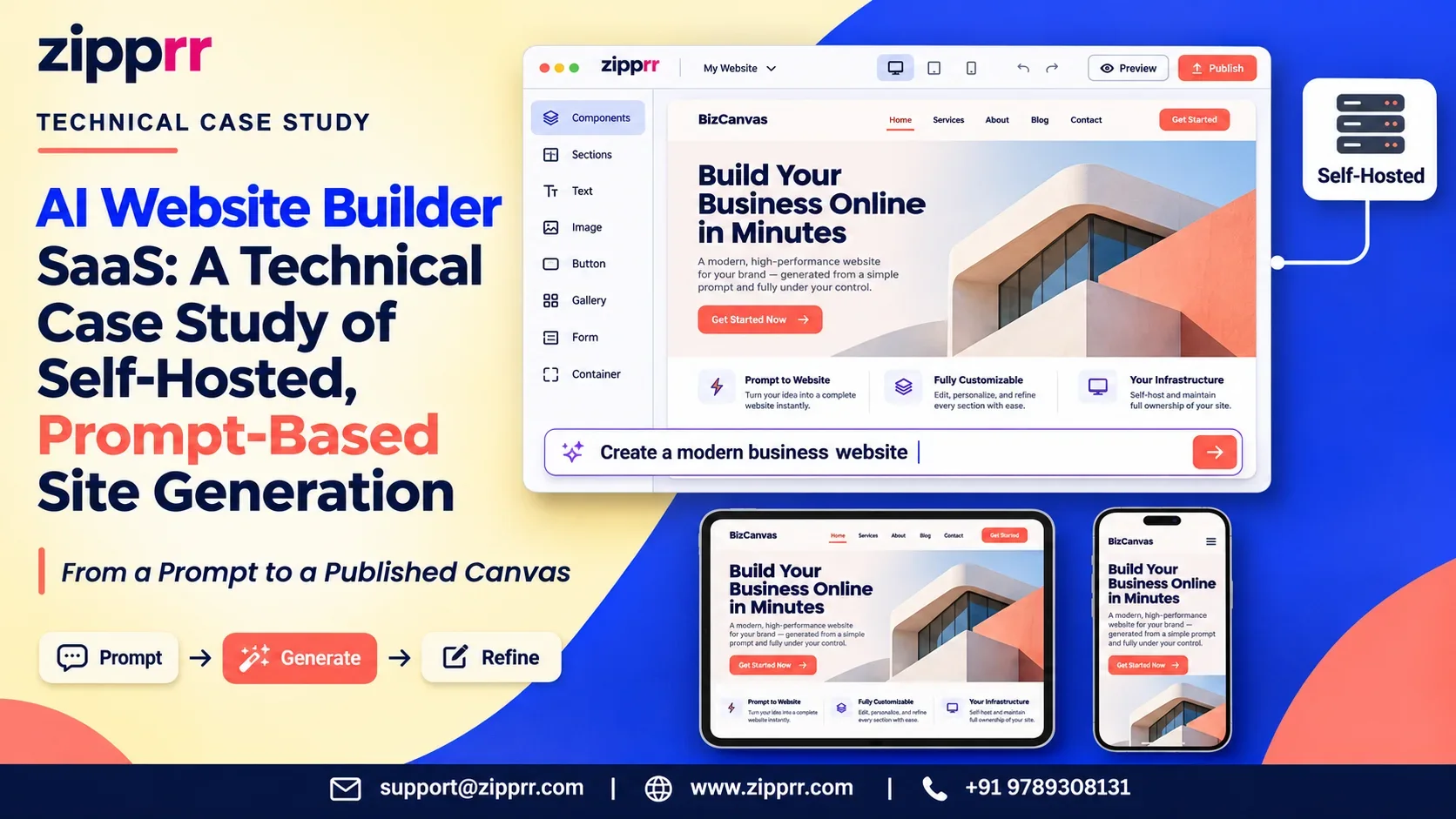
How does a self-hosted AI website builder SaaS work?
A self-hosted AI website builder SaaS runs a Laravel and Livewire platform on the operator's server for accounts, plans, credits, billing and published sites. Also, customers describe a site in plain language. In addition, the AI edits real source files, and the customer's browser installs packages, runs the live preview and compiles the production build.
Jump to a section
About This AI Website Builder SaaS Case Study
This is a feature-based case study, not a customer story. Moreover, it explains how one AI website builder SaaS platform works, using its published feature list. Furthermore, every claim falls into one of three types.
Stated in the supplied feature specification (September 2026 release).
Our reading of how the confirmed parts fit together.
Practices we suggest, not product features.
There are no customers, results or benchmarks here. Check every feature against the current release before you rely on it.
What Problem Does an AI Website Builder SaaS Solve for Operators?
Founders and agencies want to sell AI website creation under their own brand. Besides, the hard part is the build infrastructure. Server-side builds usually mean Node.js processes, a build queue and CPU spikes when many users build at once.
The operator therefore needs a platform that can:
- Generate editable websites from conversational prompts, not just visual mock-ups.
- Avoid an always-on server-side build pipeline.
- Sell plans and meter AI use, so revenue tracks AI provider costs.
- Publish to platform subdomains and customer-owned domains.
- Handle invoices, VAT data, staff access and branding on standard Laravel hosting.
AI Website Builder SaaS Architecture: What Runs Where?
What runs on the operator's server?
The operator's server runs the Laravel application and its MySQL or MariaDB database. Also, it handles accounts, plans, credits, billing, invoices, administration, project storage and published sites. Package installation, preview and production builds run in the customer's browser instead.
On the operator's infrastructure (confirmed)
- Laravel backend, Livewire interface and MySQL or MariaDB database: accounts, plans, credits, billing and administration.
- Project storage: projects are stored, not built.
- Published site delivery: subdomain and custom-domain sites run on the same Laravel application.
- Marketing site: landing pages, legal pages, blog, newsletter list and contact inbox.
In the customer's browser (confirmed)
- Package installation and the development server.
- Live preview beside the chat and code.
- Production compilation, which happens on the user's own machine.
The specification does not name the in-browser runtime technology. In addition, ask the vendor which runtime it uses and which browsers it supports.
Outside both (external integrations)
AI providers, payment gateways and the optional Supabase, Unsplash and Pixabay services each need their own account and may charge their own fees.
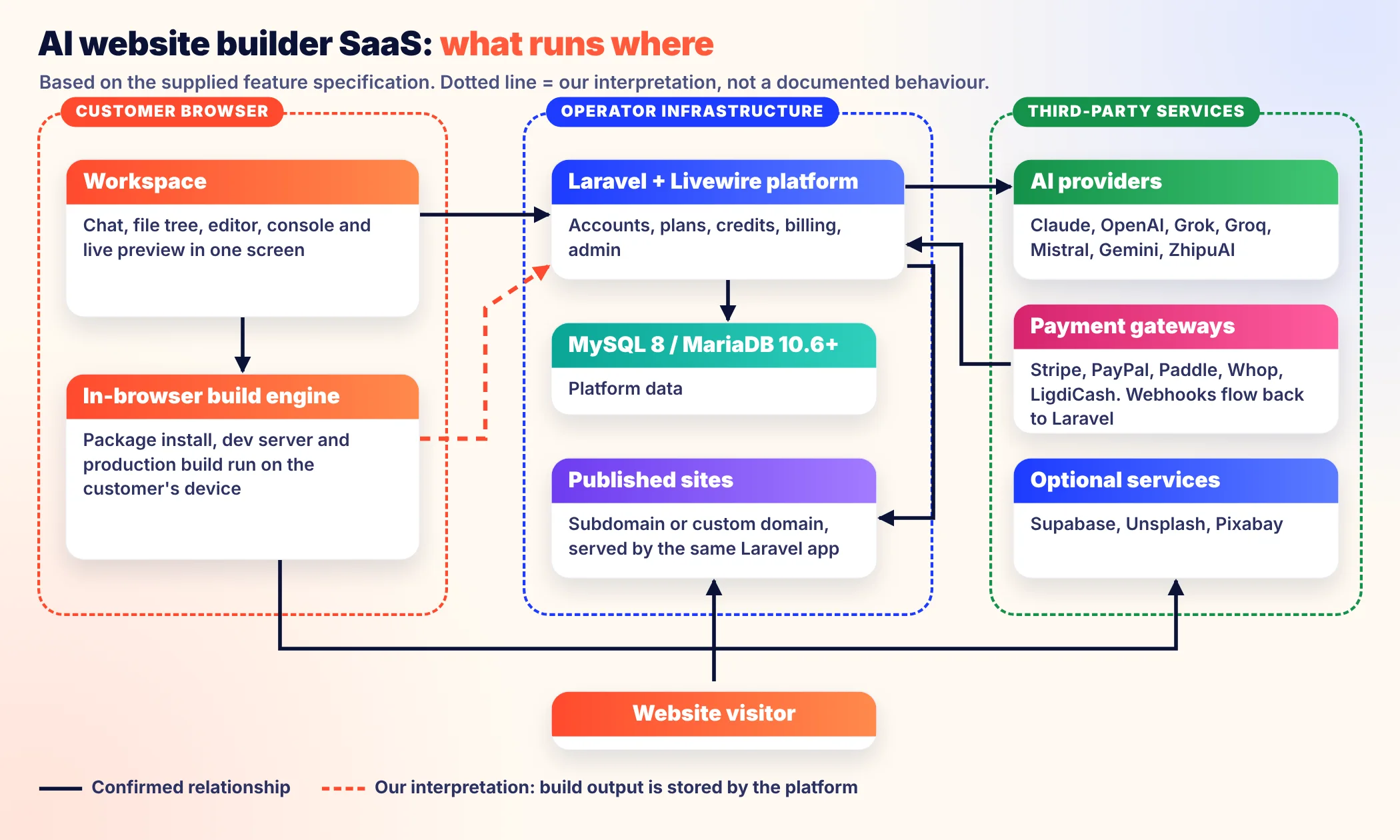
Two details are not documented. First, how AI calls are routed: through the server, the browser, or both. Second, how built files reach the server. Confirm both before you plan capacity or security.
How Does a Customer Use the AI Website Builder SaaS, Step by Step?
What does a customer do, step by step?
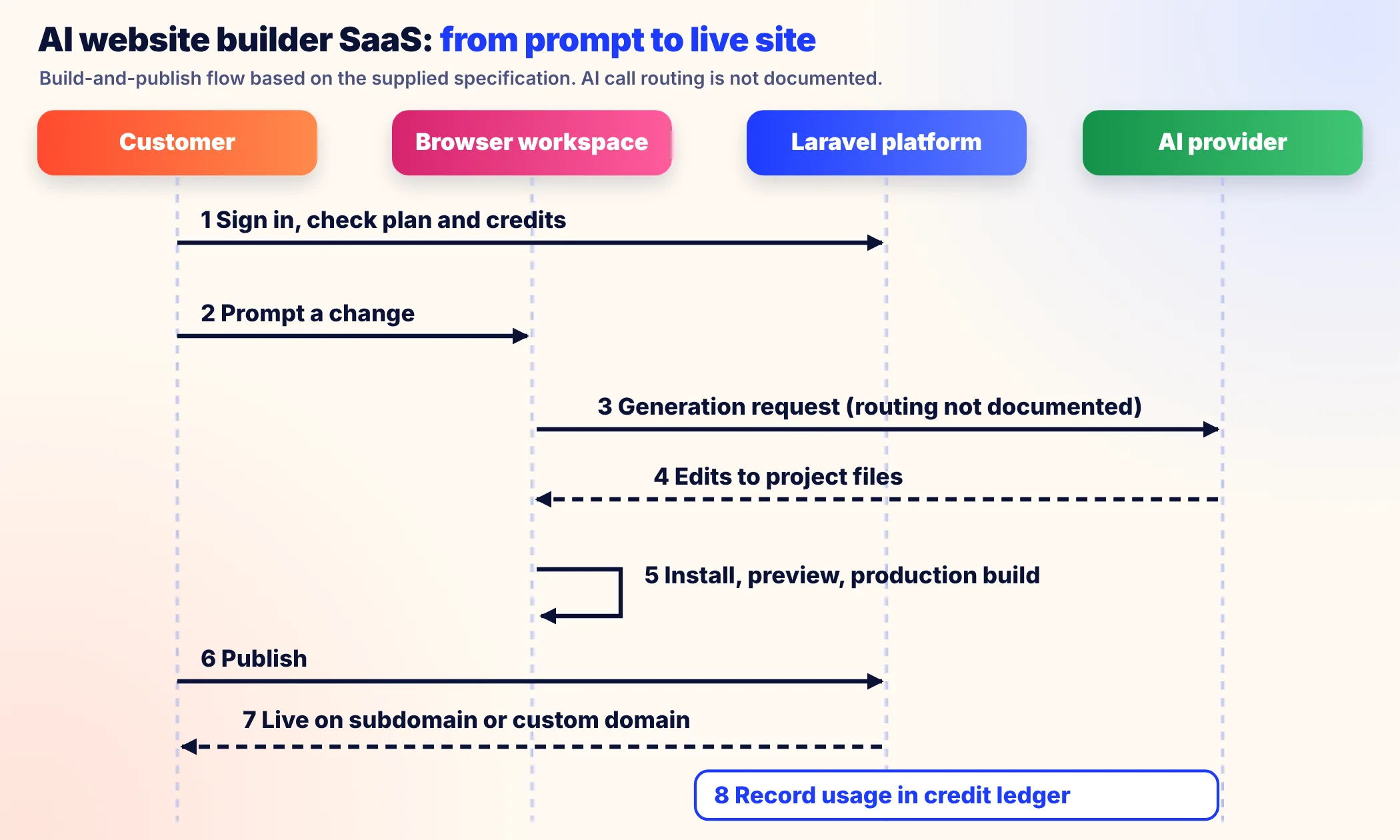
A customer signs in, gets a plan or credit allowance, starts or imports a project, and describes the site in plain language. The AI edits real files while the browser shows a live preview. Moreover, the customer edits code if needed, builds in the browser and publishes to a subdomain or custom domain.
- Register or sign in to the branded service.
- Get an allowance: choose a subscription plan or receive AI credits.
- Start a project: begin from scratch, import from GitHub, or start from a public project URL.
- Prompt the AI: describe the site or a change. The AI edits the project's real files.
- Watch it take shape in the file tree, editor and live preview.
- Refine by hand: open any file, change the code directly, then return to prompting.
- Build and publish: the browser compiles the production build, and the site goes live on a subdomain or custom domain.
- Record usage: AI actions, plan allowances and subscription billing are logged.
Planning your own branded AI website builder?
Talk to Zipprr about hosting, DNS, AI provider costs and plan design before you commit.
- Hosting and DNS check
- AI provider costs
- Plan and credit design
Technical Analysis of the AI Website Builder SaaS
Browser-Side Builds: What an AI Website Builder SaaS Saves and Shifts
This is the main architectural choice. No always-on Node.js process or server build queue is required, so server CPU demand during concurrent builds drops. However, the work moves to the customer's device (interpretation).
- Build speed depends on the customer's computer, browser and connection.
- Package downloads during install come from the network the browser can reach.
- Support needs a list of supported browsers and device specs.
So "lighter build load" is accurate. "Zero hosting cost" is not.
Editable Source Code and the Unified Workspace
The AI changes real project files, not a picture of a page, and all tools share one screen. As a result, beginners can stay prompt-first, while developers fix details by hand. Furthermore, GitHub and public-URL imports bring existing projects into the same workflow.
AI Provider Integrations
Operators enter provider credentials in the admin dashboard and can switch providers later. Besides, the listed providers are Anthropic Claude, OpenAI, xAI Grok, Groq, Mistral, Google Gemini and ZhipuAI.
For OpenAI, the platform supports Responses API streaming and reasoning-effort selection on compatible models. Also, streaming shows progress during generation, which keeps long requests from feeling stalled. In addition, provider fees sit outside the software, and model pricing changes often.
Publishing, DNS and Custom Domains
Two publishing routes are confirmed.
Subdomains
Addresses look like project.yourdomain.com, and automated subdomains need a wildcard DNS record on the operator's domain.
Custom domains
The customer must own the domain and add the required DNS records.
The specification does not describe HTTPS certificate handling. For that reason, plan a wildcard certificate for subdomains and a certificate process for each custom domain (recommended). We also recommend scoping session cookies so they are not shared with customer subdomains.
Credit Metering and the Usage Ledger
Operators set credit prices and plan limits. Moreover, AI actions are metered in credits, and a usage ledger records consumption. Furthermore, the goal is to keep customer spending in line with provider costs.
The specification does not say how a credit maps to tokens or requests, so test real prompts and price credits from your own cost data. Besides, zipprr's AI advertising creative generator SaaS case study shows another way credit pricing can be structured.
Billing, Webhooks, VAT and Invoices
- Gateways: Stripe and PayPal subscriptions with webhook handling, plus Paddle, Whop and LigdiCash. Paddle and Whop are described as merchant-of-record options.
- Customer portal: Stripe subscribers can follow a portal link. Available actions depend on the Stripe account settings.
- Tax data: UK and EU place-of-supply rules, B2B reverse charge, EU OSS considerations and country VAT rates.
- Billing profiles: legal names, addresses and tax IDs, with tax ID validation.
- Invoices: PDF invoices with sequential yearly numbering, designed to stay unchanged once issued.
- Invoice ledger: filters, CSV, TSV or JSON export, ZIP download of PDFs, and a backfill command for legacy paid invoices.
These are tools, not compliance. Also, confirm your tax position with an accountant.
Access Control and Security
Roles with fine-grained abilities let staff work without full admin access. In addition, two-factor authentication and session control protect logins. Moreover, HTTPS, hardening and backups remain the operator's job.
For a deeper look at role design in a multi-tenant product, see the multi-tenant AI CRM and ERP SaaS case study.
Branding, Languages, Marketing Site and Extensions
Operators get white-label branding with light or dark themes and accent colours, dashboard-managed translations, and SEO settings for the marketing site. Furthermore, A headless or login-only mode puts the dashboard behind an existing website. Besides, licence-gated extensions and themes may be sold separately.
Hosting Requirements and Operational Constraints
The stated requirements are PHP 8.3 or later (8.4 supported), MySQL 8 or MariaDB 10.6 or later, and standard PHP extensions checked by the web installer. Also, shared hosting and cPanel are supported, with no terminal commands for normal installation. Still, size hosting for published-site traffic, storage growth and database load.
AI Website Builder SaaS Feature-to-Value Table
This table links each feature to what it means for the operator, for the customer, and for your planning.
Ready to plan your AI website builder SaaS launch?
Tell us your hosting, AI providers and plans. We will say honestly what to check first, and what to ask any vendor about browser builds, HTTPS and credits.
- Honest scope check
- Reply within one business day
- No hard sell
Illustrative Implementation Scenario for an AI Website Builder SaaS
Illustrative implementation scenario. This example is hypothetical. It describes no real company, and its outcomes are not measured results.
Imagine a five-person web agency that wants to offer "describe it, preview it, launch it" landing pages under its own brand.
First, it installs the platform on its cPanel hosting and adds a wildcard DNS record for client.agencybrand.com addresses. Next, it connects one AI provider, sets three credit-based plans and enables Stripe webhooks. In addition, A project manager gets a staff role without billing access.
Later, a client imports an older site from GitHub and asks for a new pricing section. Moreover, an agency developer adjusts one component by hand. The site is then built in the browser and moved to the client's own domain. Nothing here predicts results.
How Should You Measure an AI Website Builder SaaS Launch?
Set these up before launch. Furthermore, confirm which values the platform records natively and which need your own analytics events.
AI Website Builder SaaS Readiness Checklist
Work through these ten items before you open sign-ups.
Tick what you already have
Quick self-check. Your ticks stay on this page only.
0 of 10 ready
Who Should Launch an AI Website Builder SaaS, and What to Validate First?
Good fit
- Founders launching a branded AI website builder SaaS.
- Agencies and freelancers producing many client sites.
- No-code landing page services and multilingual offerings.
Weaker fit
- Teams needing server-side builds for very large projects.
- Buyers expecting AI costs, hosting and gateways to be included.
Validate First
- Browser build behaviour on your customers' typical devices.
- How AI calls are routed.
- HTTPS for published sites.
- The real cost of one credit.
If you are comparing other ready-made platforms, Zipprr's software product catalogue lists what is available today.
FAQs: AI Website Builder SaaS
What is an AI website builder SaaS?
It is a subscription platform where customers describe a website in plain language and AI builds it. Besides, in the self-hosted version, the operator runs it under its own brand and sells plans and credits. The AI edits real code, so customers can inspect and change it.
Does the server build every customer's website?
No, package installation, the development server, preview and production build run in the customer's browser. Also, the server runs the Laravel platform, stores projects, handles billing and serves published sites. In addition, that removes the need for a server-side build queue.
Can I run it on shared hosting?
Yes, according to the specification. You need PHP 8.3 or later and MySQL 8 or MariaDB 10.6 or later, and a web installer checks PHP extensions. Moreover, size hosting for published-site traffic and storage.
Which AI models can it use?
The listed providers are Anthropic Claude, OpenAI, xAI Grok, Groq, Mistral, Google Gemini and ZhipuAI. You add credentials in the admin dashboard and can switch later. Furthermore, each provider bills you separately for usage.
How do customers publish to their own domain?
The customer must own the domain and add the DNS records the platform requires. The same Laravel application then serves the site. Besides, subdomains on your domain need a wildcard DNS record. Also, plan HTTPS certificates for both routes.
More Questions About Launching an AI Website Builder SaaS
How are AI costs controlled?
AI actions are metered in credits, and a usage ledger records consumption. In addition, operators set credit prices and plan limits. Because the credit formula is yours to define, test real prompts against provider invoices before you set prices.
Does it handle VAT automatically?
It includes UK and EU place-of-supply rules, reverse charge, OSS considerations, country rates and tax ID validation. However, those are tools. Moreover, the operator stays responsible for tax compliance and should confirm the setup with an accountant.
Which payment gateways does it support?
The specification lists Stripe and PayPal subscriptions with webhook handling, plus Paddle, Whop and LigdiCash. Furthermore, Paddle and Whop are described as merchant-of-record options. Gateway approval, fees and availability vary, so test webhooks for failed and refunded payments.
How does it protect staff access and logins?
Roles with fine-grained abilities let staff work without full admin access. Besides, two-factor authentication and session control protect logins. HTTPS, hardening and backups remain the operator's job, so test backup and restore before launch.
What is not documented, and what should I ask the vendor?
Four areas are not documented: the in-browser runtime and supported browsers, how AI calls are routed, how built files reach the server, and HTTPS handling for published sites. Ask for written answers on all four before you plan capacity or security.
Plan Your AI Website Builder Launch with Zipprr
Map your AI website builder launch with Zipprr
Before you commit, map out hosting, DNS, AI provider costs and plan design with someone who works on white-label platforms every day. Book a free demo call with Zipprr, contact the Zipprr team, or read more Zipprr technical case studies.
- Hosting and DNS
- AI provider costs
- Plan design