

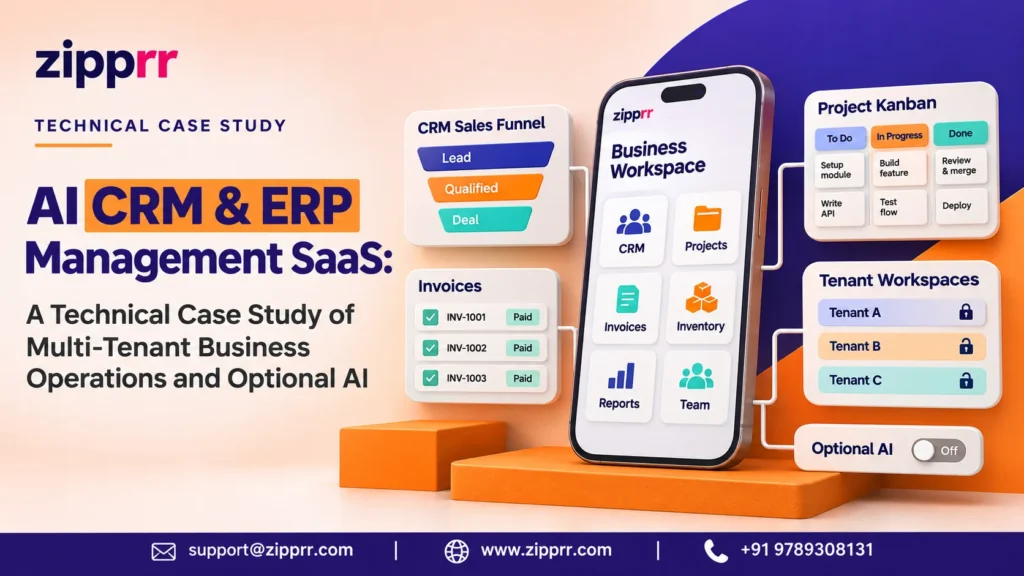
An AI CRM ERP SaaS platform is a single web application that manages customer relationships (CRM) and core business operations (ERP) for one company or for many companies at once. In the platform examined here, one self-hosted deployment covers sales, invoicing, purchasing, inventory, accounting, HR and payroll. AI features are optional and can be switched off without losing core ERP functions.
Technical case study
Scope note. This case study describes platform features. It does not tell a verified customer success story. The platform comes from a third-party vendor's feature specification. Zipprr did not develop it, and this article makes no claim of a client deployment, revenue result, benchmark or time saving. The methodology and sources section shows how we label each statement.
Table of contents
Quick Answer: What Is an AI CRM ERP SaaS Platform?
It is one web application that runs customer relationships (CRM) and core business operations (ERP) for one company or many. This self-hosted platform covers sales, invoicing, purchasing, inventory, accounting, HR and payroll, runs in standalone or multi-tenant SaaS mode, and keeps AI optional per workspace.
Methodology and Scope of This AI CRM ERP SaaS Review
The input for this article is one feature specification. Everything here falls into one of four labelled groups.
A capability stated in the supplied specification.
A made-up business scenario used to explain a workflow. It is not a real deployment.
A good practice the buyer should consider. It is not a built-in feature.
A detail the specification does not settle. Confirm it with the vendor before you commit.
No one independently audited, code-reviewed or load-tested the platform for this article. We quote technology versions as the specification lists them. If vendor documentation for the release you receive differs, trust the vendor documentation and record the difference.
The platform is not a Zipprr product, and its terms are not borrowed from any Zipprr product. This article does not cover pricing, licensing or delivery terms.
Executive Summary of the AI CRM ERP SaaS Platform
- What it is: a self-hosted, browser-based business management platform that combines CRM, sales, invoicing, purchasing, inventory, accounting, HR and payroll.
- Two modes: a standalone single-company mode, or a multi-tenant SaaS mode. You choose the mode during setup.
- Multi-tenant control: a landlord (the platform operator) manages tenants, plans and platform billing. Each tenant has its own users, permissions and branding.
- Connected data: shared customer and vendor records (the Parties model) link CRM, sales and inventory.
- Optional AI: a business copilot, lead scoring, cash-flow forecasting, receipt OCR and more. Each workspace can disable AI, choose a provider, supply its own API key and set a monthly token cap.
- Integration: API tokens, REST endpoints for selected records and outbound webhooks.
- Main caution: several behaviors need hands-on verification, including tenant isolation internals, custom domains, webhook events, barcode workflows and automatic accounting posting.
AI CRM ERP SaaS Platform Overview
What Problem Does a Combined CRM and ERP Solve?
It reduces the gaps between teams that normally use separate tools. A sales team tracks deals in one system. Also, a warehouse counts stock in another. In addition, accountants rebuild invoices in a third. HR keeps leave in a spreadsheet. Likewise, each hand-off is a place where records drift apart.
The same customer then appears under three spellings. A quote does not match the invoice. Moreover, stock on hand differs from what sales believes it can promise. Also, payroll depends on attendance data that lives somewhere else.
An AI CRM ERP SaaS platform like this one tries to cut these gaps in two ways. First, it uses shared contact and item records across modules. Second, it keeps all modules inside one permissioned workspace. The specification does not promise that every hand-off is automatic, so buyers should test each transition. The acceptance checks section shows how.
CRM vs ERP vs the Combined AI SaaS Platform
CRM manages the relationship with leads and customers. ERP manages the resources and records that run the business. A combined platform keeps both in one system so they share data.
Definition. In this article, "AI CRM ERP SaaS" means a CRM and ERP application that can be offered as a multi-tenant subscription service and that includes optional AI assistance. "Optional" matters: the AI layer sits on top of the core modules and does not replace them.
If your main need is conversation handling across messaging channels, a different product category fits better. See Zipprr's multi-tenant omnichannel messaging CRM case study for that topic. In addition, omnichannel messaging is not part of the platform described here.
Who Uses the AI CRM ERP SaaS Platform, and What Can Each Role Do?
Six role types appear in the specification. One belongs to the platform operator. The rest belong to a tenant or to a single company.
Each tenant can create custom roles and permissions. A payroll clerk, for example, could be a custom role limited to HR and payroll. The exact permission granularity of each module should be confirmed in a trial.
How Does the Multi-Tenant AI CRM ERP SaaS Model Work?
One deployment hosts many business workspaces, called tenants. Each tenant sees only its own data, users, permissions and branding. A landlord administers the tenants.
What the Specification States
- Multiple workspaces run from one deployment, with tenant-scoped data isolation.
- A signup wizard lets new tenants register.
- Each organization has its own users, permissions, logo and favicon.
- Tenant-scoped domains support separate workspaces.
- Workspace access is permission-controlled.
What It Does Not State
VerifyThe specification does not say how isolation is implemented. Do not assume a separate database per tenant. Do not assume automatic domain provisioning or support for arbitrary custom domains. Treat these as items to verify.
Landlord Versus Tenant Responsibilities
Note on branding: tenant branding in the specification means logo and favicon. Domain behavior is a separate topic and needs its own verification.
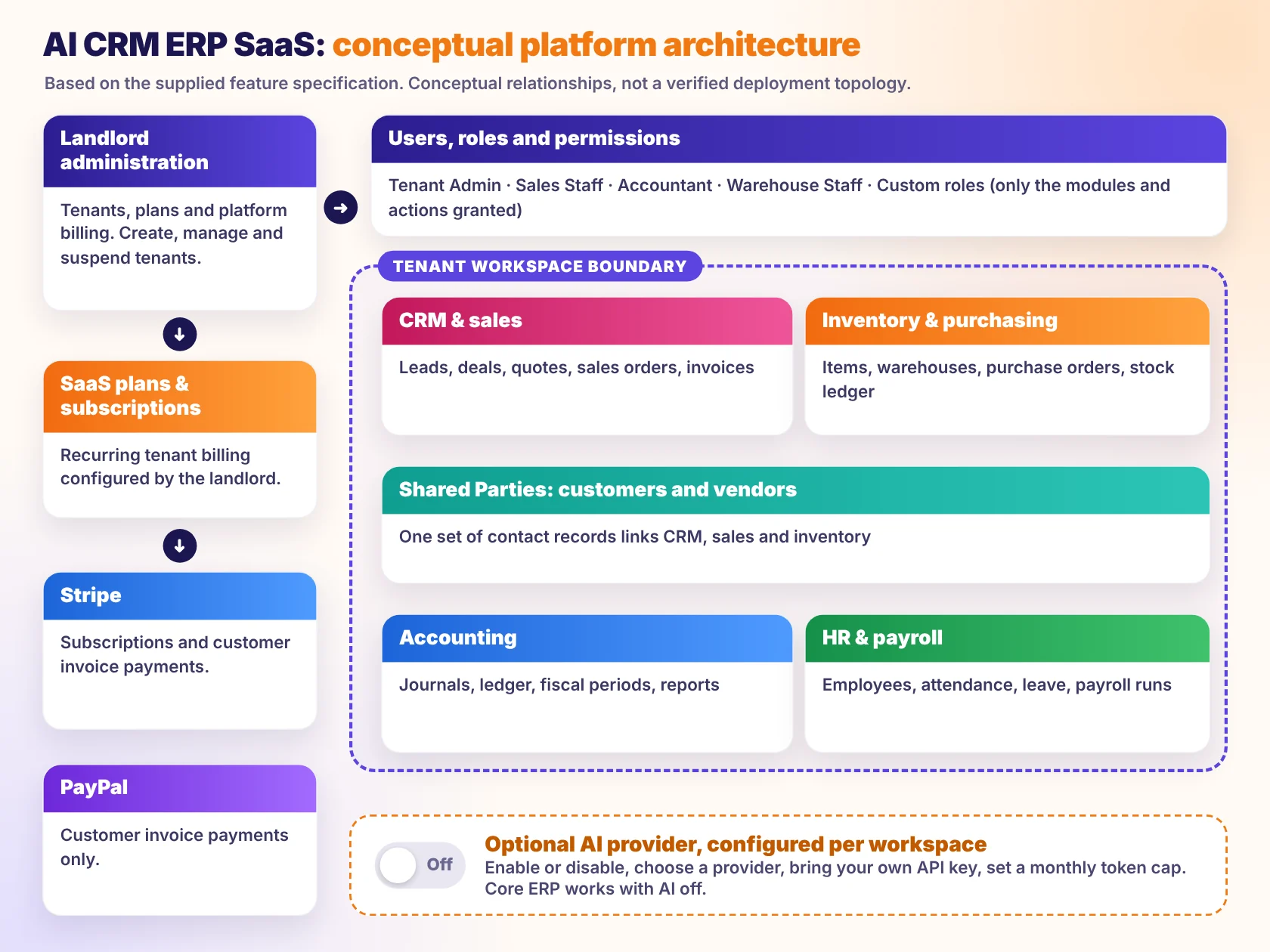
Conceptual Architecture of the AI CRM ERP SaaS Platform
The diagram below is a conceptual relationship diagram. Likewise, it is not a verified deployment topology.
From Lead to Payment: The Connected Sales Workflow
The sales flow runs from lead capture through pipeline, quote, optional sales order, invoice, payment and accounting review. The specification describes these as connected stages. It does not promise that every step converts automatically.
The Stages
- 1Lead captureUsers can create leads manually, import them from CSV or capture them through public lead-capture forms.
- 2Optional enrichment and scoringAI can enrich leads and score leads and deals. Both are optional.
- 3PipelineA drag-and-drop Kanban deal board supports custom pipelines and stages.
- 4ActivitiesCustomer-facing activities and a unified activity inbox connect to leads and deals. Reusable email templates support sending email from the CRM.
- 5QuoteUsers can share customer quotations through a public link, and the customer can accept through that link.
- 6Sales orderA distinct sales-order module exists, using shared customer and item records.
- 7InvoiceCustomer invoices have public links, recurring options, PDF export, credit notes and configurable tax rates.
- 8PaymentCustomers can pay online through a configured gateway.
- 9ReviewAccountants review receivables and accounting records.
Illustrative Example
IllustrativeThis scenario is invented to explain the flow. It is not a customer result.
A small equipment supplier receives an enquiry through a public lead form. A sales user moves the lead into a deal stage and sends a reusable email template. The user prepares a quote and shares the link. The buyer accepts. The team creates a sales order, then an invoice with a public link. The buyer pays through the configured gateway. Moreover, an accountant then reviews the receivable.
At each arrow in that story, an operator should check whether the platform converts data automatically or needs manual re-entry. The specification does not confirm automatic conversion between quote, order and invoice, or automatic ledger posting.
Email handling is limited to what is stated: templates and sending from the CRM. Do not assume a full omnichannel inbox or specific email-provider integrations.
Purchasing, Warehouses and Stock Valuation in AI CRM ERP SaaS
The platform manages stock through a shared item catalogue, multiple warehouses, purchase orders and a stock movement ledger. Valuation uses FIFO or weighted average.
Specified Capabilities
- Shared item catalogue, with CSV item import.
- Barcode support is described for inventory operations. Exact behavior needs verification.
- Multiple warehouses with warehouse-level quantities.
- Purchase orders that use the shared vendor records.
- Goods receipt, including partial receipts where supported.
- Stock adjustments and transfers.
- A stock movement ledger.
- FIFO or weighted-average inventory valuation.
- Low-stock notifications.
The Purchasing Flow
A warehouse user would typically own steps 3 to 6. Also, sales users benefit when quantities are visible before they promise delivery. The specification does not say whether sales documents reserve stock, so test it.
Accounting, Receivables, Payables and Reporting
The accounting module provides a chart of accounts, journal entries, fiscal periods, expenses and standard financial reports. Country-specific accounting or tax compliance is not claimed.
Specified Capabilities
- Chart of accounts, journal entries and fiscal periods.
- Expense tracking, with optional receipt OCR.
- Trial balance, general ledger, profit-and-loss statement and balance sheet.
- Cash-flow information.
- Accounts receivable aging and accounts payable aging.
- PDF export for supported financial reports.
- Configurable tax rates on invoices.
How the Pieces Relate
A sales transaction or an expense feeds a journal process. In addition, journals sit inside a fiscal period. Likewise, the trial balance checks the period, and financial statements summarize it. The specification describes this as a connected process. Moreover, it does not confirm that every sales document posts to the ledger automatically, so ask for a demonstration of exactly which events create journal entries.
Why Aging Reports Matter
Receivable aging shows which customer invoices are overdue and by how long. Also, payable aging shows what the business owes vendors. Together they give a finance user a view of cash timing. The optional AI collections coaching builds on this data, which is why clean invoice and payment records matter.
HR, Attendance, Leave and Payroll
HR data flows from employee profiles to attendance and leave, then to payroll runs and payslips. The specification does not claim automatic payroll calculation or statutory payroll integration.
Specified Capabilities
- Employee profiles.
- Attendance tracking.
- Configurable leave types, leave requests and a leave calendar.
- Payroll runs and deduction types.
- Payslip PDF export.
How the Records Relate
Confirm in a trial how attendance and leave feed a payroll run. Payroll rules vary by country. Because country-specific payroll compliance is not established, plan for local review of any payroll output.
The Optional AI Layer in This AI CRM ERP SaaS
AI features are optional. A workspace can disable them and keep all core ERP functions. When enabled, they depend on a configured AI provider and on the quality of the business data.
Tools by Group
Provider Controls
- AI can be enabled or disabled at workspace level.
- Provider selection includes supported providers such as OpenAI or Anthropic.
- The organization supplies its own API key.
- A monthly token cap is available.
- The vendor describes a key-free demo mode.
Costs and Review Requirements
External AI usage may incur separate charges from the provider. A token cap limits tokens. In addition, it should not be read as an exact monetary budget, because provider pricing differs. The vendor does not describe how the key-free demo mode performs inference, so do not assume it.
AI output needs human review. A lead score is a prioritization aid. Likewise, a cash-flow forecast depends on the data fed into it. Moreover, a drafted journal entry is a draft that an accountant must review before use. Also, nothing here is autonomous approved accounting.
For readers whose interest is website conversation rather than business operations, Zipprr's AI chat software is a separate product. In addition, it is distinct from the in-app business copilot described in this platform. For analytical products, see the AI data analytics platform case study. That analytics product is not integrated into this CRM and ERP platform.
Technical Architecture and Deployment Requirements
The specification lists a Laravel 13 backend on PHP, an Inertia.js 3 and Vue 3 frontend, Tailwind CSS 4 styling and MySQL or MariaDB for data.
Specification-Listed Stack
Specification-Listed Requirements
- PHP 8.3 or higher.
- MySQL 8 or compatible MariaDB.
- Composer.
- Node.js and npm for frontend asset builds.
- Hosting configuration appropriate to the deployment mode.
Verify the versions against the vendor documentation for the release you receive. If they differ, record the difference rather than assuming either is right.
The specification names Fortify and Sanctum in acknowledgements only. Do not assume exactly what each handles. Likewise, the specification does not list Redis, Docker, Kubernetes, queue workers, a named cloud provider or microservices. Ask the vendor what a production setup needs.
Installation Flow
A browser-based installation wizard runs server requirement checks and guides initial workspace configuration. A license activation flow is part of setup. You choose the mode (standalone or SaaS) during this process.
Illustrative Pseudocode for AI CRM ERP SaaS Access Checks
IllustrativeIllustrative pseudocode, not extracted from the product.
function can_access(user, tenant, module, action):
    # 1. Tenant boundary
    if user.tenant_id != tenant.id:
        return DENY

    # 2. Workspace state
    if tenant.is_suspended:
        return DENY

    # 3. Role and permission (built-in or custom role)
    role = user.role
    if not role.allows(module, action):
        return DENY

    return ALLOW

function list_records(user, tenant, module):
    require can_access(user, tenant, module, "view")
    # Every query is scoped to the current tenant
    return query(module).where(tenant_id = tenant.id)

# Recommended practice (not a confirmed feature):
# write an audit entry for financial or administrative actions.
The sample shows the idea of checking the tenant boundary first and the permission second. Likewise, it is not production code and does not reflect real endpoints or schema.
API and Webhook Integration Scope
The platform offers token-authenticated REST endpoints for leads, deals, invoices, items and shared parties, plus outbound event webhooks. Actual coverage depends on the endpoints and events the release provides.
Specified
- Authenticated integrations using API tokens.
- REST endpoints for leads, deals, invoices, items and shared parties.
- Outbound event webhooks.
Verify Before You Build
Do not design an integration around assumed routes or delivery guarantees. Read the vendor's API documentation first and test with a sandbox workspace.
Security, Tenant Boundaries and Support Impersonation
Specified security controls include two-factor authentication, WebAuthn passkeys, audit logs, module-level permissions and tenant isolation. Support impersonation is a landlord capability that needs strict handling.
Specified Controls
- Two-factor authentication and WebAuthn passkey sign-in.
- Financial and administrative audit logs.
- Tenant isolation and module-level permissions.
- A demo environment with sample records and write protection.
Support Impersonation
Authorized support staff can impersonate tenants for troubleshooting. That is useful, and it is also a high-trust capability. The specification says access should be restricted to trusted support roles.
RecommendedThe specification does not mention time limits, approval flows or impersonation-specific logs. Do not assume them. Keep the number of impersonating users small, tell tenants in your terms how support access works, and confirm that audit logs capture actions taken during an impersonated session.
Tenant Boundary Checks
Because the isolation mechanism is not specified, test it rather than trust it. Create two tenants. Confirm that a user from one tenant cannot view or change records from the other through the interface or the API. This article makes no security certification or legal compliance claim for this platform.
Subscription Billing vs Customer Invoice Payments
These are two separate money flows. Subscription billing is what a tenant pays the landlord for a plan. Invoice payments are what a tenant's customer pays the tenant.
Payment gateways need external accounts and configuration. PayPal recurring subscriptions for SaaS plans are not included in the stated scope. If you plan PayPal-only tenant billing, confirm what is possible before launch.
Landlord-managed plans and recurring tenant billing are the monetization route for an operator. The specification does not say whether a plan can restrict specific modules or limits, so test plan configuration.
Standalone vs SaaS Mode for AI CRM ERP Software
Standalone mode serves one company without landlord billing. SaaS mode adds tenant management, plans and subscriptions for operators who serve many businesses.
The specification says you choose the mode during setup. Ask the vendor whether a deployment can switch modes later. That is not stated.
Planning to run an AI CRM ERP SaaS for many businesses? Tell us your industry and the modules you need on WhatsApp, and we will help you plan the evaluation.
Discuss on WhatsAppPractical AI CRM ERP SaaS Deployment Acceptance Checks
RecommendedRecommended practices, not built-in features. Run these before any production launch. Tick each one as you pass it.
Expected AI CRM ERP SaaS Benefits and a Measurement Plan
These are intended capabilities, not measured customer results.
Intended Benefits by Audience
What an Operator Could Measure
These are proposed measurement categories. Moreover, they are not built-in reports unless the vendor confirms them. Record your own baseline before launch. This article provides no baseline or improvement figures.
Limitations and Details to Verify
Frequently Asked Questions About AI CRM ERP SaaS
What is an AI CRM ERP SaaS platform?
It is a web-based application that combines customer relationship management with business operations such as invoicing, inventory, accounting, HR and payroll. It can be offered to many companies as a subscription service. AI features are optional additions, not the core of the system.
What is the difference between CRM and ERP?
CRM manages leads, deals and customer activity. ERP manages the resources behind the business, such as stock, purchasing, accounting and payroll. A combined platform keeps both in one workspace so they share customer, vendor and item records.
Can the platform run for a single company?
Yes. The specification describes a standalone single-company mode that operates without SaaS landlord billing. You choose the mode during setup.
What does multi-tenant mean here?
One deployment hosts several business workspaces. Each tenant has its own users, permissions and branding, with tenant-scoped data. The specification does not say how isolation works, so test it before launch.
Can I charge tenants a subscription?
In SaaS mode, a landlord can configure plans and recurring tenant billing. Stripe supports subscriptions. PayPal is described for invoice payments, and recurring SaaS subscriptions through PayPal are not claimed.
More Questions About AI CRM ERP SaaS Platforms
Can customers pay invoices online?
Yes, through a configured gateway. Stripe and PayPal support invoice payments. You need your own gateway accounts and configuration.
Does the platform require AI to work?
No. AI is optional. A workspace can disable it and keep all core ERP functions. When enabled, it needs a supported provider and an organization-supplied API key.
Does it include mobile apps?
Dedicated Android and iOS applications are not established by the specification. The platform is described as web-based, so confirm mobile needs with the vendor.
Does it meet local tax or payroll rules?
The specification does not establish country-specific tax, accounting or payroll compliance. Review your local requirements with a qualified professional and test the outputs before relying on them.
What should I verify first before deploying?
Start with tenant separation, role permissions and one complete workflow from lead to payment. Then check custom domains, webhook events, barcode behavior and which events post to the ledger automatically.
Evaluate the AI CRM ERP SaaS Platform in a Demo
A strong evaluation does not need to be long. Pick three things and test them end to end: tenant separation between two workspaces, role permissions for a custom role, and one complete operational workflow from lead to paid invoice and ledger review.
Zipprr's team can discuss your requirements. Ask whether a demonstration of this specific platform is available before you plan around it. You can also browse Zipprr's software catalogue for related products.
Get a Free DemoChat on WhatsApp[email protected]