

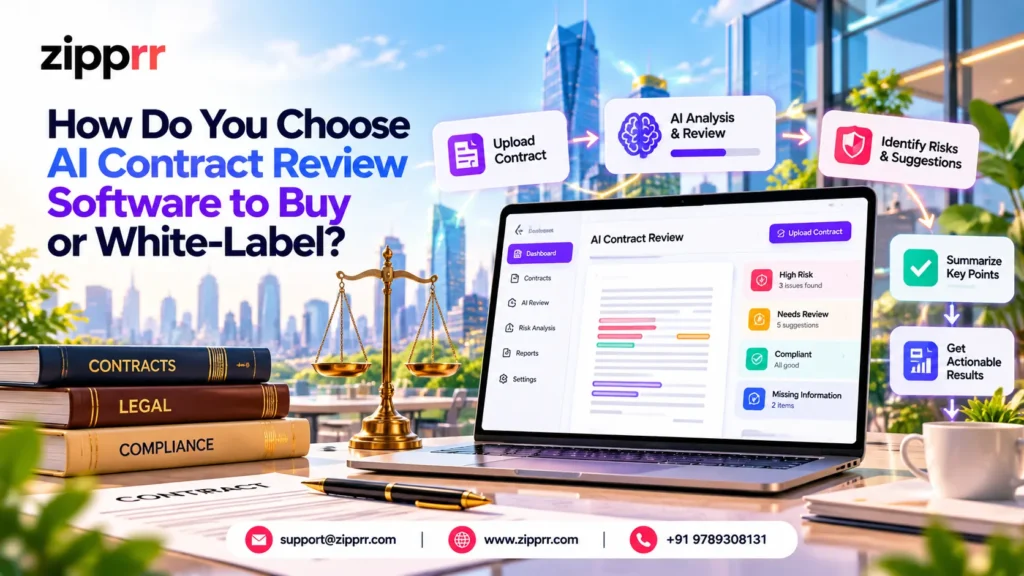
AI contract review software is a program that reads an agreement, finds the clauses that matter, rates the risk in each one and suggests edits. A lawyer or trained reviewer then accepts or rejects every suggestion. It speeds up the first pass. It does not replace the person who answers for the result.
Last updated: October 2026. Zipprr builds AI lawyer software with contract review built in, so this guide is written from the seller’s side of the table. Where a claim comes from Zipprr, it says so.
Not legal advice. Zipprr is a software company, not a law firm. Nothing here is legal advice, and AI output must be checked by a qualified attorney before anyone relies on it.
Why Are So Many Teams Suddenly Shopping for Contract AI?
Because the idea has moved from curiosity to a budget line. In a survey run in December 2025, LegalOn Technologies and In-House Connect asked 452 in-house legal professionals about AI. Fifty-two percent said their teams were using or evaluating AI for contract review.
The same survey shows why buying is hard. Limited time and resources to implement AI was the top concern at 61%. Data privacy and confidentiality followed at 59%, and difficulty integrating with existing systems at 51%.
Read that list as a buyer. None of the three top worries is “will the AI be smart enough?” They are about time, trust and fit. That is the order this guide follows.
Key takeaway: Most failed contract AI purchases do not fail on model quality. They fail on privacy review, integration work or a reviewer workflow nobody designed.
How Does AI Contract Review Software Work, Step by Step?
It reads a contract and gives you a clear list of findings in five steps, and a person makes the final call. The stages are the same whether you subscribe to a tool or run your own.
Step three is where quality is won. A tool without your playbook can only give generic opinions. A tool that encodes your own positions gives answers that match how your clients actually negotiate.
Who Should Buy or White-Label AI Contract Review Software?
Three kinds of buyers get the most from owning or white-labeling the software instead of renting a seat. Each has a different reason.
- Legal-tech founders who want a branded product on their own domain without spending a year on core engineering.
- Law firms that handle client documents they are not willing to send to a shared multi-tenant service.
- SaaS builders who already serve accountants, HR teams or procurement teams and want a contract review feature inside their existing product.
Teams that only need a few reviews a month are usually better off with a basic subscription. We say that plainly because the wrong purchase costs more than a lost sale.
What Should You Check Before Buying AI Contract Review Software?
Check four areas before you sign anything: data privacy, integrations, human review and ownership. They map directly to the concerns buyers reported in the survey above.
Data privacy: where does the contract text go?
Ask who stores the documents, who can read them, and whether they are ever used to train a model. Ask where the servers are located, because clients in the UK, Australia or Singapore may have their own expectations about data location.
A self-hosted platform changes the answer. The files stay on a server you control. In Zipprr’s case the product page lists self-hosting, role-based access and an audit log. It does not claim any third-party security certification, so do not assume one exists. Ask for what you need in writing.
Integrations: does it fit the way work already moves?
A review tool that lives in its own tab gets abandoned. Check for e-signature, cloud storage, calendar, billing and practice-management connections. Zipprr’s page lists more than 50 integrations, including DocuSign, Adobe Sign, Google Drive, Dropbox, QuickBooks and Zapier, plus one-click import from three common practice-management tools.
Whatever you evaluate, run one real document through the full path from upload to signed copy. That single test exposes more than any feature list.
Human review: who checks every flag before it is used?
The American Bar Association’s Formal Opinion 512 (July 2024) on generative AI tools reminds lawyers that they remain responsible for competence, confidentiality, and supervision when they use them. Whether you are a firm or a vendor serving firms, build that duty into the product.
Look for per-flag accept and reject buttons, a visible source quote for every finding, and a log of who approved what. Our own long-form guide to AI lawyer versus human lawyer covers where the line sits for different task types.
Ownership: what exactly do you get?
“White-label” can mean very different things. Some vendors lend you a logo slot inside their hosted product. Others hand over the source code. On Zipprr’s AI Lawyer page, buyers receive the full source code and may rebrand it for their own business. The license does not allow reselling, redistributing or sublicensing the code, so it suits a company running its own product, not one building a reseller business.
What Is the Five-Gate Buyer Test for AI Contract Review Software?
Use the five-gate test to score any option on a 0 to 2 scale per gate. It is a working framework we use in demos, not an industry standard.
A total under 5 means the option is a trial, not a platform. A total of 8 or more means it can carry client work. Anything in between needs a written fix list before purchase.
What Features Do You Actually Need?
A short, honest list beats a long one. These are the features that decide whether reviewers keep using the tool after the first month.
- Clause extraction with the source text quoted beside each finding
- Risk rating by severity, with a plain reason for each rating
- Version comparison between drafts and redlines
- Obligation and deadline mapping with reminders
- Editable playbooks per client or contract type
- Handling of long agreements (Zipprr’s page states contracts up to 200 pages)
- Audit log and role-based permissions
- Export to Word and PDF so lawyers can keep working in their own format
Zipprr’s AI Lawyer page lists the first five of these in its contract review module, along with drafting, deadline tracking, billing and client intake. Those performance numbers on the page are the vendor’s own, so test them on your documents.
How Do You Make Money With AI Contract Review Software?
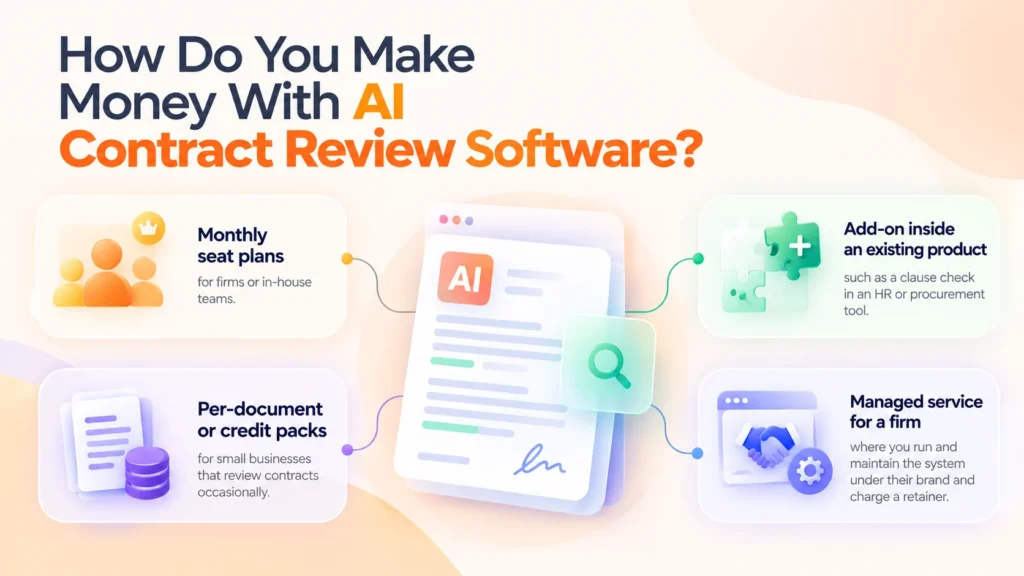
You can earn from it in four ways, and most operators combine two. Pick the model before you pick features, because it decides what you build first.
- Monthly seat plans for firms or in-house teams.
- Per-document or credit packs for small businesses that review contracts occasionally.
- Add-on inside an existing product, such as a clause check in an HR or procurement tool.
- Managed service for a firm, where you run and maintain the system under their brand and charge a retainer.
If you plan to run credits or metered usage, the engineering is covered in our write-up on model routing, retrieval search and credit billing in one AI platform.
How Much Does It Cost and How Long Does It Take to Launch?
It depends on the route you take. The table compares three common routes using hypothetical planning figures for the subscription and custom paths, and Zipprr’s published prices for the source-code path.
| Route | Upfront cost | Ongoing cost | Typical time to first live use | You own the code? |
|---|---|---|---|---|
| Subscribe to a hosted tool | Low | Per seat, every month (hypothetical: $300 per seat) | Days to weeks | No |
| Build custom from scratch | Very high (hypothetical: six figures) | Developers plus hosting plus AI usage | Several months | Yes |
| Source-code platform (Zipprr AI Lawyer) | $490 Standard or $890 Pro, one-time | Your hosting, AI model usage and your own legal review | Zipprr states same-day setup; plan extra days for your playbooks and testing | Yes, for your own use |
On Zipprr’s live page, Standard is $490 and Pro is $890, both one-time with no monthly fee. Both include the full source code, website installation and 90 days of support. Native iOS and Android apps and app store submission are part of Pro only. A 7-day money-back guarantee applies.
Remember the costs that sit outside any license: server hosting, AI model usage fees, your own playbook writing and a lawyer’s review of your client terms. A fair budget includes them.
Not sure which route fits? Send us three sample contract types and your user count, and we will show you the AI Lawyer contract review flow on those documents in a free 30-minute walkthrough. Use the contact block at the end of this article.
What Does a Worked Example Look Like?
The numbers below are hypothetical. They show how to calculate your own break-even, not what any firm will achieve.
A small firm reviews 120 vendor and client contracts a month. Manual first-pass review averages 45 minutes each, which is 90 hours. Assume AI first pass plus a lawyer’s check takes 25 minutes each, which is 50 hours.
That frees 40 hours a month. If a fully loaded reviewer hour costs $60, the monthly saving is $2,400. Against a $890 one-time license, the license itself is recovered quickly, and the rest of your budget goes to hosting, model usage and review time. If your own measured saving is half of this, the case still holds. If it is a tenth, rent a seat instead.
Measure your baseline for two weeks before you buy. That number is worth more than any vendor claim.
Which Mistakes Do Buyers Make Most Often?
- Skipping a pilot. Demo contracts are clean. Yours have scanned pages and odd formatting.
- Treating AI output as advice. A flag is a prompt for a lawyer, not a conclusion.
- Ignoring the playbook. Without your standard positions, the tool flags everything or nothing.
- Forgetting data location. Clients abroad may ask where their files sit.
- Buying features you will not use. Drafting, billing and intake are useful only if you plan to run them.
- Underestimating change management. Reviewers need a short training session and a clear rule for when to override the tool.
What Are the Red Flags When Choosing a Vendor?
- No clear answer on whether your documents train their models
- Accuracy claims with no method or sample behind them
- “Compliant” or “certified” claims with no named standard or report
- No export of your data if you leave
- Pricing that changes after the demo
- Promises that the software replaces attorney review
Ask every vendor, including us, to put the privacy and ownership answers in writing before you pay.
Who Should Buy This and Who Should Not?
Buy a source-code platform if you run a legal-tech brand, a law firm that wants control of client data, or a SaaS product that can use a contract module. The one-time price suits you if you would rather spend on your own product than on seat fees.
Skip it if you review a handful of contracts a month, have no one to host or maintain a server, or want a vendor to carry all legal and security responsibility. A hosted subscription will serve you better.
Three common objections, answered from the live product page:
- “Is the price really one-time?” Yes, the page states no monthly fees. Hosting and AI usage are your own costs.
- “What if I need help?” Both plans include 90 days of support and installation.
- “Do I own it?” You receive the full source code and may rebrand it, but you may not resell or sublicense it.
If you want to see the broader legal workflow the module sits in, our guide to what AI lawyer software does, costs and how to choose it covers build, buy and subscribe in more detail.
What Is a Realistic Launch Plan for the First Two Weeks?
Week one is setup and safety. Week two is testing and a small real launch.
Want a ready-made version? Ask us for the free launch checklist and we will send it with your demo confirmation.
How Can Clients Stay in the Loop After Launch?
Good contract review ends with a client who knows what happened. Two simple add-ons help. A self-hosted AI chat widget can answer routine intake questions from your own documents, and a WhatsApp automation platform can send opted-in status updates. Both are separate Zipprr products, so add them only if you need them.
If you want to see how a multi-assistant white-label AI product is structured under the hood, read how a multi-expert AI platform is engineered. It is a case study of a third-party product, shown for its architecture.
Ready to Test It on Your Own Contracts?
Book a free walkthrough, bring three sample contract types, and judge the software on your documents instead of ours. You can also email [email protected].
Frequently Asked Questions About AI Contract Review Software
1. What is AI contract review software?
It is software that reads agreements, finds key clauses, rates risk and suggests edits against rules you set. A person then approves or rejects each suggestion. It speeds up the first pass of review but does not replace a lawyer’s judgment or accountability.
2. How does AI contract review work?
The tool extracts text, splits it into clauses, compares each clause with a playbook, flags risk and proposes wording. A reviewer then accepts or changes each suggestion. Quality depends heavily on how well the playbook reflects your real negotiating positions.
3. Is AI contract review safe for confidential documents?
It can be, if you control where files are stored, who can open them and whether they train any model. Self-hosting keeps files on your own server. Whatever you choose, get storage, training and deletion terms in writing before uploading client documents.
4. Can AI replace a lawyer for contract review?
No. AI can speed up a first pass, but a qualified attorney remains responsible for advice and decisions. The ABA’s Formal Opinion 512 stresses lawyers’ duties of competence and confidentiality when using generative AI. Treat every flag as a prompt for a human check.
5. How much does AI contract review software cost?
Prices vary by route. Hosted tools usually charge per seat each month. Custom builds cost the most. Zipprr’s AI Lawyer is a one-time $490 Standard or $890 Pro license on its live page, with hosting and AI usage paid separately.
6. What features should AI contract review software have?
Look for clause extraction with quoted source text, severity ratings, version comparison, obligation tracking, editable playbooks, audit logs and role-based permissions. Check that it handles long files and exports to Word, because lawyers will keep working in their own formats.
7. Can small businesses use AI for contract review?
Yes, for routine first-pass checks such as NDAs and vendor terms. Small businesses should still have a lawyer review anything high-value or unusual. A hosted tool often fits better than owning software if you review only a few contracts monthly.
8. What is the difference between AI contract review and contract management?
Contract review analyses what a document says and flags risk. Contract management stores agreements and tracks dates, owners and renewals. Some platforms offer both, so test the review feature separately before assuming a management tool does it well.
9. Can I white-label AI contract review software?
Yes. Some vendors offer logo-level branding on a hosted product, and others give you source code to rebrand. Check the license for limits. Zipprr’s license allows rebranding for your own business but not resale, redistribution or sublicensing.
10. What should I check before buying AI contract review software?
Check data privacy, integrations, human review steps and code ownership. Pilot it on 20 of your own contracts, ask for privacy terms in writing, and measure hours saved against a baseline. A short written fix list should come before any purchase.



