

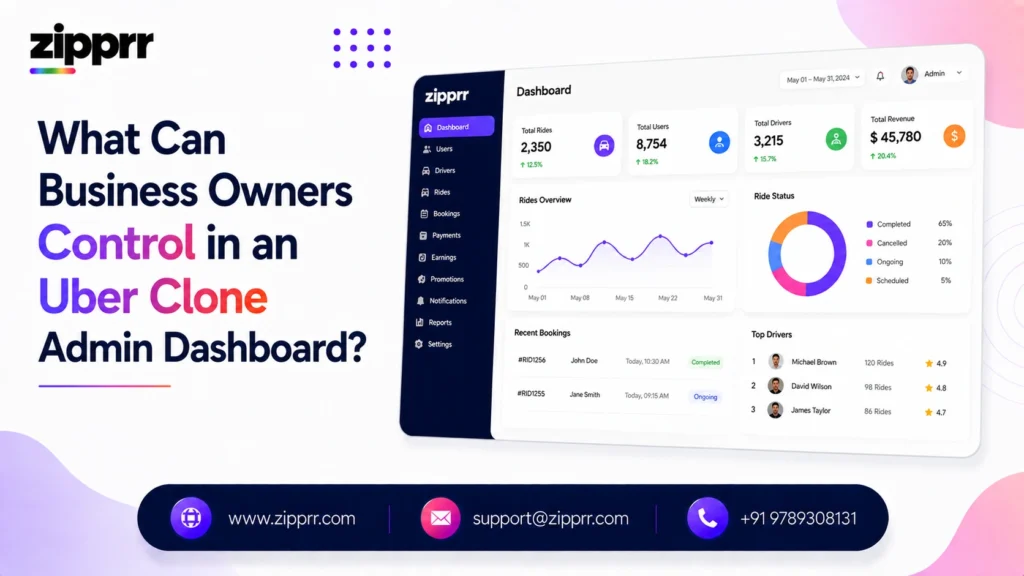
A business owner running an Uber clone can control driver management, fare and commission settings, service zones, live ride monitoring, dispute and cancellation handling, promotions, payouts, staff access levels, and reporting, all directly through the admin dashboard, without needing a developer for routine changes.
What varies significantly between platforms is how much of this is actually self-service versus how much requires submitting a request to the software vendor.
This matters more than it might seem. Two Uber clone platforms can have nearly identical feature lists on a sales page while behaving completely differently once a business is actually running day-to-day operations. The difference usually comes down to what’s configurable through the dashboard and what’s locked behind a support ticket. This article goes through each area of control in detail, what a business owner should expect to manage directly, and what typically still needs developer involvement. Owners across the country are already running exactly this setup through Zipprr’s Uber Clone, which covers the complete package and pricing beyond just the admin dashboard.
Why Admin Dashboard Quality Matters More Than It Seems
It’s easy to underweight the admin dashboard when evaluating an Uber clone, since the passenger app is what riders see and the driver app is what drivers use every day. The admin dashboard is invisible to both groups, which makes it tempting to assume any dashboard will do the job. In practice, it’s the tool the business owner or operations team touches most often, often multiple times a day once the platform is live.
A slow, confusing, or limited dashboard doesn’t just create friction, it directly limits how fast a business can respond to real conditions. If adjusting a fare rule takes a week because it requires a developer request, that’s a week where the business is either overcharging and losing riders or undercharging and losing money, with no way to correct it quickly. The admin dashboard is where strategy turns into action, and its quality sets a hard ceiling on how responsive the business can actually be.
Driver Management
Driver management is usually the largest part of daily admin work, and a functional dashboard should let a business owner handle all of it without outside help.
Onboarding and verification. Reviewing and approving new driver applications, checking submitted documents such as licenses, vehicle registration, and insurance, and activating or rejecting drivers based on that review.
Availability and status. Seeing which drivers are online, offline, or currently on a ride, and manually adjusting a driver’s status when needed, for example temporarily suspending a driver during an investigation.
Performance and ratings. Viewing each driver’s rating history, completed ride count, cancellation rate, and any flagged incidents, which supports decisions about warnings, retraining, or removal from the platform.
Document and compliance tracking. Setting expiration reminders for licenses and insurance, and flagging drivers whose documentation has lapsed so they can be paused until it’s renewed.
How Do You Manage Drivers in an Uber Clone Dashboard?
Drivers are managed through a dedicated section of the admin dashboard where business owners approve new applications, review documents, monitor live availability and ratings, and suspend or reactivate accounts as needed. This should all happen without contacting the software vendor, since driver management is one of the highest-frequency admin tasks on any active platform. Zipprr’s Uber Clone founder’s guide goes deeper into the founder’s side of this decision, including how driver-side onboarding affects launch timing.
Fare and Commission Settings
Pricing is one of the most operationally important areas to control directly, since fare strategy often needs to change quickly in response to local competition or driver supply.
Base fare and per-distance rates. Setting the starting fare, the rate per kilometer or mile, and the rate per minute, usually adjustable per vehicle category if the platform supports multiple ride types.
Surge or demand-based pricing rules. Defining the conditions and caps under which fares increase during high-demand periods, rather than leaving pricing uncapped or static.
Commission percentage. Setting what percentage of each fare the platform retains versus what the driver keeps, and adjusting it by vehicle type, zone, or driver tier if the platform supports that level of granularity.
Cancellation and waiting fees. Configuring the amount charged for late cancellations or excessive wait times, and the rules for when these apply.
Deciding where to actually set your commission percentage is a separate question from whether you can adjust it, and it depends on what drivers and riders in your market will accept. Zipprr’s cost and revenue breakdown goes deeper into realistic commission and revenue expectations if you’re still deciding where to start.
Can Business Owners Change Fares and Commission Rates Themselves?
Yes, on a well-built platform, base fares, per-distance rates, surge pricing rules, and commission percentages should all be adjustable directly through the admin dashboard. A platform where fare or commission changes require a developer request turns a routine pricing decision into a multi-day delay, which is a meaningful operational limitation worth testing before purchase.
Service Zone and City Management
As a business grows, expanding into new areas is one of the most common next steps, and how easily that happens depends heavily on what the admin dashboard allows.
Defining service areas. Drawing or setting the geographic boundaries where the platform accepts ride requests, which prevents bookings from areas the business isn’t ready to serve.
Adding new cities or regions. Expanding operations to a new city, ideally without a separate deployment or a request to the vendor, by configuring a new zone with its own fare rules and driver pool.
Zone-specific rules. Setting different fare structures, service types, or promotional rules for different zones, since pricing that works in one area may not work in another.
Can You Add Service Zones or New Cities From the Admin Dashboard?
On platforms built for scale, yes: business owners can define new service areas and expand into additional cities directly through the dashboard, each with its own fare rules and driver pool. Platforms without this capability typically require a new deployment or vendor involvement for every new market, which slows expansion and adds cost.
Multi-City and Franchise Management
Beyond simply adding a new zone, businesses that plan to expand into multiple cities or run a franchise model need the dashboard to support that structure directly, not as an afterthought.
Centralized versus delegated control. A business owner running multiple cities may want a single view across all locations, while also being able to delegate day-to-day management of each city to a local manager with limited permissions.
City-level reporting. Seeing performance broken down by city separately, not just in aggregate, which matters for deciding where to invest in driver recruitment or marketing next.
Franchise-specific settings. If the business model involves franchising the platform to local operators, the dashboard should support giving each franchisee their own scoped access without exposing data from other cities.
Vehicle and Service Type Management
Many Uber clone platforms support more than one type of ride, and managing that from the dashboard is a distinct control area worth understanding before purchase.
Vehicle category setup. Adding or removing vehicle types, such as standard cars, premium vehicles, or two-wheelers, each with its own fare structure and driver eligibility rules.
Service type toggles. Turning specific services on or off in specific zones, for example enabling airport transfers only in zones near an airport.
Vehicle document tracking. Verifying and tracking vehicle-specific documents such as registration and insurance, separate from the driver’s personal documents.
If your business is closer to a single-fleet taxi dispatch operation than a multi-service ride-hailing marketplace, it’s worth comparing this against Zipprr’s Taxi Booking Script, which is built around structured taxi dispatch rather than the broader multi-service model this article assumes.
Notifications and Communication Controls
The admin dashboard is also usually where a business owner controls what riders and drivers actually see and hear from the platform.
Automated notification settings. Configuring what triggers a notification, such as ride status changes, driver arrival, or payment confirmations, and adjusting the message content.
Broadcast messaging. Sending a message to all drivers or all riders at once, useful for announcing a new promotion, a service change, or an important operational update.
Support contact routing. Setting how riders and drivers reach support, whether that’s in-app chat, a phone number, or a support ticket system, and where those requests land internally.
Live Ride Monitoring and Dispatch Oversight
Beyond configuration, the admin dashboard is also where a business owner or operations team watches the platform function in real time.
Live map view. Seeing active drivers and in-progress rides on a real-time map, which helps identify coverage gaps or unusual activity.
Ride intervention. Reassigning a ride to a different driver, canceling a ride on the platform’s side, or contacting a rider or driver directly if something goes wrong mid-trip.
Demand visibility. Seeing where ride requests are concentrated and where driver supply is thin, which supports decisions about driver incentives or targeted recruitment.
Dispute and Cancellation Handling
Disputes are inevitable in any ride-hailing operation, and how they’re handled directly affects trust on both sides of the marketplace.
Refund and adjustment authority. Issuing a full or partial refund to a rider, or adjusting a driver’s payout, in response to a complaint.
Cancellation policy enforcement. Applying or waiving cancellation fees based on the circumstances, and tracking cancellation patterns by rider or driver.
Complaint and incident logging. Recording the details of a dispute so there’s a written history to reference if the same rider or driver has repeated issues.
How Are Disputes and Cancellations Handled in an Uber Clone Admin Panel?
Business owners typically handle disputes directly through the dashboard: issuing refunds or payout adjustments, applying or waiving cancellation fees, and logging incident details for future reference. This should be a self-service function, since disputes need to be resolved quickly to maintain trust with both riders and drivers.
Promotions and Discount Management
Marketing and growth tools are usually configurable directly, since campaigns often need to launch or end on short notice.
Coupon codes and discounts. Creating time-limited or usage-limited promo codes for new riders, referral programs, or specific zones.
Campaign scheduling. Setting start and end dates for promotions so they don’t need to be manually turned off.
Referral program rules. Configuring the reward amount and conditions for rider or driver referral programs.
Payment and Payout Settings
Money movement is one of the most sensitive areas of the platform, and it should be both controllable and transparent.
Payout schedule. Setting how often drivers are paid, daily, weekly, or on-demand, depending on what the platform supports.
Payment method configuration. Connecting and managing the payment gateways the business accepts, such as cards, digital wallets, or region-specific payment methods.
Payout history and reconciliation. Reviewing a full record of what’s been paid to each driver, which matters for both driver trust and the business’s own accounting.
How Do Driver Payout Settings Work in an Uber Clone Admin Dashboard?
Driver payouts are typically configured through the admin dashboard by setting a payout schedule, connecting a payment gateway, and reviewing payout history for each driver. Business owners should be able to see exactly what’s owed and what’s been paid without exporting data manually or contacting support, since payout transparency is one of the biggest factors in driver retention.
Want a ready-made platform like this?
Skip months of development. Uber Clone, Airbnb Clone, Uber Eats Clone, TaskRabbit Clone and Gojek Clone ship with 100% source code. Book a free demo or chat with us on WhatsApp.
Reporting and Analytics
Decisions about pricing, driver incentives, and expansion should be based on real data, which makes reporting one of the more consequential parts of the dashboard.
Ride volume and revenue reports. Tracking completed rides, cancellations, and revenue over time, ideally broken down by zone, vehicle type, or time period.
Driver performance reports. Identifying top-performing and underperforming drivers based on completion rate, ratings, and earnings.
Financial reconciliation reports. Reports that support accounting and tax needs, showing commission collected, payouts made, and any refunds issued.
Export and integration options. Whether reports can be exported to a spreadsheet or connected to external accounting software matters for businesses that already have a bookkeeping process in place. A dashboard that locks data inside its own interface, with no way to export it, makes it harder to combine ride-hailing data with the rest of the business’s financial picture.
Roles and Permissions for Staff
As a business grows beyond a single owner-operator, controlling who can access what inside the dashboard becomes important for both security and accountability.
Role-based access control. Creating different permission levels, for example a support staff member who can handle disputes but can’t change fare settings, versus a full administrator who can.
Activity logs. Tracking which staff member made which change, useful for accountability and for diagnosing when something was changed unexpectedly.
Can Multiple Staff Members Have Different Access Levels?
On platforms with role-based access control, yes, a business owner can create separate permission levels so support staff, operations managers, and administrators each see and control only what’s relevant to their role. This matters as a business scales beyond one person managing everything, since it limits both accidental changes and the risk of a single account having unnecessary access.
What Usually Requires a Developer Instead of the Dashboard
Not everything is self-service, and it’s worth being honest about where the line typically sits, since this varies by vendor and is one of the more important questions to ask before buying.
Adding entirely new features. Building a capability that doesn’t exist in the platform at all, such as a new ride type or a new integration, generally requires development work.
Deep visual or UX changes. Beyond standard branding, app name, and color scheme, structural changes to how screens are laid out typically need a developer.
Custom integrations. Connecting the platform to a third-party system it wasn’t originally built to support, such as a specific accounting tool or a regional payment processor, usually needs development work.
The honest distinction is that configuration, adjusting settings within features the platform already has, should be self-service. Customization, adding capabilities the platform doesn’t already support, generally isn’t. A vendor that’s upfront about which category a request falls into is more trustworthy than one who treats every request as either free and instant or a black box.
Common Admin Dashboard Mistakes New Business Owners Make
A few patterns show up repeatedly among first-time Uber clone operators, and most are avoidable once you know to look for them.
Not testing the dashboard before buying. Evaluating a platform based only on a features list or a sales demo, rather than getting hands-on access to click through the actual admin screens, often leads to unpleasant surprises after purchase.
Underestimating how often fares need adjusting. New operators sometimes assume fares are a set-once decision, when in practice competitive pressure and driver supply mean pricing often needs revisiting in the first few months of operation.
Giving every staff member full access. Without role-based permissions, it’s common for a small team to all share one admin login, which makes it impossible to tell who made a given change and increases the risk of accidental mistakes.
Ignoring reporting until something goes wrong. Business owners who don’t check driver performance or financial reports regularly often only notice a problem, like a payout discrepancy or a drop in completed rides, well after it’s already affected the business.
Assuming everything is self-service. Not clarifying upfront what requires a developer leads to frustration when a business owner expects to make a change instantly and instead has to wait on a support queue.
Admin Dashboard Security Considerations
Since the dashboard has access to driver documents, payment information, and rider data, security is worth evaluating directly rather than assuming it’s handled.
Reasonable questions to ask include: whether admin accounts support two-factor authentication, whether access can be restricted by role as described above, whether activity is logged for accountability, and whether the vendor can explain in plain terms how sensitive data like driver identification documents is stored and protected. None of this requires deep technical expertise to evaluate, it requires asking directly and getting a specific answer rather than a vague reassurance.
It’s also worth asking what happens to admin access when a staff member leaves the business. A dashboard that makes it easy to revoke one person’s login without disrupting everyone else’s access is a basic but frequently overlooked security requirement, especially for a business that will eventually have more than one or two people touching the platform.
How to Actually Evaluate an Admin Dashboard Before Buying
A sales demo is designed to show the dashboard at its best, walking through a curated path that avoids anything clunky. Getting a genuinely useful evaluation means going beyond that.
Ask for hands-on access, not just a demo video. A live login, even a sandboxed or trial account, reveals far more than a scripted walkthrough, since you can click into the areas that matter most to your specific business rather than the areas the salesperson chose to show.
Try to change a fare rule yourself. If it’s genuinely self-service, this should take a few clicks. If it’s not, you’ll find out immediately rather than after you’ve already paid.
Ask what a real support ticket looks like. Request an example of a past change that required vendor involvement and how long it took, which gives a realistic sense of turnaround time rather than a marketing promise.
Check how the dashboard looks on mobile. Many business owners manage day-to-day operations from a phone, especially early on, so a dashboard that only works well on desktop is a real limitation.
Confirm what happens if you switch providers later. Ask whether historical data, driver records, and reports can be exported, since being unable to leave with your own data is a serious lock-in risk.
What to Ask a Vendor Before Buying
- Which of these controls are included in the base admin dashboard, and which are paid add-ons or require a custom request?
- Can fares, zones, and commission be changed without contacting support, and how quickly do changes take effect?
- Does the dashboard support role-based access for staff beyond the primary owner account?
- What reporting is available out of the box, versus what would need custom development to build?
- How is sensitive driver and rider data protected, and can the vendor explain this clearly and specifically?
A vendor who can answer all five of these directly and specifically, in writing, is a much stronger signal than a features list on a sales page.
Getting Started
The best way to evaluate an admin dashboard is to see it in action rather than rely on a features list, since the difference between “included” and “possible with a developer” often isn’t obvious until someone is actually clicking through the screens. Booking a free demo with Zipprr is a practical way to see exactly what’s self-service before comparing vendors on price alone, on the exact interface you’d be running your business from every day.
Want to See the Admin Dashboard Yourself?
The best way to know what you’ll actually control is to see it in action. Talk to our team for a walkthrough of what’s self-service and what’s customizable in Zipprr’s Uber Clone admin panel.



