

Zoopla Clone: Launch a Property Listing Website Like Zoopla
Launch your own property portal with Zipprr’s Zoopla Clone. Moreover, it is a ready-made real estate website with an admin panel, built for entrepreneurs who want to start fast. As a result, buyers, renters and agents can search, list and send inquiries in one place. Also, you can book a free 30-minute demo before you decide.
Countries Served
0
+
Happy Clients
0
%
Years of Experience
0
+


Server Installation
Hassle‑free setup, we handle deployment for you.

Multi‑Language Support
Connect globally, serve users in their language.

Post‑launch Support
Get 90 days free expert technical assistance.

Transparent Pricing
Clear cost structure, no hidden surprise charges.
What is Zoopla Clone Script?
A Zoopla clone is ready-made real estate software that lets you launch a property listing portal similar to Zoopla under your own brand. As a result, buyers, tenants, agents, landlords and owners connect through one marketplace.
For example, Zipprr’s Zoopla Clone includes property listings, advanced search, map-based browsing, agent profiles, user inquiries and an admin dashboard.
Instead of building a property portal from scratch, you start with a working product. Also, pricing starts at $490 as a one-time payment, with 90 days of support and lifetime updates. Zipprr’s Zoopla Clone is independent software, so it is not affiliated with Zoopla. However, if you target the US instead, see our Zillow Clone.

See What Our Happy Clients Say
Why Choose Zipprr’s Zoopla Clone Script?
01
02
03
04
05
Ready-Made Zoopla Clone Real Estate Solution
Zipprr’s Zoopla Clone is designed for businesses that want to launch quickly, so you do not build every feature from the beginning.
Fully Customizable Zoopla Clone Platform
Also, you can customize design, features, property categories, user flow, language and business model based on your target market.
Website and Mobile App Zoopla Clone Support
In addition, you can launch your property listing business on the website with every plan. Moreover, the Pro plan adds Android and iOS apps with app store submission.
Source Code Access for Zoopla Clone Script
Because you get source code based on your selected package, you keep better control over future updates and customization.
Business-Friendly Zoopla Clone Features
Finally, the platform supports property listing, lead management, agent handling, inquiry flow, admin control and monetization options.
Zoopla Clone Platform Workflow
User Searches Property on Zoopla Clone
First, users visit the website or app and search for properties based on location, budget and property type.
Shows Matching Listings
Then, the system displays relevant properties with images, price, location and key details.
User Views Property Details
Next, users open a listing to check photos, floor plans, amenities, description, pricing and agent information.
User Sends Inquiry
After that, interested users can send an inquiry, call the agent or use the available contact option.
Agent Manages Leads
Finally, agents receive inquiries, follow up with users, update listings and manage property status.
Admin Controls
Admin manages users, agents, properties, monetization, reports, content, and platform settings.
Key Features of Zoopla Clone App Panels
User Panel Features
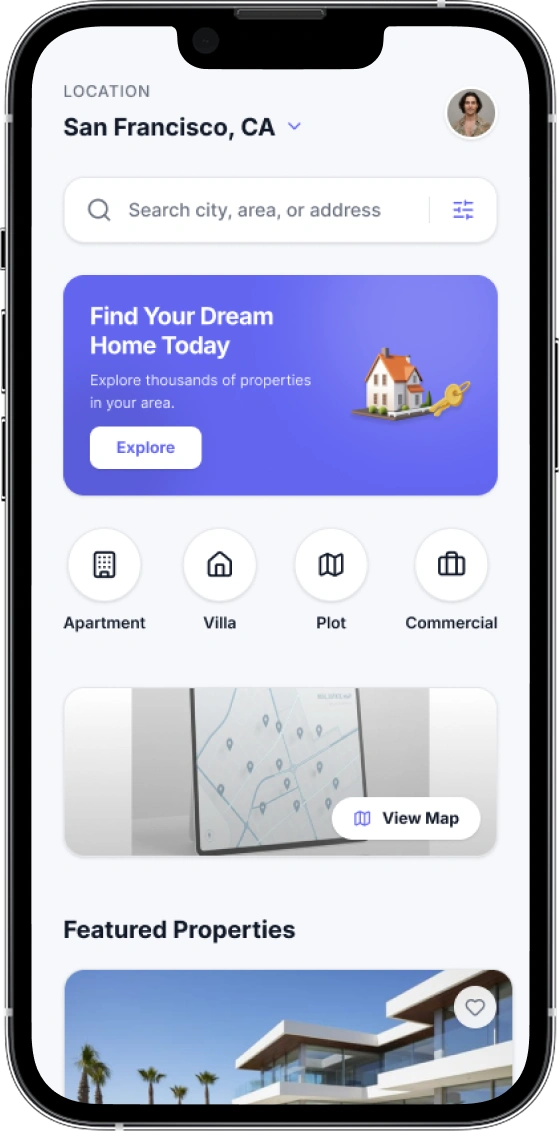
- Advanced Search and Filters : Users can look for properties based on location, price, type, number of rooms, amenities, and other key features.
- Interactive Map Search : Clone App The platform allows users to view properties through map integration, making location-based property discovery easier.
- Property Details Page :Users can view high-quality images, floor plans, property descriptions, price details, amenities, and location information.
- Favorites and Wishlist : Users can save preferred properties and revisit them later for comparison or inquiry.
- Agent Contact :App Built-in messaging, inquiry, or call options help users connect directly with agents or property owners.
- Mortgage Calculator : A mortgage calculator helps users estimate possible financing options before making a property decision.
Agent Panel Features
- Listing Management : Agents can add, edit, update, or remove property listings with images, videos, floor plans, pricing, and location details.
- Lead Management : Agents can track inquiries from buyers and tenants, manage follow-ups, and handle potential customer leads.
- Analytics Dashboard : Agents can monitor property views, saved property counts, inquiry volume, and listing performance.
- Premium Listings : Agents can upgrade selected listings as featured properties to gain better visibility on the platform.
- Agent Profile Management : App Agents and agencies can manage contact details, company logo, business profile, bio, and professional information.

Admin Panel Features
- User and Agent Management : Admin can verify, approve, suspend, or manage users, agents, agencies, landlords, and property owners.
- Property Management Admin can monitor all property listings and approve, edit, or remove inappropriate or low-quality content.
- Monetization Management Admin can manage subscriptions, featured listing charges, advertising options, and other revenue models.
- Analytics and Reporting : Admin can view platform-wide statistics, revenue reports, user activity, listing performance, and market trends.
- CMS Management : Platform Admin can manage static pages such as About Us, Privacy Policy, Terms and Conditions, FAQ, and other content pages.

Core Features of Zoopla Clone App
Property Listing Management
To begin with, agents, owners and admins can add and manage property details, images, pricing, location, amenities and availability.
Advanced Property Search
In addition, users can search properties by location, budget, property type, rooms, features and other preferences.
Map-Based Property Search
Besides that, interactive map search helps users explore properties and browse nearby locations.
Property Details Page
Moreover, each property page can show images, floor plans, pricing, description, location, amenities and agent details.
User Registration
Similarly, users can create accounts, manage profiles, save properties and send inquiries from the platform.
Agent and Owner Management
Additionally, agents, agencies, landlords and property owners can manage listings, leads, profile details and inquiries.
Property Inquiry System
Therefore, interested users can contact agents or property owners directly through inquiry, call or message options.
Admin Dashboard
Lastly, admin can manage users, agents, listings, property categories, inquiries, content and platform settings.
Saved Properties
Also, users can save favorite properties and view them later for comparison and decision-making.
Alerts and Notification
Finally, the platform can send email or push notifications for matching properties, inquiries, updates and platform activities.
Monetization
Zoopla Clone App Monetization Options
Also, you can generate income from multiple streams within your marketplace:

Featured Property Listings
For example, you can allow agents or property owners to promote selected listings for higher visibility.
Agent Subscription Plans
In addition, you can offer monthly, yearly or custom subscription plans for agents and agencies.
Lead Generation Model
Also, you can earn through verified property leads from buyers, tenants, sellers and rental users.
Premium Listing Packages
Likewise, property owners and agents can upgrade listings for better ranking and more exposure.
Advertisement Revenue
Finally, you can generate revenue by placing real estate-related ads, sponsored banners or promotional spaces.
Platform modules
Zoopla Clone Features: Seven Core Modules for a Property Portal
Overall, seven modules power the platform. Also, each one shows what it does, why it matters and the result you can expect.
MODULE 01
Property Listing Management
FeatureFirst, agents, owners and admins add, edit, publish and update listings from one dashboard.
BenefitAs a result, listing data stays accurate and easy to maintain.
OutcomeOverall, you get fewer listing errors and a more trustworthy portal for buyers and renters.
MODULE 02
Advanced Property Search
FeatureSpecifically, users filter listings by location, budget, property type, rooms and features.
BenefitTherefore, visitors reach relevant homes faster.
OutcomeIn addition, you get more engagement and more inquiries per visit.
MODULE 03
Map-Based Discovery
FeatureBesides lists, interactive map search offers nearby-location browsing.
BenefitMoreover, it matches how buyers expect to explore a property portal.
OutcomeFinally, you see longer sessions and better-qualified inquiries from users who narrowed by area.
MODULE 04
Agent Dashboard
FeatureMeanwhile, a dedicated workspace lets agents manage listings, leads, analytics and their profile.
BenefitBecause the tool fits their workflow, agents have a real reason to list on your portal.
OutcomeAs a result, agent retention rises and more listings stay active.
MODULE 05
Inquiry Management
FeatureNext, the system captures buyer and tenant inquiries and routes them to the right agent or owner.
BenefitConsequently, fewer leads are lost and replies are faster.
OutcomeLikewise, more inquiries turn into real conversations.
MODULE 06
Saved Properties and Alerts
FeatureFor example, users save favorites and get email or push alerts for matching properties.
BenefitAlso, it brings visitors back to the portal.
OutcomeThen, you build a growing base of repeat, warmer leads.
MODULE 07
Admin Control Panel
FeatureFinally, admins manage users, agents, listings, monetization, analytics and content.
BenefitThus, routine management needs no developer help.
OutcomeBecause of this, the portal owner spends less effort on running it.
Right fit
Who Should Buy a Zoopla Clone Script?
First, check that this fits your plan before you buy.
Good fit if you are
Agencies and brokerages that want their own listing portal
Startups launching a niche or regional property portal
Rental portal owners who need agent and landlord listings
Entrepreneurs who want source-code-based software they can brand
Businesses that want to skip building core portal features from zero
Teams that need customization for their market, languages and workflow
Not a fit if
You need a completely unique platform outside the property portal category
You need proprietary third-party data feeds that are not supported
You need functionality outside the verified product scope
Launch process
How to Launch a Zoopla Clone Website in Five Steps
Five steps take you from your first demo to go-live. Also, most launches take about 7 days, depending on your customization scope.
STEP 01
Book a demo
First, see the live platform and discuss your market.
STEP 02
Confirm requirements
Next, define property types, users, branding and customization.
STEP 03
Receive your quote
Then, get pricing based on the confirmed scope.
STEP 04
Customize and configure
After that, apply your branding and the agreed changes.
STEP 05
Launch
Finally, review the finished portal and go live.
Business model
Zoopla Clone Revenue Model: How Your Property Portal Earns
First, a property portal earns from the people who want visibility. Therefore, you can mix the streams below to match your market and your agents.
Featured listings
Agents or owners promote selected listings, so they get higher visibility.
Paid by: Agents and property ownersAgent subscription plans
Agents pay monthly, yearly or custom plans, so income stays recurring.
Paid by: Agents and agenciesLead generation
Verified leads from buyers, tenants, sellers and renters are then sold to agents.
Paid by: Agents and agenciesPremium listing packages
Owners and agents upgrade listings, so they get better ranking and more exposure.
Paid by: Property owners and agentsAdvertisement revenue
Real estate ads, sponsored banners and promotional spaces help advertisers reach your audience.
Paid by: AdvertisersComparison
Zoopla Clone vs Custom Development vs Other Clone Scripts
Also, the right choice depends on budget, speed and ownership. As a result, this table shows how Zipprr’s Zoopla Clone compares with a custom build and with other clone scripts.
| Factor | Zipprr Zoopla Clone | Custom development | Other clone scripts |
|---|---|---|---|
| Upfront cost | $490 Basic or $890 Pro, so you pay once | Quoted per project and depends on scope | Varies by seller |
| Setup | Website installation is included, so you can launch sooner | Built from scratch, including design and testing | Check what the seller includes |
| Source code | Website and admin source code included, so you own the delivered code | Depends on your contract | Varies by seller |
| Support | 90 days of support included, so help is available after launch | Set by the development agency | Varies by seller |
| Updates | Lifetime updates included, so your platform stays current | Depends on your agreement | Varies by seller |
| Refund | 100% refund within 7 days, so you can buy with confidence | Usually governed by the contract | Check the seller’s policy |
Pricing Plan
Not happy with our product? No worries! Get a 100% refund within 7 days. Choose your plan with confidence—risk-free!
Basic
Get essential features, all in one place
$490
- Website Source Code
- Admin Source Code
- Website Installation
- 90 Days Support
- Life Time Updates
- One Time Payment
Pro
Popular
Launch your business app fast, with everything done-for-you
$890
- Website Source Code
- Admin Source Code
- Website Installation
- 90 Days Support
- Life Time Updates
- One Time Payment
- Android App
- IOS
- App Submission
Get Started With Our Zoopla Clone Script
- Get Started
Launch Your Marketplace Business With Zipprr
Book a personalized demo and discover how Zipprr helps you launch a fully customizable marketplace solution built for growth.
Can we customize the platform?
Yes, every solution can be tailored to your business.
-
100% Source Code Ownership
Complete control from day one
-
Custom Branding
Your logo, colors and identity
-
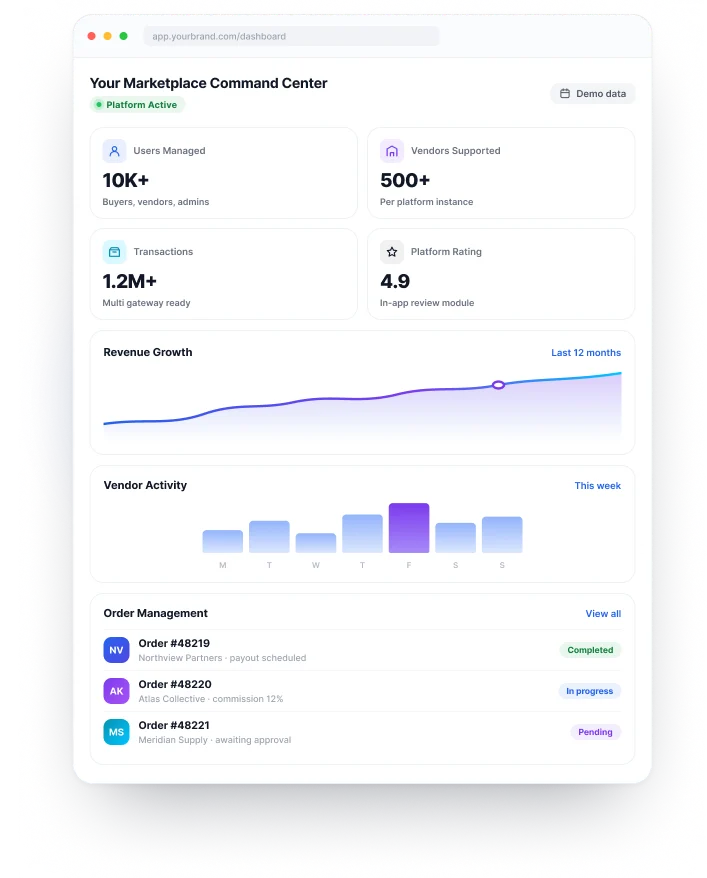
Multi Vendor Ready
Manage sellers, roles and payouts
-
Built To Scale
Grow without limits
- 30 Minute Product Walkthrough
Request Your Free Demo
Book a personalized demo and discover how Zipprr helps you launch a fully customizable marketplace solution built for growth.
- 100% source code ownership
- Custom feature discussion
- Free product consultation
- 90 days launch support
Frequently Asked Questions?
Get quick answers to the most common questions about buying and launching a Zoopla clone.

What is a Zoopla clone?
In other words, a Zoopla clone is ready-made real estate software for launching a property portal similar to Zoopla under your own brand. For example, it includes property listings, search filters, map browsing, agent profiles, inquiry forms and an admin dashboard. In addition, Zipprr’s Zoopla Clone starts at $490 as a one-time payment and is independent software, not affiliated with Zoopla.
How do I make a property listing website like Zoopla?
Instead of coding from scratch, the fastest way is to start with a ready-made Zoopla clone script. First, Zipprr installs the website. Then you add your branding, property categories and agent plans. After that, you invite agents to publish listings, so you can focus on onboarding agents and attracting buyers rather than development.
How much does it cost to build a real estate website like Zoopla?
A custom build means paying for design, development and testing, and the cost depends on scope. However, with Zipprr’s Zoopla Clone you pay $490 for the Basic plan or $890 for the Pro plan, once. Also, both plans include website and admin source code, installation, 90 days of support and lifetime updates. In addition, a 100% refund is available within 7 days.
What is a real estate portal script?
In other words, a real estate portal script is pre-built code that powers a property listing website. Specifically, it handles listings, search, user accounts, agent profiles, inquiries and admin controls, so you do not build them yourself. Instead, you add your brand and listings, then launch. As a result, Zipprr’s Zoopla Clone works as a real estate portal script for buyers, renters and agents.
Does a real estate website script come with source code?
It depends on the seller, so always check before you buy. For example, Zipprr’s Zoopla Clone includes website source code and admin source code in both plans. Because you own the delivered code, you can customize it for your market. Finally, book a free demo to see exactly what you receive.
Can I launch a website like Zoopla outside the UK?
Yes, Zipprr’s Zoopla Clone supports multiple languages and flexible locations, so you can launch for any city or country. First, start with one niche, such as rentals or a single region. Then you can expand later. Also, you can adjust property categories and search filters to match how people search in your market.
How does a real estate marketplace script make money?
Overall, revenue comes from several streams. First, you can charge agents for featured listings. Second, you can sell monthly or yearly subscription plans and premium listing packages. Third, you can sell verified leads and run real estate ads. Zipprr’s Zoopla Clone supports these models, so you choose the mix that fits your market and your agents.
What is included in real estate portal software?
Overall, Zipprr’s real estate portal software includes a user panel, an agent panel and an admin panel. First, users get search, filters, map view, favorites, alerts and a mortgage calculator. Next, agents manage listings, leads and profiles. Finally, admins control users, properties, monetization, analytics and content.
Can property portal software be customized?
Yes, you can customize branding, design, language, property categories, payment flow and your business model. In addition, custom features such as extra filters, payment gateways or subscription plans can be added on request. Therefore, share your requirements on a free demo call and the team will confirm the scope and timeline.
How do agents manage listings on a property portal?
First, agents log in to their own panel to add, edit and update property listings and set prices. Besides that, they receive buyer inquiries, follow up on leads, view analytics and maintain their agent profile. Similarly, agencies and owners can manage their own listings the same way.
Book a Free Zoopla Clone Demo
The fastest way to know if this fits is to see it live. Therefore, book a short demo and walk through listings, search, agent dashboards, inquiries and the admin panel with our team.
One-time paymentInstallation includedLaunch in about 7 daysLifetime updates