

Launching a platform like this? Zipprr clone scripts start at $490 with 100% source code, a 7-day refund and 90 days of free support. Book a free demo or chat with us on WhatsApp.
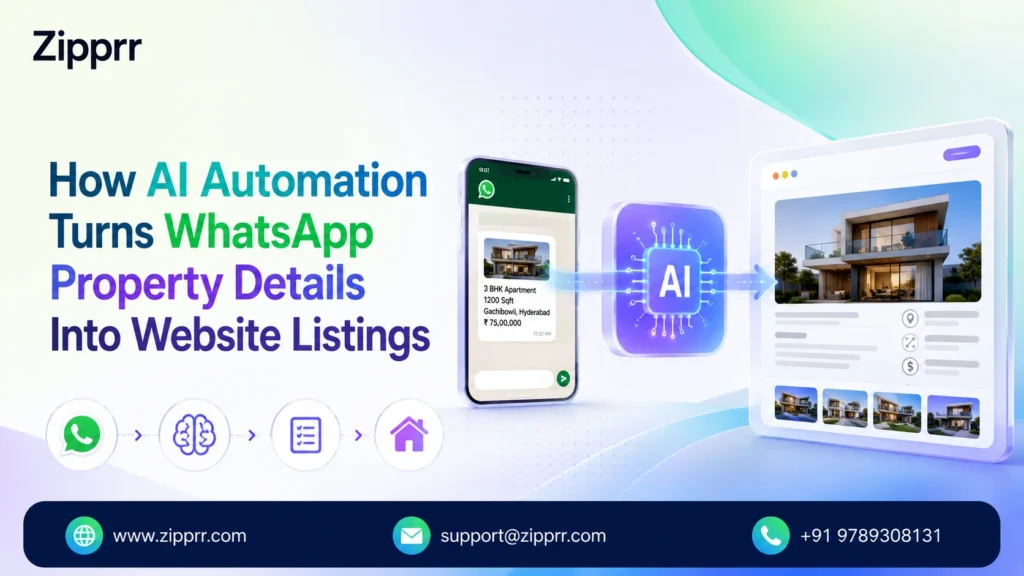
A property owner sends a WhatsApp message: a few lines describing the property, a price, a location, the number of bedrooms, and a handful of photos.
In a typical agency, an employee reads that message, copies the details, opens the website’s listing form, retypes everything, downloads each photo from WhatsApp, uploads it to the site, checks the result, and only then does the listing exist on the website.
The information was never missing. It just arrived in a format the website cannot use directly. WhatsApp gives you free text and loose photos; a listing page needs structured fields. Closing that gap by hand, every single time, is exactly the kind of repetitive work a person should not have to do.
Zipprr’s automation approach reads the WhatsApp submission, extracts what it can, and prepares a draft listing on the agency’s real estate platform, ready for a person to check before anything goes public.
The Business Problem
Manual listing creation from WhatsApp submissions creates a specific set of operational problems:
- Repetitive data entry, the same fields typed by hand for every submission
- Copy-paste mistakes that creep in when details move from a chat app to a web form
- Inconsistent listing information depending on which employee handled the submission
- Manual photo handling, downloading from WhatsApp and re-uploading to the website
- A delay between when property information arrives and when the listing actually exists
- Difficulty keeping listings consistent when multiple staff members handle intake
- Staff time spent on low-value administrative work instead of higher-value tasks
No specific time or cost figures are claimed here, since none have been verified for any particular business. The problems above are structural: they exist regardless of how fast any one employee happens to be.
The Automation Solution
Two different things are doing the work in this workflow, and it is worth naming them separately, since the terms get used loosely elsewhere.
AI is the language-understanding step: reading a free-text WhatsApp message and photos and working out which words correspond to which property fields. Automation is everything around that step: receiving the WhatsApp message, handing it to the AI step, taking the result and creating a draft listing, and triggering a WhatsApp follow-up if something is missing. AI interprets the message. Automation moves the data and runs the process. Neither one decides whether a listing goes public; that stays with a person, covered in detail below.
Step-by-Step Workflow
Step 1: Property Owner Sends Information. The owner sends a WhatsApp message describing the property, along with photos. An illustrative example of what that message might look like:
“2BHK apartment available in [location]. Price [amount]. Ready to move. Attached are the photos.”
Illustrative example only, not a real customer message.
Step 2: AI Extracts Available Information. The AI step reads the message and identifies whatever fields are actually present: property type, location, price, bedroom count, a short description. Photos sent with the message are associated with the same submission. If a detail was never mentioned, it is marked missing rather than guessed or invented.
Step 3: Convert to Structured Property Data. The extracted information becomes a structured record the listing platform can use. A short illustrative example:
					{
  "property_type": "2BHK Apartment",
  "location": "As stated in message",
  "price": "As stated in message",
  "bedrooms": 2,
  "photos": ["photo_1.jpg", "photo_2.jpg"],
  "status": "pending_review",
  "source": "WhatsApp"
}
This is a simplified illustration of the type of structured record an automation workflow can create. It is not an actual customer export.
Step 4: Create Draft Listing. This is where the automation piece does its work. Each field in the structured record maps to its corresponding field on the Zipprr-powered real estate platform, such as a Zillow Clone site: property type into the listing category, location into the address field, price into the price field, bedroom count into the BHK selector, and each photo into a gallery upload slot. The platform’s own listing-creation flow runs the same way it always does, just triggered automatically instead of by someone typing it in. The result is saved as a draft, marked pending review, not published.
Step 5: Human Review. An agent or admin checks the draft against the original submission: price, location, property type, bedroom count, description, photos, and whether anything important is missing or inconsistent.
Step 6: Publish or Request More Information. If everything checks out, the agent approves the listing and it goes live. If information is incomplete or unclear, the missing pieces are requested back from the property owner over WhatsApp, and the listing stays pending until that follow-up arrives.
Want a ready-made platform like this?
Skip months of development. Uber Clone, Airbnb Clone, Uber Eats Clone, TaskRabbit Clone and Gojek Clone ship with 100% source code. Book a free demo or chat with us on WhatsApp.
What AI Handles vs What Stays Human
AI / automation handles:
- Receiving the WhatsApp submission
- Reading the message
- Extracting available property fields
- Structuring the information
- Associating photos with the submission
- Mapping fields into a draft listing
- Identifying missing information
- Triggering follow-up workflows
The human team handles:
- Verifying property details
- Confirming price and location
- Checking photo accuracy
- Resolving ambiguous information
- Approving publication
- Deciding what actually becomes public
The automation removes repetitive work. It does not remove accountability for what gets published.
The Workflow at a Glance
Text message + photos from owner
Unstructured message becomes structured property data
Fields mapped onto the Zipprr real estate platform, pending review
Agent / admin checks details, price, photos, completeness
Listing goes live
WhatsApp follow-up sent
Before vs After
| Manual Process | Automated Process |
|---|---|
| Owner sends WhatsApp message | Owner sends WhatsApp message |
| Employee reads and copies details | AI extracts available details |
| Employee retypes listing information | Data is structured automatically |
| Employee uploads photos | Photos are associated with the draft |
| Employee creates listing manually | Fields are mapped into a draft listing |
| Agent checks listing | Agent reviews draft |
| Listing is published | Listing is published only after approval |
Business Benefits
Faster listing preparation. Property information can move from WhatsApp into a draft listing without manual retyping.
Less repetitive data entry. Employees spend less time copying the same information between a chat app and a web form.
Better consistency. Property details are mapped into the same structured fields every time, regardless of who is handling the submission.
Faster intake. Teams can process more submissions without a matching increase in manual administrative work.
Human quality control. Agents keep full control over the review step; nothing goes live unreviewed.
Better follow-up. Missing information triggers a structured request back to the property owner instead of a submission sitting incomplete and forgotten.
No specific percentage or time-savings figures are claimed here beyond what is structurally true of removing a manual retyping step; verified figures would need to come from an actual deployment.
Beyond WhatsApp: Building a Connected Real Estate Workflow
The WhatsApp-to-listing workflow can be one part of a larger automation ecosystem, not an isolated feature. A few examples that follow the same underlying pattern:
- Listing Approved > Social Media Auto-Post
- New Enquiry > CRM Entry + Agent Notification
- Buyer Enquiry > WhatsApp Follow-Up
- New Listing > Email / Buyer Notification
- Appointment Request > Calendar + WhatsApp Confirmation
The first item is worth one extra note, as a secondary, related example rather than a case study of its own: once a listing is approved, that approval can act as a trigger, with the property details and approved photos formatted into a social post and handed to a workflow tool such as Zapier for publishing or a human approval queue, depending on what a business has configured. This is not a claim that a specific integration ships by default, just an illustration that the same trigger-review-act pattern extends past the listing itself.
Beyond that one example, these are not separate case studies here, just illustrations of a shared principle: the bigger opportunity is not one isolated AI feature, it is connecting the repetitive steps between the tools a real estate business already uses, with people still deciding what matters.
Get Started
If your team is still manually moving property details from WhatsApp into your website, this is worth a closer look. Zipprr’s WhatsApp Automation Software connects to a Zipprr real estate platform, such as a Zillow Clone site, so every submission becomes a structured, reviewable draft listing instead of a retyping job. Explore Zipprr’s WhatsApp Automation Software and real estate platform options at zipprr.com to see how this fits your workflow.
How does WhatsApp automation create property listings?
Can AI extract property details from WhatsApp messages?
Does AI automatically publish property listings?
What happens when property information is missing?
Can WhatsApp property submissions include photos?
Can the workflow connect with a Zillow Clone or real estate marketplace?
Can the same automation be used for social media posting?
Related Automation Case Studies
This is the Zipprr’s AI Automation Case Study Series. Related workflows referenced above, such as property-listing-to-social-media automation and WhatsApp booking or enquiry automation, are planned as future entries in this series.



