

Launching a platform like this? Zipprr clone scripts start at $490 with 100% source code, a 7-day refund and 90 days of free support. Book a free demo or chat with us on WhatsApp.
A furniture retailer in Austin used to run its entire WhatsApp presence off one manager’s personal phone. Customers would ask about delivery windows, she’d put down whatever she was doing, scroll back through the chat history to remember which order was whose, and type out an answer. On a slow day that was fine. On the Saturday before a holiday sale, her phone buzzed itself off the counter, and by Monday she had forty unanswered messages and at least six customers who had bought the same item somewhere else because nobody replied in time.
That story repeats itself, with different products and different cities, thousands of times a week. WhatsApp is where 3 billion people already keep their conversations, so businesses show up there whether they’ve planned for it or not. What separates the companies that thrive on the channel from the ones drowning in it usually isn’t effort. It’s whether they’re running the channel manually or using WhatsApp automation software.
This guide is written for the person who has to make that call: is it time to move off a personal phone number and onto a real platform, and if so, which capabilities actually matter versus which are just marketing copy. We’ll go through the mechanics of how automation on WhatsApp actually works, what a serious platform needs to include, what it costs, how the ROI math plays out, and where businesses commonly get it wrong.
Executive Summary
WhatsApp isn’t a nice-to-have channel anymore for consumer-facing businesses; in most of the world it’s the default one. Meta reports message volume on its Business Platform in the hundreds of billions per month, and independent research on messaging behavior consistently finds WhatsApp read and reply rates far outpacing email and SMS. That’s the opportunity. The complication is that the underlying WhatsApp Business Platform was never built to be operated by a human clicking through a phone screen at scale — it was built to be automated, which is exactly why a software layer sits between the raw API and the people using it day to day.
In mid-2025, Meta overhauled its billing approach on the platform, replacing the previous per-conversation charges with per-template-message pricing broken into three categories: marketing, utility, and authentication. That shift changed how automation platforms calculate cost, and it means guidance written before that date is now describing a billing model that no longer exists. Anything a business reads about WhatsApp API costs from earlier sources should be treated with that caveat in mind.
The rest of this guide walks through what automation software actually does underneath the marketing language, how to evaluate it against your own operations, what it costs end to end, and how to avoid the mistakes that turn a promising rollout into another abandoned tool nobody uses by month three.
The Problem: Why WhatsApp Outgrows a Personal Phone
Every business that adopts WhatsApp goes through the same three stages, usually without realizing it’s a pattern until they’ve already lived it.
Stage one is the honeymoon. Someone on the team starts replying to customers on WhatsApp because it’s faster than email and customers clearly prefer it. Response times are great. Customers are delighted. Nobody has built anything yet — it’s just a person with a phone.
Stage two is the strain. Volume grows past what one inbox and one person can track. Messages get answered out of order. The same question gets typed out, slightly differently, fifty times a week, because there’s no way to save and reuse an answer. Someone goes on vacation and the channel goes quiet for four days. A customer who asked about a return three weeks ago never got a reply because the message scrolled off the bottom of the screen.
Stage three is the fork in the road: automate properly, or watch the channel become a liability instead of an asset. Some businesses try to patch stage two with more headcount, which works for a while but scales linearly with cost while the number of conversations keeps climbing. Others bolt together spreadsheets, personal broadcast lists capped at 256 recipients, and a rotating cast of employees checking a shared phone. Neither approach survives contact with a real growth curve.
What actually resolves the tension is separating the work into two buckets: the genuinely repetitive (where is my order, what are your hours, can I book a slot, send me the price list) and the genuinely judgment-dependent (a complaint that needs empathy, a negotiation, an edge case nobody anticipated). Automation absorbs the first bucket completely and hands the second bucket to a person with full context already loaded, instead of a blank inbox.
Industry Snapshot: WhatsApp Business Messaging in 2026
A few data points are worth grounding this guide in, sourced from public reporting and platform documentation rather than vendor marketing claims:
Meta has repeatedly disclosed that WhatsApp carries well over 100 billion messages a day across its consumer and business use combined, and business messaging specifically has been one of the platform’s fastest-growing segments since the Business Platform (formerly the Business API) opened to third-party providers. Independent messaging-behavior research has consistently found that WhatsApp messages get opened and read within minutes for the large majority of recipients, a stark contrast to email open rates that hover in the single-to-low-double digits percentage range for typical marketing sends.
The billing structure changed materially on July 1, 2025, when Meta retired its long-standing conversation-based pricing (a flat 24-hour session fee regardless of message count) in favor of per-message pricing tied to template category — marketing, utility, and authentication — with country-specific rates. Utility and authentication messages sent inside a customer-initiated 24-hour service window remain free in most cases; marketing messages and any business-initiated conversation outside that window are billed per message. This is a genuinely significant shift for cost modeling, and any pricing guidance that predates it should be treated as historical rather than current.
On the vendor side, the market has consolidated around a layer of officially registered Business Solution Providers (BSPs) — companies Meta has approved to resell and manage API access — with a second layer of software companies (automation platforms, CRMs, helpdesks) building the actual user-facing product on top of that access, sometimes as their own BSP and sometimes through a partner. That two-layer structure explains a lot of the pricing confusion buyers run into, which we’ll unpack in the pricing section.
What Is WhatsApp Automation Software?
WhatsApp automation software is a platform, connected to Meta's official WhatsApp Business Platform, that lets a business send and receive WhatsApp messages programmatically — through chatbots, scheduled broadcasts, and rule-based workflows — instead of requiring a person to type every reply from a phone.
Unpacking that a bit further: the software sits between three things. First, Meta’s WhatsApp Business Platform, which is the actual messaging infrastructure and the only legitimate way to send business messages at scale (unofficial “bulk sender” tools that spoof the regular consumer app violate WhatsApp’s terms and routinely get numbers banned). Second, the business’s own systems — its order database, CRM, booking calendar, or support ticketing tool. Third, the humans on the team who need a usable interface to see, join, and take over conversations when automation isn’t enough.
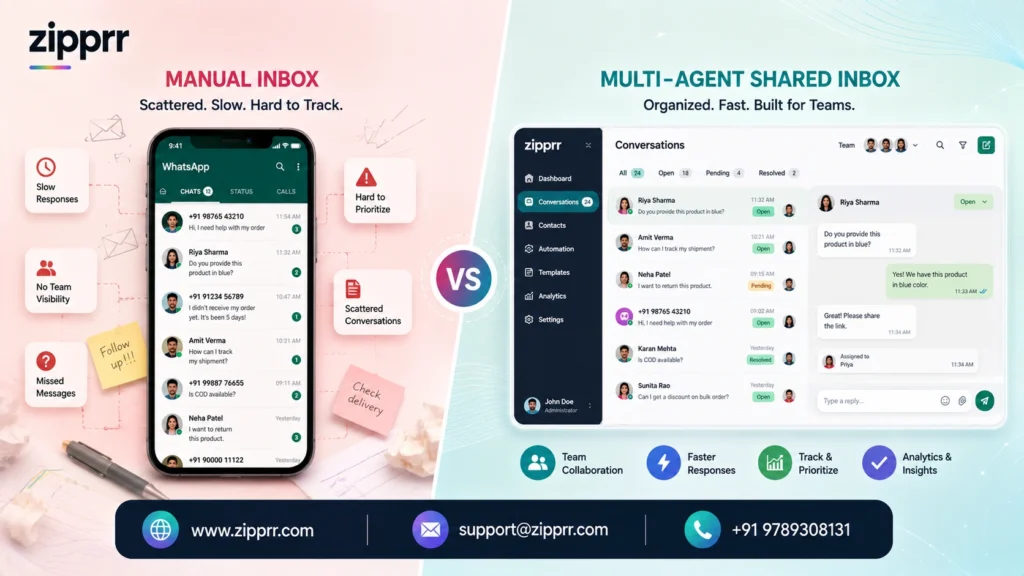
A useful way to think about the category: it’s not one tool but three layered together under a single dashboard — a messaging gateway (the API connection itself), a chatbot/workflow engine (the logic that decides what happens next), and a team inbox (where humans work the conversations automation escalates). Different vendors emphasize different layers. Marketing-focused tools lean hard into broadcast and segmentation. Support-focused tools lean into the shared inbox and ticketing. Developer-focused tools expose the rawest API access and expect the buyer to build the logic themselves. Enterprise platforms, including Zipprr’s WhatsApp Automation Software, try to cover all three well enough that a business doesn’t have to stitch several vendors together.
How WhatsApp Automation Software Actually Works
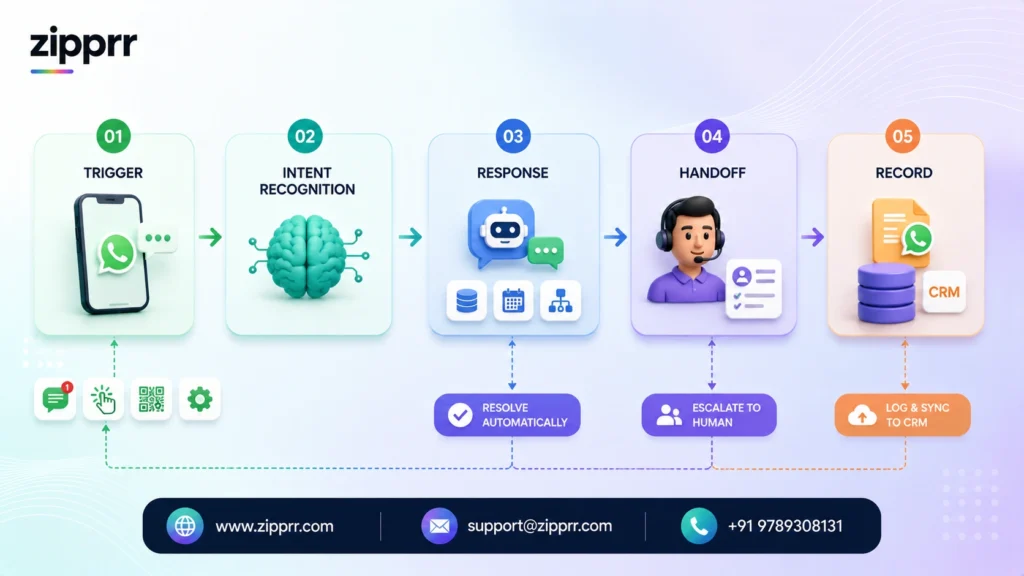
Strip away the marketing language and the mechanics are fairly linear. A message arrives at the WhatsApp Business Platform’s servers, gets routed through a webhook to the automation software, and the software decides what happens next based on rules, AI classification, or both. Here’s the sequence in more detail:
Step one — the trigger
A customer sends a message, clicks a “click-to-WhatsApp” ad, scans a QR code, or a business-side event fires (an order ships, an appointment is 24 hours out, a cart sits abandoned for two hours). Each of these can start an automated flow.
Step two — intent recognition
For inbound customer messages, the platform decides what the customer actually wants. Simple platforms use keyword matching (“if message contains ‘order’ or ‘track’, run the order-status flow”). More advanced platforms run the message through a natural language model that classifies intent even when the customer’s phrasing doesn’t match a keyword — “where’s my stuff” gets treated the same as “track my order.”
Step three — the response
Depending on intent, the software either replies directly (pulling live data from a connected system, like an order-tracking database or a booking calendar), routes the conversation into a multi-step flow (a booking wizard, a lead-qualification questionnaire), or escalates immediately to a human if the intent is ambiguous, emotionally charged, or explicitly requested (“talk to a person”).
Step four — the handoff
When a human does need to step in, the good platforms hand over full context: the conversation history, any data the bot already collected, and a summary of what triggered the escalation. A support agent picking up a handed-off chat should never have to ask “what’s this about?” — that defeats the purpose.
Step five — the record
Every message, whether bot- or human-sent, logs into the platform and typically syncs to a connected CRM, so the conversation history persists even if the customer messages again three weeks later through a completely different channel.
Underneath all five steps sits one constraint that shapes everything: WhatsApp’s messaging window rules. Once a customer messages a business, that business gets a 24-hour window in which it can send free-form replies, including utility-category templates, without incurring per-message charges. Outside that window, or when a business wants to initiate contact first (a reminder, a promotion, a re-engagement nudge), it must use a pre-approved message template, and in most cases that message is billed. This single rule is why “reactive support” flows and “proactive outreach” flows are architected so differently inside any competent automation platform.
Core Concepts You Need to Understand First
A handful of terms get thrown around loosely in vendor marketing. Getting these right up front saves a lot of confusion later.
WhatsApp Business Platform (formerly WhatsApp Business API). The official, Meta-operated infrastructure for programmatic business messaging. This is distinct from the free WhatsApp Business App, which is a manual, single-device tool meant for very small operations — one phone, one person, no automation at real scale.
Business Solution Provider (BSP)
A company Meta has officially vetted and approved to provide access to the WhatsApp Business Platform on behalf of other businesses. Every legitimate automation platform is either a BSP itself or partners with one; there’s no way around this requirement for the official channel.
Message templates
Pre-written message formats that must be submitted to Meta for approval before they can be used to initiate a conversation outside the 24-hour window. Templates fall into three billing categories: marketing, utility, and authentication.
The 24-hour customer service window
The free-form messaging period that opens whenever a customer sends a message to a business. Inside this window, a business can reply with any content, including many template types, generally without incurring the marketing or utility template charge tied to business-initiated sends.
Opt-in
WhatsApp requires businesses to obtain explicit customer consent before sending business-initiated messages. This isn’t optional or a formality — accounts that message people without consent get flagged, quality-rated down, and eventually restricted.
Quality rating and messaging limits
Meta assigns every WhatsApp Business account a quality rating based on block rates, opt-outs, and complaint volume, and ties that rating to a messaging tier that caps how many unique customers a business can message in a rolling 24-hour period. This is a mechanic competitor content rarely explains clearly, and it matters enormously for any business planning a broadcast-heavy strategy.
Green tick verification
The official business verification badge, granted selectively by Meta based on business authenticity and, for some categories, prominence — not something a software vendor can simply switch on.
Feature Breakdown: What a Serious Platform Includes
| Feature Category | What It Does | Why It Matters |
|---|---|---|
| Chatbot builder (rule-based) | Decision-tree flows triggered by button taps or keywords | Handles predictable, high-volume questions with zero ambiguity |
| Conversational AI / NLP layer | Understands free-text messages and classifies intent | Catches the long tail of phrasing that rule-based bots miss |
| Shared team inbox | One dashboard where multiple agents see and claim conversations | Prevents duplicate replies and dropped conversations |
| Broadcast and segmentation | Sends approved templates to filtered customer segments | Turns WhatsApp into a marketing channel, not just support |
| CRM and helpdesk integration | Syncs contacts, deal stages, and ticket status bidirectionally | Keeps WhatsApp data connected to the rest of the business |
| Template management | Submits, tracks approval status, and organizes message templates | Removes the manual grind of Meta's approval process |
| Multi-agent routing | Assigns incoming chats by team, skill, or availability | Matches the right person to the right conversation |
| Analytics and reporting | Tracks delivery, read, response, and resolution metrics | Shows what's actually working, not just what shipped |
| Workflow automation / triggers | Fires messages based on business events (order status, cart abandonment) | Connects WhatsApp to operational systems, not just conversations |
| Multi-number and multi-brand support | Manages several WhatsApp numbers from one account | Needed for franchises, agencies, and multi-location businesses |
| Compliance and consent management | Tracks opt-in status and manages opt-outs automatically | Protects the account's quality rating and legal standing |
| API and webhook access | Lets developers build custom logic beyond the built-in tools | Needed for businesses with unusual or highly specific workflows |
Not every business needs all twelve. A solo consultant booking appointments needs a fraction of what an enterprise retailer running abandoned-cart recovery across five markets needs. The buyer’s guide later in this article walks through matching features to business size.
Benefits of WhatsApp Automation Software
Faster first response, consistently. Automated replies fire in seconds regardless of time zone, staffing levels, or how busy the team is at that moment. For the routine questions that make up most inbound volume, that’s the difference between a customer who stays and one who goes looking elsewhere.
Support capacity that doesn’t scale with headcount. Once a flow is built, it handles the thousandth conversation as easily as the first. That decouples support quality from support staffing in a way that manual messaging never can.
A genuine two-way marketing channel. Email marketing fights spam filters and low open rates. WhatsApp marketing, done with proper opt-in and segmentation, reaches people where they already spend attention, and it supports rich media — images, PDFs, product catalogs, interactive buttons — that most SMS platforms can’t match.
Data that actually connects. Every automated conversation is structured data: what was asked, what was answered, what the customer bought or didn’t. Piped into a CRM, that turns a messaging channel into a source of customer intelligence instead of a black box of unsearchable chat history.
Consistency across agents. A well-built bot never has an off day, never forgets to mention the return policy, and never gives two customers different answers to the same question. Human agents, augmented by the same knowledge base the bot uses, tend to follow suit.
Compliance built into the workflow. Good platforms track opt-in and opt-out status automatically, which matters both for WhatsApp’s own account-health rules and for regional data-privacy regulations businesses are separately obligated to follow.
Business Use Cases by Industry
E-commerce and retail
Order confirmations, shipping updates, abandoned-cart recovery, back-in-stock alerts, and post-purchase review requests — all templated, all triggered automatically by events in the store’s backend. A shopper who gets a WhatsApp nudge about an item still sitting in their cart converts at meaningfully higher rates than one relying on an email they may never open.
Healthcare and clinics
Appointment reminders, pre-visit intake forms, prescription refill requests, and post-visit follow-up, all of which reduce no-show rates without adding front-desk headcount. Any healthcare deployment needs to be scoped carefully around what patient information can be discussed over the channel and how consent and data handling are documented — this is an area where “move fast” is the wrong instinct.
Real estate
Instant response to property inquiries from listing portals, automated qualification questions (budget, timeline, financing status), and scheduled viewing confirmations. Agents report that lead response speed is one of the strongest predictors of whether an inquiry turns into a closed deal, and WhatsApp automation directly compresses that response time to seconds.
Hospitality and restaurants
Booking confirmations, pre-arrival information, in-stay concierge requests, and post-stay feedback collection, replacing a front desk that otherwise juggles phone calls, walk-ins, and messages simultaneously.
Logistics and delivery
Automated shipment status replies pulled directly from a tracking system, proactive delay notifications, and delivery-window confirmations — the exact pattern that turns “where is my order” from the single biggest driver of support volume into a fully self-service interaction.
Legal and professional services
Client intake scheduling, document-status updates, and appointment confirmations. Firms exploring this alongside broader legal technology investments — including AI lawyer software for the document and research side of the practice — often find WhatsApp automation is the simplest, fastest win to implement first, since client communication has none of the accuracy stakes that legal drafting does.
B2B and lead generation
Instant qualification of inbound leads from ads or a website form, automated routing to the right sales rep, and follow-up sequences for prospects who’ve gone quiet, covered in more depth in Zipprr’s guide to WhatsApp automation for lead generation.
A Tale of Two Clinics
Two dermatology clinics, similar size, similar patient volume, opened within eighteen months of each other in the same metro area. Clinic A hired a second front-desk coordinator when call and message volume outgrew the first. Clinic B implemented WhatsApp automation for appointment reminders, intake forms, and rescheduling requests, keeping the same one-person front desk.
Eighteen months later, Clinic A’s no-show rate sat roughly where it started — a live phone call reminder, even a well-executed one, still depends on someone answering and remembering. Clinic B’s no-show rate dropped meaningfully after automated, two-way WhatsApp reminders went live, because patients could confirm or reschedule with a single tap instead of playing phone tag. Clinic A’s front-desk payroll had grown by a full salary. Clinic B’s had grown by the cost of a software subscription, a fraction of that salary.
Neither clinic did anything unusual. The difference was entirely in which lever they pulled to handle growth: headcount, which scales linearly with cost, or automation, which mostly doesn’t.
Want a ready-made platform like this?
Skip months of development. Uber Clone, Airbnb Clone, Uber Eats Clone, TaskRabbit Clone and Gojek Clone ship with 100% source code. Book a free demo or chat with us on WhatsApp.
Implementation Guide
Step 1: Register on the WhatsApp Business Platform. This requires a verified Meta Business Manager account and a phone number not currently active on regular WhatsApp or WhatsApp Business App. Most automation vendors handle this registration process on the customer’s behalf as part of onboarding.
Step 2: Choose and configure a Business Solution Provider or platform. This is the vendor decision covered throughout this guide — weigh chatbot sophistication, CRM integrations, pricing model, and support quality against your specific use case.
Step 3: Map your top conversation types. Before building a single flow, list the ten to fifteen questions or requests that make up the bulk of your WhatsApp volume today. This is the single highest-leverage step in the entire process — automation built around guesses instead of real conversation data almost always needs a costly rebuild within a few months.
Step 4: Build and test core flows. Start with the highest-volume, lowest-ambiguity flows first (order status, hours, booking) before attempting anything conversationally complex. Test with real team members playing the customer role before any customer sees it.
Step 5: Submit message templates for approval. Templates go through Meta’s review process, which typically takes anywhere from minutes to a couple of days. Vague or overly promotional wording is the most common cause of rejection.
Step 6: Connect your CRM, helpdesk, or order system. This is what turns the bot from a static FAQ machine into something that can answer “where is order #4471” with a real, live answer.
Step 7: Set escalation rules. Decide explicitly what triggers a handoff to a human — sentiment, specific keywords, a direct request, or simply “the bot doesn’t have high confidence in its classification.” Ambiguity here is where automation earns its bad reputation; a bot that confidently gives a wrong answer is worse than one that says “let me get a person.”
Step 8: Launch to a subset, then scale. Route a portion of traffic through the new flows first, watch resolution and escalation rates closely, then expand once the numbers hold up.
Step 9: Review and iterate monthly. Conversation patterns shift as a business changes. A flow that covered 90% of intents at launch can quietly drop to 70% coverage six months later if nobody’s watching.
Pricing Considerations and ROI
WhatsApp automation pricing has three separate cost layers, and vendors that quote “one number” are usually only quoting one of them:
Meta’s messaging costs. Per Meta’s own current model, conversations a customer initiates are largely free within the 24-hour service window for utility-category replies; conversations a business initiates, or marketing-category templates sent at any time, are billed per message at rates that vary by country and category. This is the layer that’s genuinely usage-driven — the more proactive marketing a business sends, the more this line item grows, and it applies no matter which software platform sits on top of it.
The BSP or platform fee. This is the software subscription itself, typically tiered by number of contacts, agents, or monthly conversation volume. It can range from a low monthly rate for a small business running basic flows to a substantial enterprise contract for a company running AI-driven flows across multiple markets and brands. Most vendors in this category bill monthly or annually for as long as the business uses the software.
Implementation and ongoing management. Often underestimated. Building good flows, writing templates that pass approval on the first try, and maintaining the bot as the business evolves takes real time, whether that’s an in-house team member’s hours or an agency retainer.
Zipprr's Pricing Model: A One-Time Alternative to Recurring Subscriptions
Most of the platform layer described above is priced as an ongoing subscription, which is worth flagging clearly because it’s the layer where costs compound over years of use. Zipprr’s WhatsApp Automation Software takes a different approach on that specific layer: it’s sold as a one-time purchase for $490, with the complete open-source code handed over so the business owns and can modify its own copy of the software rather than renting access to it.
That purchase includes 90 days of free support to get the platform live and tuned to real usage, and — because there’s no subscription behind it — there are no recurring monthly fees ever, so a business budgets for it once and isn’t tracking a growing software bill years down the line. Meta’s own per-message costs described above still apply regardless of vendor, since that layer is billed directly by Meta; what a one-time-purchase model like this removes is the platform subscription layer stacking on top of it indefinitely.
ROI Framework
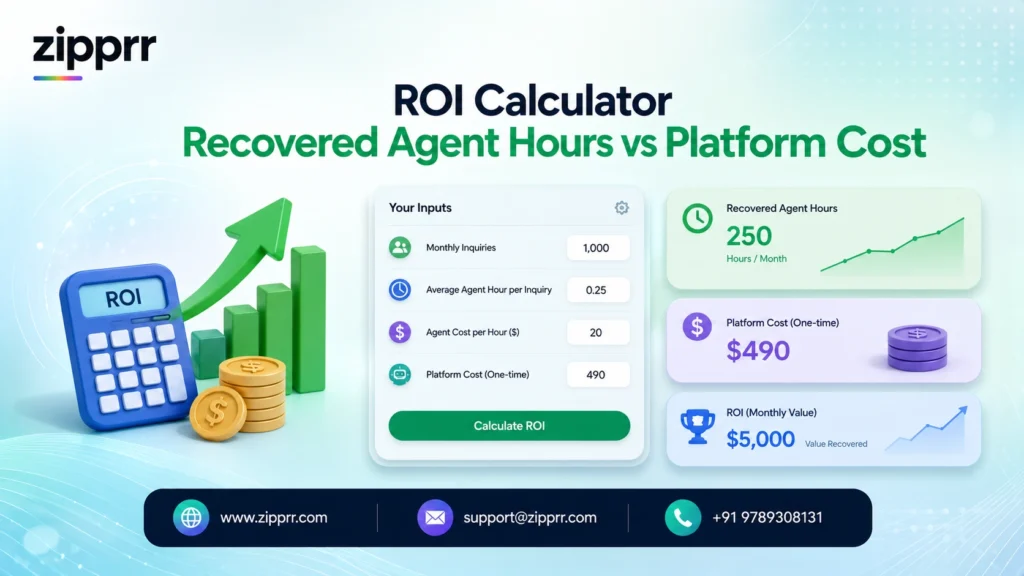
A simple way to model return: take the number of routine, repetitive conversations automation can fully resolve without a human, multiply by the average handling time a person would have spent on each, and compare that recovered time against the platform’s cost. Layer on the harder-to-quantify but often larger gains — faster response times converting more leads, fewer abandoned carts, lower no-show rates — and the payback period for a mid-volume business frequently lands inside the first two to four months. Where the platform itself is a one-time cost rather than a recurring one, that payback math only has to happen once; every month after that is pure recovered time with no matching subscription line item to offset it.
| Cost Category | Typical Range | What Drives It Up |
|---|---|---|
| Platform/BSP subscription (typical market) | Low monthly fee to several thousand per month, ongoing | Contact volume, agent seats, AI features, multi-number support |
| Zipprr platform (one-time alternative) | $490 one-time, plus 90 days free support, no monthly fee | N/A — fixed regardless of contact volume or team size |
| Meta messaging fees | Fractions of a cent to a few cents per message | Marketing-category sends, business-initiated volume, country |
| Template setup and approval | Usually included with the platform | Custom, highly specialized templates needing repeated resubmission |
| Implementation/onboarding | One-time, varies widely by complexity | Number of integrations, number of flows, degree of customization |
| Ongoing optimization | Part-time to full-time role, or agency retainer | Business complexity, rate of change in offerings/policies |
Comparison Tables
Automation Approach Comparison
| Approach | Best For | Weakness |
|---|---|---|
| Manual (personal phone/app) | Solo founders, very low volume | Doesn't scale, no analytics, high risk of dropped messages |
| Rule-based chatbot only | Predictable, narrow use cases (FAQs, hours) | Breaks on unexpected phrasing, feels rigid to customers |
| AI-powered conversational bot | Businesses with varied, high-volume inbound | Requires more setup and ongoing tuning |
| Full platform (bot + inbox + CRM sync) | Growing and enterprise businesses | Higher cost, more implementation effort upfront |
Vendor Category Decision Matrix
| Vendor Type | Strength | Consideration |
|---|---|---|
| Marketing-first platforms | Broadcast, segmentation, campaign analytics | May lack deep support-ticketing features |
| Support-first platforms | Shared inbox, ticketing, agent routing | May lack sophisticated marketing/broadcast tools |
| Developer/API-first platforms | Maximum flexibility and customization | Requires in-house engineering resources |
| Subscription full-stack platforms | Covers marketing, support, and automation together | Costs recur indefinitely; evaluate pricing transparency |
| One-time-purchase platforms (e.g. Zipprr) | Fixed cost, full source code ownership, no recurring fee | Fewer built-in vendor-managed updates than a hosted SaaS subscription |
Zipprr WhatsApp Automation Software: Best Features at a Glance
The feature list in the earlier breakdown table applies broadly across the category. Where Zipprr specifically differentiates is in how those same features are packaged and owned:
| Feature | How It Works in Zipprr | Why It Stands Out Against Typical Subscription Platforms |
|---|---|---|
| Full source code ownership | Complete, open-source codebase delivered with the one-time purchase | Most subscription platforms keep the codebase closed and hosted on their infrastructure; here the business holds the code itself |
| One-time licensing model | Single $490 payment covers the software outright | Removes the compounding, multi-year subscription cost that typical BSP-based platforms carry |
| No recurring platform fees | Zero monthly or annual software charges after purchase | Meta's own per-message costs still apply, but the platform layer itself never adds a second recurring bill on top |
| 90 days of free support | Hands-on setup, configuration, and troubleshooting help included at no extra cost | Gives a business enough runway to get flows built, tested, and stable before support becomes optional |
| No-code chatbot and flow builder | Drag-and-drop builder for rule-based and AI-assisted conversation flows | Matches the ease of use of subscription competitors without requiring an ongoing plan to keep using it |
| Shared multi-agent team inbox | Centralized dashboard for routing, claiming, and tracking conversations | Comparable to dedicated support-first platforms, bundled in rather than sold as an add-on tier |
| Broadcast and segmentation tools | Template-based campaign sending with contact segmentation | Covers the marketing-platform use case in the same package as support and automation |
| CRM and system integrations | Connects to order, booking, and helpdesk systems via API | Keeps WhatsApp data synced with the rest of the business, the same as enterprise-tier subscription tools |
| Customization freedom | Because the code is owned outright, flows and integrations can be modified without vendor approval or a higher-tier plan | Subscription platforms typically gate deeper customization behind enterprise pricing tiers |
For a business trying to decide between a typical monthly subscription and a one-time-purchase platform, the practical question is less “which has more features” — most established platforms, Zipprr included, cover the same core ground — and more “who do you want holding the code and the long-term cost five years from now.”
Challenges and How to Solve Them
Challenge: The bot misunderstands and frustrates customers. Solve it by scoping the bot narrowly to start — cover the handful of intents you have real data on, and route everything else to a human, rather than trying to handle every possible question on day one.
Challenge: Template messages get rejected by Meta. Solve it by writing templates that read as genuinely useful information rather than disguised promotions, avoiding excessive emojis or all-caps, and keeping variable placeholders clearly tied to their purpose.
Challenge: Messaging limits cap how many customers you can reach. Solve it by protecting your quality rating from day one — never message without consent, make opt-out effortless, and monitor block/report rates, since Meta raises messaging tiers automatically for accounts with strong quality history.
Challenge: The bot and human agents feel disconnected. Solve it with a platform that hands off full conversation context automatically, so a customer never has to repeat themselves after being transferred.
Challenge: Costs creep up unexpectedly. Solve it by modeling all three pricing layers (Meta fees, platform fees, and implementation) before launch, and by setting internal alerts on marketing-template send volume specifically, since that’s the layer most likely to scale faster than expected. Choosing a one-time-purchase platform for the subscription layer, as described above, removes one of those three variables entirely.
Common Mistakes to Avoid
Skipping the conversation-mapping step and building flows around assumptions instead of real data is the single most common failure point, and it’s almost always why a bot underperforms in its first quarter. A close second is treating WhatsApp automation as “set and forget” — flows need the same ongoing attention as any other customer-facing system, not a one-time build. Businesses also frequently underinvest in the human-handoff experience, building an impressive bot and a mediocre escalation path, which means the moments that matter most (an upset customer, a complex request) get the worst experience instead of the best.
Ignoring opt-in requirements to chase faster list growth is a mistake that shows up weeks later as a damaged quality rating and throttled messaging limits — by which point the account is much harder to repair than it would have been to build correctly from the start. And relying on a single, generic welcome flow for every customer, regardless of how they arrived (an ad click versus an organic message versus a returning customer), wastes the context WhatsApp automation is uniquely positioned to use.
Expert Recommendations
Start narrower than feels ambitious. A bot that flawlessly handles five real, high-volume intents earns more trust — from customers and from your own team — than one that mediocrely attempts fifty. Build your escalation path before you build your flashiest AI feature; the failure mode that damages a brand fastest isn’t a bot that can’t do something impressive, it’s a bot that traps a frustrated customer in a loop with no way out.
Treat message templates as a design discipline, not paperwork — a clear, specific, genuinely useful template both passes Meta’s review faster and performs better with customers. Weigh the total multi-year cost of a subscription platform against a one-time-purchase alternative with source code ownership before committing, since that decision compounds every year the software stays in use. Finally, put a real person’s name on the ongoing ownership of the WhatsApp channel; automation that nobody explicitly owns tends to quietly decay as the business evolves around it.
Buyer's Guide and Decision Matrix
Match the buying decision to actual business scale rather than aspirational scale:
Solo founders and very small teams typically need straightforward rule-based flows, a simple shared inbox, and transparent, low-commitment pricing. Complex AI and elaborate segmentation are usually premature here.
Growing SMBs with rising message volume should prioritize CRM integration, solid analytics, and a genuinely capable AI/NLP layer, since this is the stage where conversation variety starts outpacing what simple keyword rules can handle.
Multi-location or franchise businesses need multi-number management, centralized reporting across locations, and role-based access control so each location’s team only sees its own conversations.
Enterprises and regulated industries (healthcare, financial services, legal) need strong compliance tooling, audit trails, granular permissions, and a vendor with clear documentation on data handling — pricing sophistication matters less here than governance and reliability.
Businesses wary of long-term subscription costs, at any of the sizes above, should weigh a one-time-purchase, source-code-owned platform like Zipprr’s WhatsApp Automation Software against the recurring-fee alternatives, since it removes the platform-subscription line item from the cost equation entirely while still covering the chatbot, inbox, and integration needs described throughout this guide.
Pre-Launch Checklist
Before going live, confirm: your Meta Business Manager account is verified and your sending number is properly registered; your top ten to fifteen conversation intents are mapped from real historical data, not guesses; your message templates are drafted, submitted, and approved; your escalation rules are defined and tested by a real team member acting as the customer; your CRM or order system integration is connected and returning accurate live data; your opt-in and consent-collection process is documented and compliant with both WhatsApp policy and applicable regional privacy law; your team knows how to monitor the shared inbox and take over an escalated conversation; and you’ve set a specific date, no more than thirty days out, to review real performance data and adjust.
If you're ready to move your WhatsApp channel off a personal phone and onto infrastructure that scales with your business
explore Zipprr’s WhatsApp Automation Software — available as a one-time purchase of $490 with full open-source code, 90 days of free support, and no monthly fees for life — to see how the chatbot builder, shared inbox, and CRM integrations described in this guide come together in practice. Or read Zipprr’s related guide on WhatsApp broadcast messaging software if campaigns and marketing sends are your immediate priority.
Frequently Asked Questions
What is WhatsApp automation software?
Is WhatsApp automation software the same as the WhatsApp Business App?
How much does WhatsApp automation software cost?
Is WhatsApp automation safe and compliant?
Can WhatsApp automation replace human customer support entirely?
Do I need coding skills to set up WhatsApp automation?
What is the WhatsApp Business API, and do I still need it separately?
How long does it take to get verified on WhatsApp Business Platform?
What happens if a message template gets rejected?
Can WhatsApp automation integrate with my existing CRM?
What's the difference between a rule-based chatbot and an AI chatbot on WhatsApp?
How many customers can I message on WhatsApp at once?
Is WhatsApp marketing automation effective compared to email?
What industries benefit most from WhatsApp automation?
How do I choose between different WhatsApp automation vendors?
Conclusion
The businesses getting real value out of WhatsApp in 2026 aren’t the ones with the flashiest chatbot demo. They’re the ones that took the time to understand which conversations are genuinely repetitive, built automation that handles those completely and honestly, and kept a clear, well-staffed path for everything else to reach a real person fast. That’s a more modest ambition than “AI that replaces support,” and it’s exactly why it works.
If you’re still running WhatsApp off a personal phone, the honeymoon stage described earlier in this guide has an expiration date, and it’s usually sooner than businesses expect. The good news is that the path off that phone and onto a real platform doesn’t require betting the business on an all-or-nothing overhaul, or committing to a subscription that grows every year — it starts with mapping your ten highest-volume conversations and automating those first.



