

A Practo clone demo should prove five things before you pay: patients book quickly, doctors control their own schedules, payments settle cleanly, reminders arrive on time, and the admin panel runs the whole marketplace. When all five pass, you hold a doctor appointment platform that is ready for a Saudi Arabia launch. When one falls short, you leave the demo with a precise fix list.
This guide gives you that checklist. Each test comes with a pass criterion you can score live while the demo runs. If you want to see the platform itself first, the Zipprr Practo clone page shows the patient, doctor and admin panels side by side.
The article is written for entrepreneurs who plan to launch a doctor appointment app, a clinic marketplace or a multi-specialty booking portal in the Kingdom. You do not need a technical background. You only need a laptop, a phone and about 45 minutes with the vendor.
Why Does a Saudi Arabia Launch Reward a Careful Demo?
Patients in the Kingdom already have a clear reference point for digital booking. The Ministry of Health describes a “Booking Medical Appointment” service that lets people book doctors, lab tests and imaging through an app, with flexible management of those appointments. That sets a friendly bar for what a private platform should feel like.
Your platform will not need to copy a government service. It will need to be fast, clear and dependable on the same everyday tasks. A careful demo shows you whether your future patients will find that experience on day one.
Here are the Saudi specifics worth testing in any demo:
- Arabic content next to English content on the same screens.
- Right-to-left layout on patient pages, forms and confirmation messages.
- Prayer-time-friendly and weekend-friendly doctor schedules.
- Local payment methods your patients actually use.
- Mobile-first behavior, since patients often book from a phone.
The Zipprr product page lists multi-language support and a customization checklist that includes languages for your market. Because language and layout choices differ from build to build, ask the team to show your exact Arabic and English setup during the demo. That keeps your decision based on what you see, not on a feature list.
What Is the Zipprr Demo Scorecard for a Doctor Appointment Platform?
The Zipprr Demo Scorecard is a simple framework for judging any doctor appointment platform in one sitting. It splits the demo into five tests, gives each test a weight, and asks you to score the pass criteria from 0 to 10. You finish with a total out of 100.
The weights below are a sample starting point. Adjust them to your business model. A pure telehealth startup might raise the reminders weight, while a multi-clinic marketplace might raise the admin weight.
| Test area | What to run in the demo | Pass criteria | Sample weight |
|---|---|---|---|
| 1. Patient booking | Search, pick a doctor, book a slot on a phone | Booking completes in about two minutes with clear confirmation | 25 |
| 2. Doctor schedule | Set hours, block a day, accept and reschedule | Changes appear to patients immediately, with no double booking | 20 |
| 3. Payments | Pay online, view the record, check the admin view | Every payment shows in the booking and in the admin panel | 20 |
| 4. Reminders | Book a slot and check which notices are sent | Patient and doctor both receive timely confirmation notices | 15 |
| 5. Admin control | Approve a doctor, edit content, review reports | One person can manage listings, bookings and payments | 20 |
Score each area as you go. At the end, multiply each score by its weight, divide by 10, and add the results. A total of 80 or more signals a platform ready to buy. A total from 65 to 79 signals a strong base with a fix list. A total below 65 signals that a second demo will help.
How Should You Prepare Before the Demo Starts?
Preparation takes ten minutes and doubles the value of the session. First, write down your launch model in one sentence. For example: “A multi-specialty clinic marketplace in Riyadh with online payment and video consultation.”
Next, prepare three test personas. These keep your testing realistic and fast.
- The patient: a new user who books a general physician for tomorrow morning.
- The doctor: a specialist who works split shifts and takes one day off a week.
- The admin: you, approving doctors and watching bookings and payments.
Then open the demo on two devices. Use a laptop for the doctor and admin views, and a phone for the patient view. Switching devices mirrors how your real users will behave.
Finally, set your scorecard in a spreadsheet or a notebook. Keep the five areas as rows and leave a notes column for anything you want to ask afterward.
Test 1: Can a Patient Book an Appointment Quickly?
Patient booking carries the highest weight because it creates your revenue. Every extra tap costs you a booking. Run this test first, and run it on a phone.
What to do in the demo
- Open the patient side as a new visitor and search for a doctor by specialty.
- Open a doctor profile and check that photo, specialty, experience, fees and available slots are easy to find.
- Pick a slot, confirm the booking and note how many steps it takes.
- Look for a clear confirmation screen that shows the doctor, date, time and fee.
- Return to the patient account and find the booking in an appointments list.
Pass criteria
- A new patient reaches a confirmed booking in about two minutes.
- Search results are easy to scan on a small screen.
- Slot times shown to the patient match the times the doctor set.
- The appointments list shows upcoming bookings in a simple, readable order.
The Zipprr patient panel is built around the same flow: search doctors, clinics, labs and pharmacies, view profiles and specialties, book a slot, pay online, and access records. Use your stopwatch and see how it feels for yourself.
For a deeper look at what makes a consultation platform work for users, the Zipprr guide on the pillars of an effective online doctor consultation platform covers user experience, security, payments and support in plain language.
Sample scoring note
In a sample demo, a patient booking took 7 taps and about 2 minutes 20 seconds. That earns an 8 out of 10, with a note to shorten the confirmation step. Treat that figure as an illustration of how to score, not a measured result.
Test 2: Does the Doctor Schedule Stay Accurate?
A booking platform earns trust when the calendar is right. Doctors need control, and patients need accurate slots. Test both sides together.
What to do in the demo
- Log in as a doctor and set weekly availability with a morning shift and an evening shift.
- Block one full day for leave and check that patients can no longer pick it.
- Book a slot from the patient phone, then accept it from the doctor view.
- Try to book the same slot from a second patient account.
- Reschedule or cancel one appointment and watch what both sides see.
Pass criteria
- Availability changes appear on the patient side within seconds.
- A booked slot is not offered to another patient.
- The doctor sees appointment history and upcoming visits in one place.
- Rescheduling updates both the doctor and the patient views.
Saudi clinics often run split shifts and adjust hours around prayer times. Ask the demo team to set a split-shift day and a short midday break, then confirm that the patient calendar respects both. A schedule that handles your real working day is a schedule your doctors will keep using.
Also look at the doctor’s other daily tools. The Zipprr doctor panel includes schedules, appointment management, prescriptions, patient appointment history and profile updates. Click through each one and confirm that a busy doctor can find them quickly.
Test 3: Do Payments Flow From Patient to Admin?
Payments decide whether your marketplace earns. This test confirms that money, bookings and records tell the same story everywhere. It also shows you how your commission model could work.
What to do in the demo
- Pay for a booking from the patient phone using a test payment.
- Open the booking afterward and check that it shows paid status.
- Switch to the admin panel and find the same payment.
- Ask which payment gateways can be set up and where the admin enters them.
- Ask which gateways suit your Saudi patients and which your team can add.
Pass criteria
- The payment appears in the patient booking, the doctor view and the admin panel.
- The admin panel has a clear place to set up payment gateways.
- Fees, taxes and totals are easy to read.
- You understand how your own revenue model, such as a booking fee or a subscription, would fit.
The Zipprr platform supports multiple payment gateways, and the admin panel is where you set them up. Because you own the source code, your developers can also connect a gateway that your market prefers. Bring a short list of the payment methods your patients use, and ask to see that list reflected in the plan.
A neat way to judge this test is to follow one riyal through the system. Start at the patient screen, then find it in the booking, then in the admin payment list. If the trail is clear at every stop, the score is high.
Ready to Run This Checklist on a Live Platform?
You can put the scorecard to work right away. Send your launch model and your top three questions to [email protected] and the team will prepare the demo around them. Prefer a live session? Book a free demo and run all five tests yourself. Quick questions are welcome on WhatsApp as well.
Test 4: Do Reminders and Notifications Reach Everyone?
Reminders protect your doctors’ time and your revenue. A patient who forgets a visit leaves an empty slot that nobody can use. This test shows you which notices your platform sends and where you can add more.
What to do in the demo
- Book an appointment and watch for a confirmation in the patient account.
- Check the doctor view for a matching new-booking notice.
- Ask the team to list every notice the build sends today.
- Ask which notices can be added, such as a reminder before the visit, and how that is done.
- Ask which channels you can use, such as email, app notices or WhatsApp.
Pass criteria
- Patient and doctor both receive a clear notice when a booking is made.
- You receive a written list of current notices and the channels they use.
- The team can describe how a reminder before the visit would be added.
- Message wording can be edited, including in Arabic.
The Zipprr product page does not list a specific reminder feature, so this is a perfect question to put to the team directly. Since the source code is yours, a reminder flow is an extension your developers can build on top of the booking records. Ask for a rough effort estimate and write it in your notes column.
WhatsApp deserves a special mention for the Saudi market, because it is a channel patients check all day. Zipprr also offers WhatsApp automation as a separate product area, so you can ask how booking confirmations might connect to it later. Treat that as a growth step after launch, not a launch blocker.
Sample scoring note
In a sample demo, confirmations worked on both sides but the team had no pre-visit reminder to show. That earns a 5 out of 10 today, with a clear path to 9 once the reminder is added. Again, the figures are a sample for practice.
Test 5: Can One Admin Run the Whole Marketplace?
The admin panel is your control room. You will live in it every day, so it deserves a full 20 percent of your attention. This test checks that one person can manage doctors, bookings, payments and content without developer help.
What to do in the demo
- Open the admin panel and add a new doctor, or approve a pending doctor.
- List a clinic, lab or pharmacy and check where it appears for patients.
- Find all bookings for one day and filter by doctor.
- Open the payments view and check totals against the bookings.
- Edit a page, a logo and a color to see how branding changes.
Pass criteria
- Doctor, clinic, lab and pharmacy approvals take a few clicks each.
- Bookings and payments can be found by date, doctor or patient.
- Branding and content can be changed from the admin area.
- You can describe a normal admin day in five simple steps.
The Zipprr admin panel covers approvals for doctors, clinics, labs and pharmacies, booking and payment tracking, patient records and prescriptions, payment gateway setup and brand control. Many of these tasks are the daily work of a marketplace owner. Click each one so you know exactly where it lives.
Finish this test by asking a practical question: “What would my first week of operations look like in this panel?” A confident answer from the team is a strong sign. It also gives you a ready-made onboarding plan for your own staff.
Which Extra Features Are Worth Testing After the Core Five?
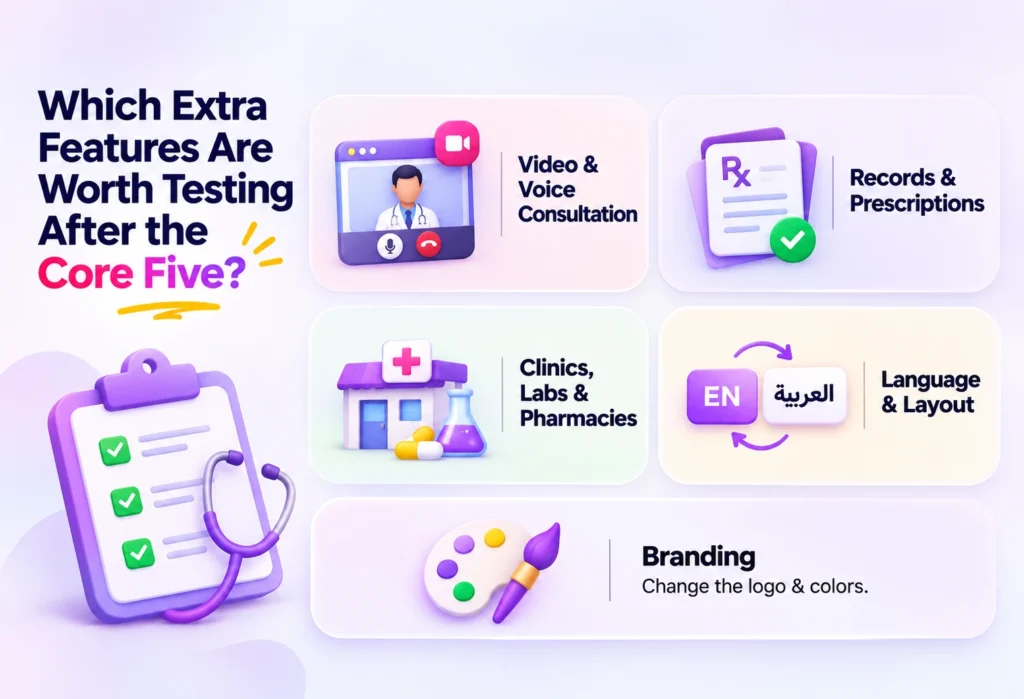
Once the core five pass, spend the last ten minutes on extras. These features differ by business model, so test only the ones that match your launch plan.
- Video and voice consultation: start a test call between a patient and doctor. Check that both sides can join from a phone and that the call button appears at the right moment.
- Records and prescriptions: add a sample prescription as a doctor, then open it as a patient. Check that access is limited to the right people.
- Clinics, labs and pharmacies: add one of each and see how patients find them.
- Language and layout: switch the interface between English and Arabic, and look at the right-to-left behavior on every key screen.
- Branding: change the logo and colors to match your own identity.
Keep healthcare wording factual and simple when you plan your own content. Your platform helps patients book and meet doctors, and the doctors remain responsible for clinical decisions. Share your content plan with your legal adviser in the Kingdom before launch, since local rules for health services and patient data are best confirmed with a qualified professional.
What Do Mobile Apps Change in the Demo?
Many Saudi patients prefer to book from a phone, so mobile apps deserve their own section in your test plan. Zipprr offers two plans, and both are one-time payments.
- Startup, $490: the web platform with source code, a single license, installation, 90 days of support and lifetime updates.
- Pro, $890: everything in Startup plus Android and iOS apps with app store submission, and a two-license setup.
Because mobile apps come with the Pro plan, ask to see the mobile experience whenever you evaluate that plan. Test the same five areas on the app: booking, schedule, payments, notices and, for the doctor, daily use.
Pricing can change, so confirm the current figures on the product page or with the team before you decide. If you later want apps built to your own design, the Zipprr mobile application development team can scope that work with you.
Whichever plan you choose, ask one more question: “Which parts of this demo are in my plan, and which are extensions?” Having that answer in writing keeps your budget clear from the first day.
How Do You Run the Whole Demo in 45 Minutes?
A timed agenda keeps the session focused and makes scoring easy. Share it with the vendor before the call. Most teams appreciate the clarity.
- Minutes 0 to 5: introductions and your one-sentence launch model.
- Minutes 5 to 15: patient booking on a phone (Test 1).
- Minutes 15 to 23: doctor schedule (Test 2).
- Minutes 23 to 30: payments from patient to admin (Test 3).
- Minutes 30 to 35: reminders and notices (Test 4).
- Minutes 35 to 42: admin tasks (Test 5).
- Minutes 42 to 45: extras, open questions and next steps.
Score each test immediately after it ends. Fresh scores are more accurate than scores written at the end of the day. Record screen captures if the vendor allows it, so your team can review the flow later.
How Does a Sample Scorecard Look in Practice?
Here is a sample run, using made-up numbers to show the method. Call the platform in this example “Platform A”. All figures are illustrative.
| Test area | Score | Weight | Weighted result |
|---|---|---|---|
| Patient booking | 9 out of 10 | 25 | 22.5 |
| Doctor schedule | 8 out of 10 | 20 | 16 |
| Payments | 7 out of 10 | 20 | 14 |
| Reminders | 5 out of 10 | 15 | 7.5 |
| Admin control | 8 out of 10 | 20 | 16 |
The sample total is 76 out of 100. That lands in the “strong base with a fix list” band. The fix list would hold two items: add a pre-visit reminder, and confirm the local payment method. Both are extension tasks rather than structural gaps.
Now imagine the vendor gives you a written plan and estimate for those two items. Your decision becomes simple, because you know the exact work between today and launch day. That is the real value of the scorecard: it turns a vague impression into a short, specific to-do list.
What Should You Confirm About Ownership, Support and Refunds?
After the technical tests, spend five minutes on the commercial side. These points shape your total cost of ownership and your peace of mind.
- Source code ownership: Zipprr states that you own 100 percent of the delivered source code, so your developers can change anything.
- Installation: the team installs the platform so you can start setting it up.
- Support: 90 days of free technical support after purchase.
- Updates: lifetime updates are included.
- Refund: a 100 percent refund is available if you ask within 7 days of purchase.
- Demo: a free demo is available before you buy.
Many of the common questions from buyers are also answered on the Zipprr FAQ page, which is handy to read before the demo. Bring any open items from it to your session.
Write the answers into your scorecard sheet. When you compare options later, you will compare real terms, not memories of a call.
Frequently Asked Questions
1. What is a Practo clone?
A Practo clone is a ready-made doctor appointment platform inspired by the well-known healthcare booking model. It lets patients search doctors, book slots, pay online and join consultations, while doctors manage schedules and admins run the marketplace. Zipprr builds its version as an independent product with its own code.
2. How do I build a doctor appointment app like Practo?
Start by defining your model, such as a clinic marketplace or a telehealth service. Next, choose between custom development and a ready-made base. A ready-made platform gets you to a working patient, doctor and admin panel faster, and your developers can then extend it. Test it with a demo scorecard before buying.
3. How much does it cost to build an app like Practo?
A Zipprr Practo clone starts at $490 for the web platform with source code, installation, 90 days of support and lifetime updates. The $890 Pro plan adds Android and iOS apps with app store submission. Both are one-time payments. Confirm current pricing on the product page before you buy.
4. What features should a doctor appointment booking app have?
The essentials are doctor profiles and search, appointment booking, doctor schedule control, online payments and an admin panel. Many platforms add video or voice consultation, records and prescriptions, and listings for clinics, labs and pharmacies. Reminders and Arabic language support are valuable additions for a Saudi launch.
5. Can I launch a doctor appointment app in Saudi Arabia with a Practo clone?
Yes, a Practo clone gives you a working base to customize for the Saudi market. Add your branding, local payment methods and Arabic content with your developers. Because rules for health services differ by activity, confirm licensing and data requirements with a qualified local adviser before launch.
6. Does a Practo clone support Arabic and right-to-left layout?
The Zipprr product page lists multi-language support and a customization checklist for languages. It does not state Arabic or right-to-left layout specifically. Ask the team to show your Arabic and English screens during the demo, so you see the exact result before you decide.
7. Does a Practo clone include video consultation?
Yes. The Zipprr Practo clone lists video and voice consultation among its key features, alongside appointment booking, payments and records. During your demo, start a test call between a patient and a doctor on two devices. Check that both sides join smoothly and that the call button appears at the right time.
8. Can a Practo clone accept online payments?
Yes. The platform supports multiple payment gateways, and the admin panel is where you set them up. Because you own the source code, your developers can connect additional gateways that suit your market. Ask for a test payment in the demo and follow it from the patient screen to the admin view.
9. Is it better to buy a Practo clone or build a doctor appointment app from scratch?
A ready-made platform suits founders who want to validate a market quickly with a proven structure. Custom builds suit teams with unique workflows and a larger budget. Zipprr’s page notes that custom development typically takes 4 to 6 months. A clone lets you start serving patients sooner.
10. What support and refund do I get after buying a Practo clone?
Zipprr includes installation, 90 days of free technical support and lifetime updates. You can also request a 100 percent refund within 7 days of purchase. You own the delivered source code, so your developers can maintain and extend the platform as your business grows.
Ready to Score Your Own Demo?
You now hold a complete checklist: five tests, clear pass criteria, a weighting method and a 45-minute agenda. Use it with any platform you evaluate, and use it first with Zipprr.
Email your launch model to [email protected] to receive a demo built around your Saudi Arabia plan. You can also schedule a free demo and start scoring right away. For a fast answer, message the team on WhatsApp at +91 97893 08131.
Ready to score your own demo?
Book a free demo and run all five tests yourself, or email your launch model to [email protected].