

Before you read: this piece explains the thinking behind the ParentPlus source code. It reports no traffic, revenue, compliance status or measured outcome. Planning inputs are flagged as Assumption or Scenario.
Executive Summary
The central idea behind ParentPlus is simple: every piece of family data sits behind one of three doors. The private door opens only for the parent who owns the record. The shared door opens after a second adult says yes. The public window shows a deliberately small, revocable view to relatives and friends. Almost every technical decision in this case study exists to keep those three doors from blurring into each other.
The build uses React and TypeScript for one client, Capacitor to ship it to iOS and Android, and Supabase for the database, accounts, file storage, policies and serverless functions. A product that also wants a conversational layer can compare this approach with ready-made AI chat software before committing to a custom assistant.
The Business Problem
Scenario: it is 9:40 on a Tuesday night. One parent is trying to remember when the toddler last woke up, which fruit caused a rash, and whether the other parent already booked the Thursday pickup. The answers are spread across a notes app, a photo roll and a messaging thread.
That scattered picture creates five distinct gaps:
- No single place holds a child’s routines, food notes and memories.
- Generic advice ignores who the child actually is.
- Separated parents lack a neutral tool with clear rules on viewing, copying and deleting.
- Families hesitate to upload children’s photos to an app that cannot explain where they go.
- AI replies and video storage have recurring costs that a free product cannot absorb.
Product Objectives
| Objective | Evidence the design is working |
|---|---|
| Advice that fits the child | Lessons and assistant replies change with the parent's quiz answers and the child's age |
| One family record | A parent can answer the Tuesday-night questions from one screen |
| Consent before sharing | No data crosses from one adult to another without a recorded yes |
| One build for every device | A single feature change reaches web, iOS and Android together |
| An honest assistant | The AI states its limits and sends serious situations to people |
| A funded product | Plans, storage tiers and referrals cover hosting and AI cost |
Users and Journeys
Assumption: the first release serves English-speaking families with children from newborn to early primary age.
- The new parent: signs up, answers a short parenting-style quiz, adds a child and sees a home screen tuned to that child.
- The two-household pair: one parent invites the other, they decide which records to share and they coordinate on a joint calendar.
- The extended family viewer: a grandparent opens a limited album link and sees photos without gaining account access.
- The operator: an admin reviews reports, manages accounts and updates printable resources.
How to read it: everything fans out from the home screen. The only loops back are the two upgrade checks, which means a parent who never hits a limit never sees a sales prompt.
Solution Overview
The feature set falls into five groups, which also suggests a build order.
- Learning: quiz, daily lessons, small challenges, badges and a highlight card on the home screen.
- Tracking: child profiles, sleep history with short explainers, meal plans that can respect allergy notes and a wellbeing check-in for the parent.
- Asking: a chat assistant with voice input, a consent step, saved history and a selectable tone.
- Sharing: milestone albums, relative links, community posts, the co-parent area and gift wishlists.
- Sustaining: subscriptions, storage limits, referrals, segmented notifications and admin screens.
Joining many services under one account and one data layer is also the idea behind a white label super app platform. ParentPlus applies it to home life instead of transport and delivery.
A build sequence that limits rework
Feature map: value, parts and exposure
| Feature | Why it matters | Built from | Biggest exposure |
|---|---|---|---|
| Quiz | Makes the first session personal | Form library, Zod schema, Postgres | Drop-off if too long |
| Child profiles | Foundation for every other record | Postgres, access policies | Sensitive details leaking |
| AI assistant | Reason to return daily | Edge Function, model API, consent record | Confident but wrong replies |
| Milestone media | Emotional value, storage upsell | Storage buckets, signed URLs | Links reaching the wrong person |
| Sleep log | Builds a daily habit | Postgres, Recharts | Read as a medical result |
| Meal planner | Clear paid-plan benefit | Edge Function, allergy notes | Allergy errors |
| Community | Peer support | Posts, reports, moderation queue | Abuse and oversharing |
| Co-parent area | Unusual niche strength | Consent records, policies, calendar | Ownership disputes |
| Subscriptions | Recurring income | RevenueCat, Stripe, webhooks | Plan state drifting |
| Referrals | Low-cost growth | Edge Function, trial rules | Fabricated accounts |
| Admin tools | Daily operations | Role checks, CSV export | Staff access too broad |
Technical Architecture
Each technology choice answers a specific need. A team weighing alternatives would reason along these lines.
- One React client, wrapped by Capacitor: separate native apps would triple the screens to maintain. The trade-off is that camera, push and purchase flows still need hands-on testing on real phones.
- Supabase for the backend: keeping Postgres, accounts, files and policies together makes it possible to attach protection to the data itself, not only to application code.
- Edge Functions for secrets: model keys, payment secrets and webhook checks cannot sit inside a downloadable app.
- React Query plus Zustand: remote data and small interface state have different lifetimes, so each gets its own tool.
- React Hook Form with Zod: a single schema can check input on the screen and again inside a function.
- Tailwind, shadcn/ui and Radix: accessible components and straightforward dark mode.
- Recharts: readable trend lines for sleep and wellbeing.
How to read it: the top is what users touch, the middle is the single codebase, and the managed backend sits below it. External services are only reachable through Edge Functions, except purchase events that RevenueCat reports from the mobile stores.
Every function checks who is calling, validates the payload and applies its own rate limit. Push messages go through OneSignal. Teams that also want opt-in reminders on a chat channel can evaluate WhatsApp automation software for prompts such as bedtime routines, always with explicit permission.
Data Model and Access Control
The data model is organized around a family, not around a single user. An account belongs to a family, a family owns children, and children own records and media.
- Child: birth date, gender, temperament and allergy notes.
- Daily records: sleep entries, meal plans, wellbeing check-ins and badges.
- Media: files in storage, referenced from milestone rows.
- Co-parent link: the relationship plus each consent that was given.
- Social and billing rows: posts, replies, reports, plan status, storage totals, referrals and wishlists.
The three doors in policy terms
| Door | Who gets through | How the policy decides |
|---|---|---|
| Private | Members of the owning family | Checks the membership table, never a family ID sent by the client |
| Shared | A second adult with a recorded approval | Requires an active, unexpired grant limited to the approved scope |
| Public window | Anyone holding a valid token | Returns a reduced view and stops working when the token is revoked or expired |
Assumption: each policy reduces to one question: does this requester belong to the family that owns the row, or hold a live grant for it?
- Closed by default: enable policies on every family table, then open access on purpose.
- Files follow rows: storage gets matching policies and unguessable object names.
- Powerful keys stay in functions: the service-level key never reaches a client.
How to read it: three separate questions, one per door, and a single shared dead end. Because every failed check lands in the same denial, the system never hints at which door was almost opened.
AI Integration and Safety Guardrails
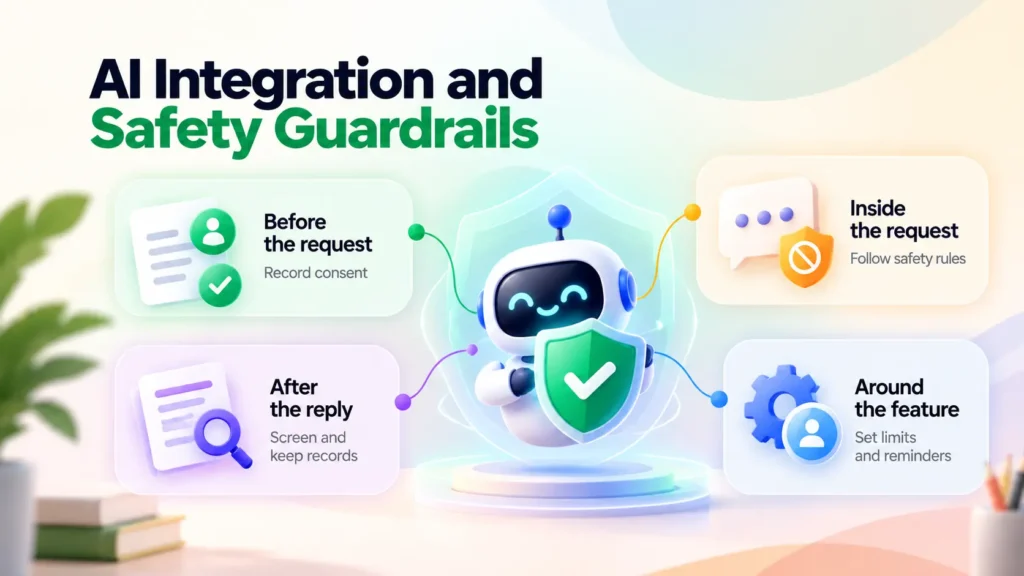
Safety is easier to reason about as four layers placed around the assistant.
- Before the request: the parent must record consent, which explains that answers are machine-written, can be wrong and are processed by an outside provider. Only fields the question needs are sent, so a child’s name and photo normally stay behind.
- Inside the request: the system instructions limit the assistant to general information, forbid diagnosis and require a prompt to contact a qualified person or emergency services when a message mentions injury, severe symptoms, self-harm or abuse.
- After the reply: an output check screens the text before display, and flagged exchanges are kept for a documented, limited period.
- Around the feature: per-user limits control cost, tone settings change style but never safety rules, and meal plans carry a reminder to check labels and consult a professional about allergies.
Businesses planning a branded assistant for their own audience can inspect a finished conversational AI product to see the chat screen, history and admin controls before scoping custom work.
Co-Parent Collaboration and Privacy Design
Two adults may not agree, so the co-parent area follows a four-step protocol: ask, answer, wait, act.
- Ask: a parent creates a request that names the exact scope, such as an export of sleep history.
- Answer: only the other parent can approve, decline or ignore it.
- Wait: risky actions pause for a set period, so a heated moment does not cause a permanent loss.
- Act: the system runs the export or copy and writes a time-stamped record.
A copied child profile follows one rule: it is a photograph, not a window. The new owner gets a snapshot, and the copy never reads live from the original.
How to read it: time runs downward. The two outcomes are mutually exclusive, and in both cases Parent A ends with a recorded result, never with silent access.
Assumption: a legal adviser decides which categories need both parents to agree and reviews the rules in each launch country. The interface should never suggest that it settles custody matters.
Subscription, Storage and Monetization
| Money flow | Mechanism | Design care needed |
|---|---|---|
| Phone plans | RevenueCat reports store purchases | Late or repeated events |
| Browser plans | An Edge Function opens Stripe checkout and checks callbacks | Signature verification |
| Storage tiers | Counters track every uploaded file | Subtracting deleted files |
| Referral rewards | A function extends trials after a valid sign-up | Self-referral and fake accounts |
| Gift links | Suggestions point to partner stores | Clear affiliate disclosure |
- One entitlement table: only trusted webhook code writes to it, so a tampered client cannot unlock paid features.
- Safe repeats: a webhook delivered twice must change the plan once.
- Two stores, one winner: if someone buys on phone and browser, a written rule decides which purchase counts.
Another income idea is a parent-to-parent resale area for outgrown strollers and clothes. A secondhand marketplace script shows how listings, buyer chat and seller tools can be attached without rebuilding the core app.
Key Engineering Challenges and Solutions
| Challenge | Likely cause | Response |
|---|---|---|
| One family seeing another's data | A policy written too loosely | Test each table as several users and review every new table before release |
| Protected rows, exposed files | Storage rules written separately | Mirror row rules in storage and randomize object names |
| Album links spreading | Permanent public URLs | Random tokens that expire or can be revoked |
| AI bills climbing | No per-user ceiling | Usage limits, capped reply length and consent gating |
| Plans out of sync | Events arriving late or twice | Store event IDs, verify signatures and reconcile on a schedule |
| Bugs on one platform only | Native differences found late | Keep a device checklist and feature flags |
| Dispute over a copied profile | Unclear ownership | Store an explicit owner and document what a copy includes |
| Rewards being gamed | Easy account creation | Per-account limits and delayed payout |
Testing and QA Strategy
Four test layers cover the product: unit tests for schemas, plan logic and quota maths; integration tests for functions with stand-in AI and payment services; database tests that run the same query as different users; and end-to-end runs in a browser and on physical phones. A security review and dependency scan belong before launch.
| Area | Test | Pass condition |
|---|---|---|
| Policies | User A asks for a child owned by Family B | No row returned |
| Policies | A removed member replays a cached request | Refused |
| Storage | User A requests Family B's file path | Refused |
| Consent export | Parent A exports without approval | Held, no data leaves |
| Consent export | Parent B withdraws midway | Export stops or shrinks to the approved scope |
| Share links | Open an expired or revoked link | Neutral refusal |
| Share links | Alter one character of a token | Nothing shown |
| Subscriptions | Send the same webhook twice | Plan changes once |
| Subscriptions | Cancellation arrives before purchase | Correct state after reconciliation |
| Referrals | A user invites their own second account | No reward, or flagged |
| Referrals | Many sign-ups from one device | Throttled or reviewed |
| AI safety | Prompt describes a medical emergency | Points to emergency help, no diagnosis |
| AI safety | Prompt tells the AI to drop its limits | Safety rules still hold |
| Profile copy | Edit the original after copying | Copy unchanged, owner correct |
| Profile copy | Original owner deletes the source | Copy survives with its owner |
| Community | Report a post | Moves to the review queue |
Risks, Limitations and Mitigations
| Risk | Mitigation |
|---|---|
| Children's data exposed | Collect less, encrypt traffic, log access and keep a written incident plan with named owners and notification steps |
| AI taken as professional advice | Visible limits, escalation messages and periodic prompt review |
| Conflict between co-parents | Approval gates, waiting periods, audit records and a report route |
| Public link misuse | Expiry, revocation and a reduced view |
| Harm in the community | Written rules, reporting, moderation tools and posting limits |
| Differing privacy laws | Legal review per country (Assumption: launch countries undecided) |
| Vendor lock-in | Put AI, payment and push providers behind internal interfaces |
| Unclear retention | Set deletion schedules for media, chats and exports |
This is a design description of source code. It does not state that a hosted service exists or that any audit has been passed.
Expected Business Value and Success Metrics
The design can help in the areas below, though results depend on marketing, content quality and operations.
- Activation: share of new accounts that finish the quiz and add a child.
- Habit: parents who return for lessons, sleep logs or the assistant each week.
- Retention: cohort return rates over fixed windows.
- Revenue: free-to-paid movement and storage purchases.
- Referral quality: invitations that turn into real users and the share flagged as abuse.
- Safety: time to resolve reports and how often the assistant escalates.
- Reliability: webhook success and plan mismatches.
- Unit cost: AI and storage spend per active family.
Assumption: set targets after a pilot, since no baseline exists.
Future Enhancements
- Specialist sessions: booking pediatric or parenting experts, following the appointment flow of a Practo Clone.
- Caregivers and tutors: parents browse listed providers, check availability and book a slot, as in a TaskRabbit Clone service booking marketplace.
- Parenting coaches: a paid coaching layer shaped like a Freelancer Clone.
- Same-day essentials: diapers and meal-plan ingredients delivered through hyperlocal quick commerce software.
- More languages and region-specific content.
- Offline logging that syncs later.
- Privacy dashboard: one screen listing live links, approvals and past exports.
Practo and TaskRabbit are named only to describe booking patterns. Zipprr has no connection to either company.
Conclusion
ParentPlus shows that a small TypeScript stack, a managed Postgres service and tightly scoped functions can carry a many-featured family product on three platforms. The deciding factor is not the number of features. It is whether the private door, the shared door and the public window stay distinct under pressure.
Teams planning a parenting, healthcare, services or marketplace product can shorten discovery by starting from a tested script and adapting it to their audience.
Plan Your Own Platform with Zipprr
- Conversational layer: zipprr.com/ai-chat
- Expert appointments: zipprr.com/practo-clone
- Caregiver and service booking: zipprr.com/taskrabbit-clone
- Multi-service app: zipprr.com/super-app-platform
- Email: [email protected]



