

A customer opens a food app on a Friday night, scrolls for two minutes, and closes it without ordering. Not because the restaurant is closed, and not because the prices are wrong, but because they couldn’t tell which dish was vegetarian, whether the curry had peanuts in it, or if delivery was even running that night. That moment of friction is exactly what an AI restaurant ordering app is supposed to remove. Taking an order and sending it to the kitchen is the easy part. The harder, more valuable work happens before the order is placed, helping someone work out what to eat and what they can eat, and after it is placed, keeping the kitchen, the delivery staff, and the restaurant’s own records in sync without manual re-entry.
This article walks through what that fuller job looks like, on the customer-facing side and the operations side, and what a restaurant owner still needs to set up before any of it works.
Ordering Is the Last Step, Not the Whole Job
Most restaurant owners evaluating restaurant ordering software start by asking whether it can take orders reliably. That’s a reasonable starting question, but it undersells what the software spends most of its time doing. Between a customer opening the app and a kitchen printer producing a ticket, there’s a sequence of smaller decisions: what’s on the menu today, what a particular dish actually contains, whether it fits something the customer avoids, what it costs after an active discount, whether the restaurant is even accepting orders right now, and where the order should go, whether that’s a table, a pickup counter, or a delivery address.
An AI restaurant ordering app earns its name by handling that sequence well, not by bolting a chat window onto an old order form. For a cloud kitchen running three virtual brands off one prep line, or a delivery-first startup modeling itself on an established marketplace such as Zipprr’s Uber Eats Clone or Eat24 Clone (independently developed, not affiliated with Uber Technologies or Eat24), those smaller decisions are where orders actually get lost, duplicated, or mispriced. Getting them right matters more than any single headline feature.
Letting Customers Talk Through the Menu Instead of Scrolling It
Picture a customer who’s vegan, training for a half-marathon, and has fifteen minutes on their lunch break. Scrolling through forty menu items to find three that work isn’t a good use of that time. This is where conversational menu discovery helps: instead of filtering manually, the customer can type or speak something like “something vegan under 500 calories” and get a short list pulled from what the restaurant actually has on the menu that day, not a generic suggestion.
This is handled by an AI food recommendation system that reads the restaurant’s own configured menu, including which items are marked vegan, vegetarian, keto-friendly, or flagged for a specific allergen, and matches that against what the customer asked for. Platforms such as Zipprr build this to stay tied to the restaurant’s own menu records rather than a generic third-party food database, which is part of why the suggestions stay specific to what’s actually in the kitchen that day. It can also ask a clarifying question back, the way a server might, such as whether “spicy” means mild heat or something closer to a vindaloo.
What a Dietary Menu Assistant Can and Cannot Tell You
A dietary menu assistant built this way is informational, not advisory. It surfaces what the restaurant has already labeled in its own system; it isn’t reading a lab report or a customer’s medical history. A plate scanner that analyzes an uploaded food photo works the same way: it can suggest menu items that look similar, but it isn’t identifying the dish with certainty, and it isn’t offering nutrition, allergy, or medical guidance. For anyone with a diagnosed allergy or a medically managed diet, that distinction needs to be visible in the app itself, not buried in a settings page nobody reads.
What a Customer Needs to See Before They Commit to an Order
Once someone has an idea of what they want, the app still has to answer a handful of practical questions before checkout.
Finding and Understanding the Dish
A search for “paneer” or a tap into “Starters” should surface what’s actually relevant, without the customer digging:
- Instant search by dish name or ingredient, plus category browsing
- Filters for price range and dietary tags layered on top of search
- Per-item details: price, any active discount, current availability, a photo, and a short description
- Nutrition figures, dietary labels, and allergen information as entered by the restaurant
Notes, Delivery, Pickup, and Checking Store Availability
The cart and checkout stage carries most of the practical weight of the order:
- Order notes for requests like “no onions” or “sauce on the side”
- Quantity adjustments before checkout
- Delivery charges and any free-delivery threshold shown clearly before payment
- Independent delivery and pickup toggles, so either channel can run on its own
- Order-intake pause when the kitchen is closed, overloaded, or otherwise unavailable
- Saved delivery addresses for repeat orders
- Order tracking through Pending, Accepted, Preparing, Ready, Out for Delivery, Delivered, or Cancelled
- Access to past invoices and the ability to cancel an eligible order
What the Restaurant Team Needs on Their Side
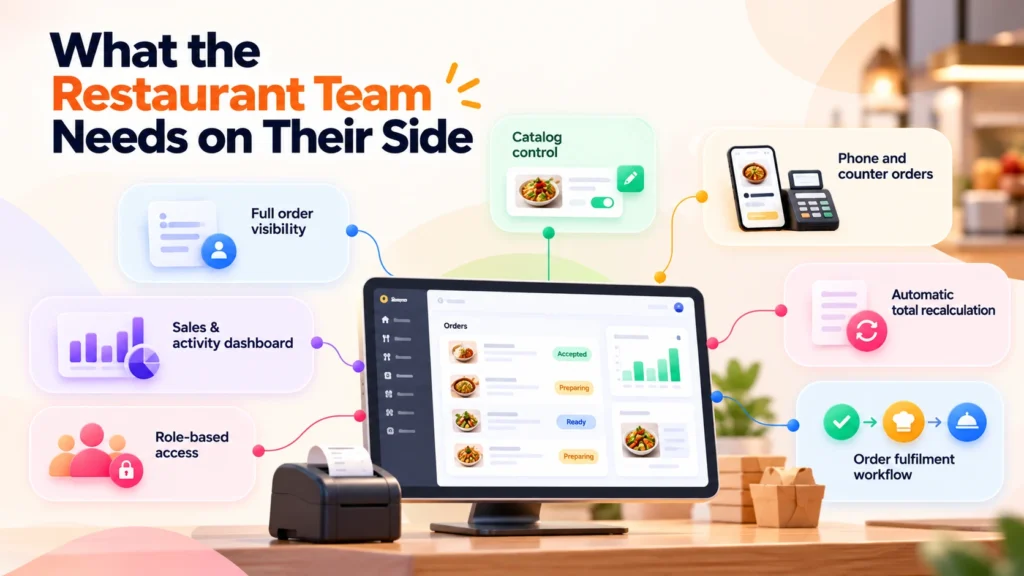
A platform like this isn’t only a customer-facing app. The staff running it day to day need a set of controls that’s just as deliberate:
- Catalog control: add a dish, change a price, mark something sold out, or update a dietary label without needing a developer
- Phone and counter orders entered by staff into the same queue the app uses, so the kitchen works off one list instead of two
- Automatic total recalculation when staff edit an order after it’s placed
- A fulfilment workflow that moves an order from accepted to preparing to ready
- Full order visibility: customer details, delivery address, order notes, and the complete line-item history, not just the current total
- A dashboard covering sales, order volume, recent activity, and the dietary or ingredient requests customers have typed into the assistant
- Role-based access that keeps a counter-staff login separate from an administrator login
Why the Backend Matters More Than the Interface
Most of what makes ordering software trustworthy is invisible to the customer. In plain terms: the app on a customer’s phone should never be the thing deciding what they get charged. Prices, discounts, and delivery charges need to be worked out on the server at the moment of checkout, and whatever was actually ordered, and at what price, needs to be locked in and kept, even if the menu changes the next day.
A simplified version of that request path looks like this:
					Flutter Customer App (Android / iOS / Web)
    |
    v
Laravel API Gateway (Sanctum auth, rate limiting, validation)
    |
    +--> MySQL + Pricing Engine (server-side totals, order snapshots)
    |
    +--> Gemini AI Service (optional, server-side key only, never in the app)
    |
    v
Admin Dashboard / Kitchen Order Queue
The point of drawing it out this way is that the customer app only ever sends a request, it never decides the answer. That’s what a Laravel restaurant backend is doing underneath the interface: validating what comes in, checking who’s allowed to do what, and recalculating totals itself rather than trusting a number the app displays. A short, simplified illustration of that checkout step looks like this:
					// Simplified illustration, not production code

Route::middleware(['auth:sanctum', 'throttle:30,1'])->group(function () {
    Route::post('/cart/checkout', [OrderController::class, 'checkout']);
    Route::post('/assistant/ask', [AiAssistantController::class, 'ask']);
});

class OrderController extends Controller
{
    public function checkout(CheckoutRequest $request)
    {
        items= request->validated('items');

        // Total is recalculated here, never trusted from the app
        total= this->pricingService->calculate($items, $request->user());

        $order = Order::create([
            'user_id'        => $request->user()->id,
            'items_snapshot' => $items,
            'total'           => $total,
        ]);

        return new OrderResource($order);
    }
}
The same pattern covers the AI assistant: the /assistant/ask route sits behind the same authentication and rate limiting, and the Gemini key it uses is read from the server’s own configuration, not sent to or stored inside the Flutter app. Background processing, invoice generation, confirmation emails, and order notifications run the same way, off the critical path of checkout, which is why a customer isn’t stuck watching a spinner while an email goes out.
What a Restaurant Owner Still Has to Set Up
No platform, AI-assisted or not, arrives ready to serve customers on day one. Several pieces sit squarely with the restaurant: menu photography and branding assets the restaurant actually has the rights to use, a hosting environment and database reachable securely over HTTPS, and an email provider for order confirmations and password resets.
If an AI assistant or plate scanner is part of the plan, that depends on the restaurant’s own Google Gemini API access and billing, kept on the server side rather than inside the customer app itself, with core ordering continuing to work normally if that key isn’t configured or runs out of quota. The same goes for optional push notifications, which need the restaurant’s own Firebase project, and for publishing a Flutter restaurant app to the Android or iOS stores, which needs developer accounts in the restaurant’s own name. None of these are pieces a vendor can quietly handle on a restaurant’s behalf, and any owner evaluating this kind of platform, whether that’s Zipprr or another provider, should ask specifically which of them they’re expected to bring themselves.
A Practical Way to Weigh This Kind of Platform
When a restaurant, café, cloud kitchen, or delivery-first startup compares ordering platforms, the demo usually shows the easy part: a customer places an order, a notification appears, done. The harder questions are the ones covered here. Can a customer actually find the dish they want and trust the dietary and allergen information next to it? Can staff manage a phone order the same way they’d manage an app order? Does the price stay consistent between what’s displayed and what’s charged? Is there a clear line between AI-generated suggestions and actual dietary or medical advice?
None of this guarantees more orders or faster growth, since that still depends on the restaurant’s own menu, pricing, and location as much as the software does. What it offers is a system where the ordering process, the kitchen’s workflow, and the restaurant’s own records stay aligned, which is the groundwork most growth actually rests on. Reviewing a platform’s restaurant ordering software at that level of detail, rather than just watching the order-placing demo, is usually what tells an operator whether it fits how their kitchen actually runs.



