
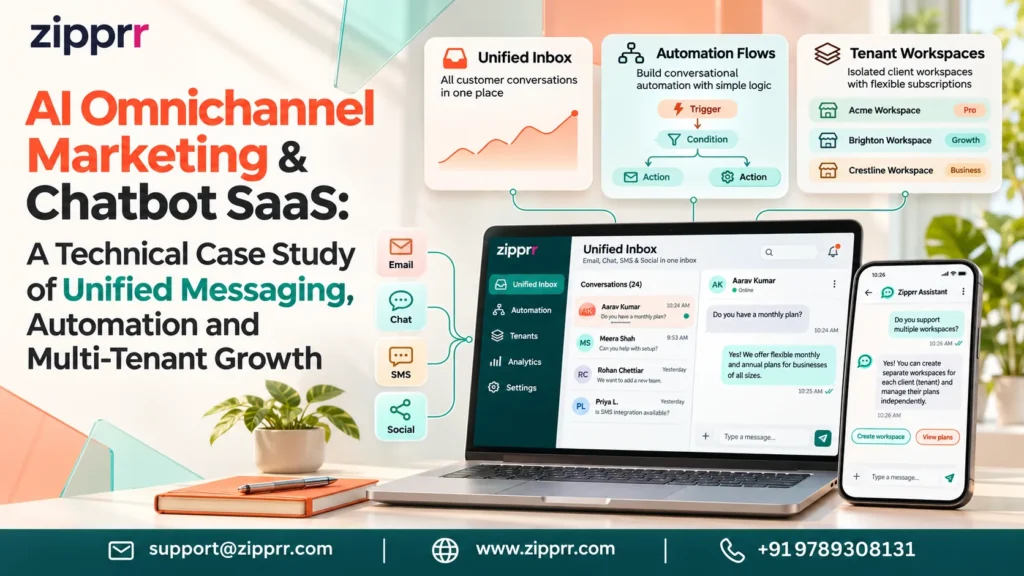
Customer conversations now arrive on WhatsApp, Instagram, Messenger, SMS, email and website chat, while orders and abandoned carts arrive from online stores. Most teams handle each source in a different tool. This case study examines how a multi-tenant AI omnichannel marketing and chatbot platform with the documented capabilities below brings those sources together. It covers a shared inbox, consent-aware contacts, queue-backed campaigns, visual automation, a knowledge-grounded chatbot, store connections, a Kanban CRM and SaaS billing.
Technical case study · Executive summary
The article explains the architecture, walks through one illustrative abandoned-cart scenario and ends with a live-demo checklist. It reports no measured results, because none are claimed.
What is an AI omnichannel marketing and chatbot SaaS?
It is a multi-tenant platform that brings WhatsApp, Instagram, Messenger, SMS, email and website chat into one shared inbox. It adds consent-aware contacts, queue-backed campaigns, visual automation, a knowledge-grounded AI chatbot, store connections, a Kanban CRM and SaaS billing, with a separate workspace for each customer.
Scope Note: Documented Features Versus Illustrative Architecture
The capability set comes from the public CodeCanyon listing for this Node.js script. We treat it as a documented product scope. It is not proof of a Zipprr client deployment, and this article does not claim that Zipprr built or owns that script.
Three labels keep the facts apart in this AI omnichannel marketing case study.
The feature list states it.
A proposed engineering choice. Confirm it against the real source code.
Our engineering advice. Confirm it against the real source code.
Native Flutter iOS and Android apps and AI voice calling are roadmap items, so they are never described here as current features. No customer names, revenue, conversion lifts, latency or throughput figures appear in this document.
The Operational Problem: Five Places Where Conversations Break
Before any AI omnichannel marketing tool helps, a team usually hits these five problems.
- Fragmented inboxes. Each channel has its own screen, so one customer becomes several threads.
- Disconnected consent and CRM records. Nobody sees in one place whether a person opted in or what they ordered.
- Missed handovers. A human takes over without the chatbot's earlier context.
- Unreliable campaigns. Large sends can time out, repeat or fail silently, and delivery states are hard to trace.
- Agency tenant separation. Agencies need each client's channels, contacts and staff kept apart, with limits and billing per client.
AI Omnichannel Marketing Platform Overview
The platform is a multi-tenant SaaS. Each customer gets an independent workspace that holds its own channels, contacts, staff, roles, business data, plan limits and usage restrictions. The owner can resell it as an agency or run it internally. The table maps each need to a documented component.
Channels, Inbox and Composer
DocumentedThe documented channels are the WhatsApp Cloud API, an optional unofficial QR connection, Facebook Messenger, Instagram Direct, Telegram, WeChat, SMS, email and website live chat, with guided credential setup. Teams that only need WhatsApp can compare Zipprr's narrower WhatsApp automation software.
Conversations form cross-channel threads with agent assignment, internal notes, labels, open, snoozed and resolved states, unread counts and optional real-time updates. A contact sidebar shows attributes, consent, orders and history. The composer sends text, media, supported WhatsApp templates and canned replies. The composer also supports AI-to-human transfer with the conversation context preserved.
Contacts and Campaigns
Contacts arrive by CSV import and carry custom fields, attributes, tags and opt-in records. Also, segments filter by activity, channel, tags and attributes, and teams can reuse them. In addition, campaigns send segmented WhatsApp-template, SMS and email messages. Redis-backed queues process them asynchronously, and each send reports queued, sent, delivered, read and failed states.
AI Omnichannel Marketing Automation and the Chatbot
The visual builder is drag and drop, with triggers, conditions, delays, actions and sub-flows, pause and resume, execution logs and counters. An AI assistant can draft a flow from a natural-language instruction.
Documented triggers: an inbound message, a keyword, a new contact, a tag, an inbound webhook, a campaign sent, an order placed, fulfilled or cancelled, an abandoned cart, and a CRM lead-stage change. Documented actions: sending supported channel messages or media, asking a question, generating an AI reply, invoking webhooks or sub-flows, assigning a conversation and applying tags.
The AI chatbot uses a configurable OpenAI, Anthropic Claude or Google Gemini provider, answers on the channels, escalates to staff and draws on business knowledge bases. Customers bring their own API keys. The platform tracks token and cost use per workspace, administrators can review it, and the AI provider bills separately.
Commerce, CRM and Growth Tools
Shopify, WooCommerce and BigCommerce connections support product and order sync, show orders in the inbox and deduplicate webhooks. Moreover, abandoned-cart journeys react to supported store events with conditional WhatsApp, SMS or email actions and delays. Furthermore, lead discovery uses Google Places for prospect lists and lead scoring, and needs external API access.
The Kanban CRM offers configurable stages, an activity timeline, contact conversion and stage-change workflows. A social planner schedules posts to connected Facebook, Instagram, LinkedIn, TikTok, X and YouTube accounts by calendar or list. Besides, it shows publishing status and available performance data, and it offers editable AI caption suggestions once a provider is configured.
The SaaS Business Layer
Monthly and yearly plans, trials, feature controls, workspace quotas, subscriptions and payment history come built in. Documented payment connectors are Stripe, PayPal, Paddle, Razorpay, Paystack, Mollie, Square, Cashfree, Iyzico, MercadoPago, MyFatoorah, Paymob, Xendit and Tap. Merchant approval, regional availability and fees come from each provider.
Pricing, coupons, tax rates, invoices, payment records and supported multi-currency settings sit alongside. A super admin area manages tenants and subscriptions, cross-workspace AI usage, queue and scheduler monitoring, global settings and marketing pages.
AI Omnichannel Marketing Architecture: From Channel Event to Reporting
The diagram arranges the documented capabilities as one possible request flow. Component and step names are illustrative.
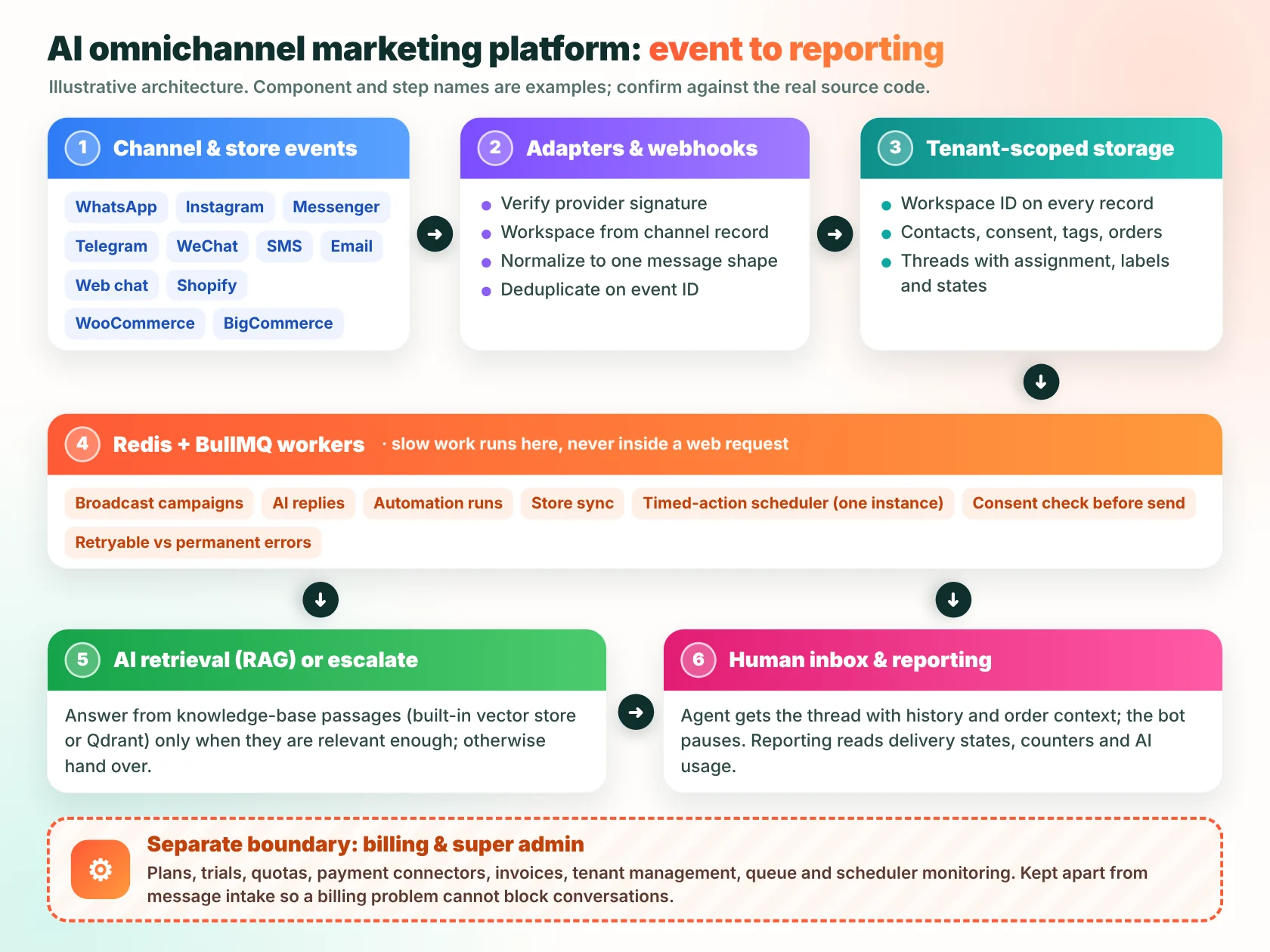
- 1-3Receive, verify and store
Events arrive, pass signature checks and land in tenant-scoped storage.
- 4Slow work runs asynchronously
The documented Redis and BullMQ workers handle broadcasts, AI replies, automation and store sync. A separate timed-action scheduler releases delayed steps.
- 5Grounded answer or escalation
The system decides between a grounded AI answer and a handover.
- 6Human inbox
Agents pick up the thread. Reporting reads from every stage.
Architecture recommendationThe dashed boundary at the bottom is the platform owner's billing and administration layer. Keep it strictly separate from message intake, so a billing problem cannot block incoming conversations.
Technical Walkthrough of the AI Omnichannel Marketing Stack
Tenant Isolation
Tenant isolation means one customer's data can never appear in another customer's queries. DocumentedChannels, contacts, staff, roles and business data are workspace-scoped.
Illustrative patternStore a workspace ID on every table, resolve it from the session or the channel connection and never from the request body, and route database access through a helper that requires it. For a deeper engineering view of workspace separation, read Zipprr's multi-tenant omnichannel messaging CRM case study.
How does an AI omnichannel marketing platform keep agency clients apart?
Each customer gets its own workspace, and channels, contacts, staff, roles and business data are workspace-scoped. A safe pattern stores a workspace ID on every table and resolves it from the session or the channel connection, never from the request body.
Normalized Messages
Every channel sends a different payload. Architecture recommendationAn adapter per channel converts each one into a single internal shape: workspace, contact, channel, direction, content, provider message ID and timestamp. The inbox, automation and reports then work on one model.
Webhook Deduplication
Providers retry webhooks, so the same event can arrive twice. The store connections document webhook deduplication. Illustrative patternKey each event on the provider's event ID within the workspace, acknowledge quickly, and process in a worker.
Queue Processing and Automation Execution
A queue worker is a separate process that takes jobs from a queue, so slow work never runs inside a web request. Illustrative patternStore each automation run with its current step, so a delay survives a restart.
Make each step idempotent, which means running it twice has the same effect as running it once. A run ID plus a step ID works well as the key. The documented pause and resume controls, execution logs and counters then describe real state.
AI Retrieval and Human Handover in AI Omnichannel Marketing
RAG, or retrieval-augmented generation, means the model answers from passages fetched from your documents instead of from its general memory alone. DocumentedThe system chunks and embeds uploaded documents, then searches them in the built-in vector storage, or in Qdrant for larger collections.
When does the AI chatbot hand a conversation to a human?
The chatbot answers from retrieved knowledge-base passages only when they are relevant enough. Otherwise it escalates: an agent receives the thread with history and order context, and the bot pauses on that thread so it does not talk over the agent.
Architecture recommendationAnswer only when retrieved passages are relevant enough, and otherwise escalate. For a website-only chatbot, see Zipprr's AI Chat software. On handover, the agent receives the thread with history intact. Pause the bot on that thread so it does not talk over the agent.
Where Consent and Delivery Receipts Affect Campaigns
Before dispatch, the worker checks the contact's opt-in for the specific channel. WhatsApp also depends on supported, Meta-approved templates, which are external requirements. After dispatch, provider receipts move a message from sent to delivered, read or failed.
Architecture recommendationSeparate retryable errors, such as a timeout, from permanent ones, such as a rejected template, so the system does not retry sends that can never succeed.
Illustrative AI Omnichannel Marketing Scenario: Abandoned Cart on a D2C Store
Illustrative only. Not a customer deployment, and it carries no results.
- 1Cart event.
A supported store event reports an abandoned cart. Deduplication drops repeats, and the trigger starts a flow.
- 2Eligibility.
The flow checks that the contact is in the workspace, has opted in on WhatsApp and has not ordered since. Without consent, it falls back to email or stops.
- 3Approved message.
After a delay set in the flow, a supported WhatsApp template goes out where the channel requires a template.
- 4Customer reply.
The customer asks about another size and the return terms. The inbound message triggers an AI reply action.
- 5Grounded answer.
Retrieval over uploaded product and policy documents supplies the passages for the answer.
- 6Human escalation.
The customer then asks for a bulk discount the knowledge base does not cover. The bot escalates, and an agent sees the thread with order context.
- 7CRM update.
The agent moves the contact to a negotiation stage. The stage-change trigger starts a follow-up flow.
- 8Reporting.
Delivery states, automation counters and AI usage appear in reports. Outcome figures would come from your own data.
For another view of WhatsApp-led CRM and campaigns, see Zipprr's AI WhatsApp CRM and marketing automation case study.
Who Would Use Which Workflow First
Planning an AI omnichannel marketing SaaS for your agency or clients? Tell us your segment and channels on WhatsApp, and we will help you shape a pilot.
Discuss on WhatsAppCode Patterns for an AI Omnichannel Marketing Backend
Both examples are short sketches in the stated stack: Next.js, TypeScript, Prisma, Redis and BullMQ. Table names, helper functions and statuses are placeholders. Review, test and adapt them before any use.
1. Tenant-Scoped Webhook Intake
Illustrative code — adapt to the actual codebase.
// app/api/webhooks/[channelId]/route.ts (Next.js route handler)
import { NextRequest, NextResponse } from "next/server";
import { Queue } from "bullmq";
import { prisma } from "@/lib/prisma"; // assumed shared Prisma client
import { redis } from "@/lib/redis"; // assumed ioredis connection

// Placeholders: implement per provider documentation.
declare function verifyProviderSignature(provider: string, rawBody: string, headers: Headers): Promise<boolean>;
declare function normalizeEvent(provider: string, rawBody: string): { providerEventId: string; type: string; payload: unknown };

const inbound = new Queue("inbound-events", { connection: redis });
const DEDUPE_TTL_SECONDS = 3 * 24 * 60 * 60;

export async function POST(req: NextRequest, ctx: { params: Promise<{ channelId: string }> }) {
  const { channelId } = await ctx.params;
  const rawBody = await req.text(); // signatures are computed over the raw body

  // 1. Tenant comes from the stored channel connection, never from the payload.
  const channel = await prisma.channelConnection.findFirst({
    where: { id: channelId, status: "ACTIVE" },
    select: { id: true, workspaceId: true, provider: true },
  });
  if (!channel) return new NextResponse(null, { status: 404 });

  // 2. Signature validation placeholder.
  if (!(await verifyProviderSignature(channel.provider, rawBody, req.headers))) {
    return new NextResponse(null, { status: 401 });
  }

  const event = normalizeEvent(channel.provider, rawBody);

  // 3. Deduplicate on provider event ID, scoped to the workspace.
  const dedupeKey = `dedupe:${channel.workspaceId}:${channel.provider}:${event.providerEventId}`;
  const firstSeen = await redis.set(dedupeKey, "1", "EX", DEDUPE_TTL_SECONDS, "NX");
  if (firstSeen !== "OK") return NextResponse.json({ ok: true, duplicate: true });

  // 4. Enqueue with tenant context. If enqueue fails, clear the mark so the provider's retry is accepted.
  try {
    await inbound.add(
      "process-inbound",
      { workspaceId: channel.workspaceId, channelId: channel.id, event },
      {
        jobId: `${channel.workspaceId}-${event.providerEventId}`.replace(/:/g, "_"),
        attempts: 5,
        backoff: { type: "exponential", delay: 2000 },
        removeOnComplete: 1000,
      }
    );
  } catch {
    await redis.del(dedupeKey);
    return new NextResponse(null, { status: 503 });
  }

  return NextResponse.json({ ok: true });
}- The handler resolves the workspace from the channel record, so a forged payload cannot choose its tenant.
- The signature check runs before anything is stored, and the handler acknowledges a duplicate without processing it twice.
- The handler only enqueues. A Redis key is a fast first filter, and a unique database constraint is a stronger second layer.
2. Worker With Consent, Eligibility and Idempotency Checks
Illustrative code — adapt to the actual codebase.
// workers/outbound.ts (separate worker process, for example under PM2)
import { Worker, UnrecoverableError } from "bullmq";
import { prisma } from "@/lib/prisma";
import { redis } from "@/lib/redis";

type Channel = "WHATSAPP" | "SMS" | "EMAIL";
type OutboundJob = { workspaceId: string; contactId: string; channel: Channel; templateKey: string; dispatchKey: string };

// Placeholder for the real provider adapter.
declare function sendViaProvider(a: { workspaceId: string; contactId: string; channel: Channel; templateKey: string }): Promise<{ providerMessageId: string }>;

const ALREADY_SENT = ["SENT", "DELIVERED", "READ"];

new Worker<OutboundJob>(
  "outbound-messages",
  async (job) => {
    const { workspaceId, contactId, channel, templateKey, dispatchKey } = job.data;

    // 1. Tenant context: the contact must belong to the workspace named on the job.
    const contact = await prisma.contact.findFirst({
      where: { id: contactId, workspaceId },
      include: { consents: { where: { channel } } },
    });
    if (!contact) throw new UnrecoverableError("Contact not found in workspace");
    // Architecture recommendation: also check plan limits and quotas here.

    // 2. Idempotency: one delivery record per workspace + dispatch key.
    const attempt = await prisma.deliveryAttempt.upsert({
      where: { workspaceId_dispatchKey: { workspaceId, dispatchKey } },
      create: { workspaceId, contactId, channel, dispatchKey, status: "QUEUED" },
      update: {},
    });
    if (ALREADY_SENT.includes(attempt.status)) return; // handled on an earlier run

    // 3. Consent and channel eligibility before any send.
    if (!contact.consents.some((c) => c.status === "OPTED_IN")) {
      await prisma.deliveryAttempt.update({ where: { id: attempt.id }, data: { status: "SKIPPED_NO_CONSENT" } });
      return;
    }

    // 4. Dispatch and record the result. Provider receipts later move SENT to DELIVERED, READ or FAILED.
    try {
      const { providerMessageId } = await sendViaProvider({ workspaceId, contactId, channel, templateKey });
      await prisma.deliveryAttempt.update({ where: { id: attempt.id }, data: { status: "SENT", providerMessageId } });
    } catch (err) {
      await prisma.deliveryAttempt.update({
        where: { id: attempt.id },
        data: { status: "FAILED", errorSummary: String(err).slice(0, 500) },
      });
      throw err; // lets BullMQ apply the job's retry policy
    }
  },
  { connection: redis, concurrency: 5 }
);- The tenant check, the consent check and the idempotency record all run before any message leaves.
- A retry finds the earlier record and skips a message that already went out. One gap remains: a crash between the provider call and the database update can still cause a repeat, so use provider-side idempotency where it is offered.
- The worker writes every outcome, including a skip, as a status, so reports can explain what happened.
Operational Design for AI Omnichannel Marketing SaaS
Documented Stack and Hosting
The application source is readable. Hosting needs Node.js 20 or later (22 LTS recommended), MySQL 8 or later or a compatible MariaDB 10.6 or later, Redis 6 or later, persistent workers and an HTTPS reverse proxy using Nginx or Apache. A suggested starting point is a VPS with 2 vCPU and 4 GB RAM on Ubuntu 22.04 or 24.04. PHP-only shared hosting is unsupported.
Documented Delivery
The package includes the web application, worker, scheduler and marketing-site source. It also ships the schema, migrations, demo seeders, installation and deployment guidance, PM2 and reverse-proxy guidance, and integration and API documentation.
Documented Runtime Features
Storage can be local or S3-compatible, including DigitalOcean Spaces and Wasabi. Optional services are Qdrant, Pusher, Google Workspace OAuth and Google Places. A token-authenticated REST API with in-app docs, outgoing webhooks with delivery logs and a media library form the integration surface.
Admin monitoring covers queues, the scheduler and cron. Likewise, reports cover inbox, campaign, automation, AI usage and social publishing activity, plus audit logs.
Architecture Recommendations
Architecture recommendationRun the web app, worker and scheduler as separate PM2 processes. Run one scheduler instance so timed actions do not fire twice. Alert on queue depth and failed jobs. Configure Redis persistence, because queue state matters, and back up MySQL on a schedule.
For broader AI SaaS layering, see Zipprr's AI SaaS platform architecture guide.
Security, Access, Provider Dependencies and Limits
DocumentedAuthentication options include TOTP two-factor authentication with recovery codes, magic links and password reset. Granular permissions, roles for agents and administrators, chat assignment, relevant audit logs and a GDPR-oriented data export support access control. These are tools, not a compliance guarantee.
The web app is an installable PWA with VAPID web push and optional Pusher real-time updates. Native Flutter apps are not included.
Provider Dependencies and Limits
- The official WhatsApp Cloud API is the recommended path. It depends on Meta business setup, approvals, message-template requirements and opt-in, and on provider charges.
- The optional QR connection is unofficial, disabled by default, needs a separate gateway and carries account-suspension risk.
- AI, SMS, email, payment and storage providers each charge separately. Native apps and AI voice calling are roadmap items only.
- Lead discovery needs external Google Places access. Payment connectors depend on merchant approval, availability and fees.
SaaS Commercialization of an AI Omnichannel Marketing Platform
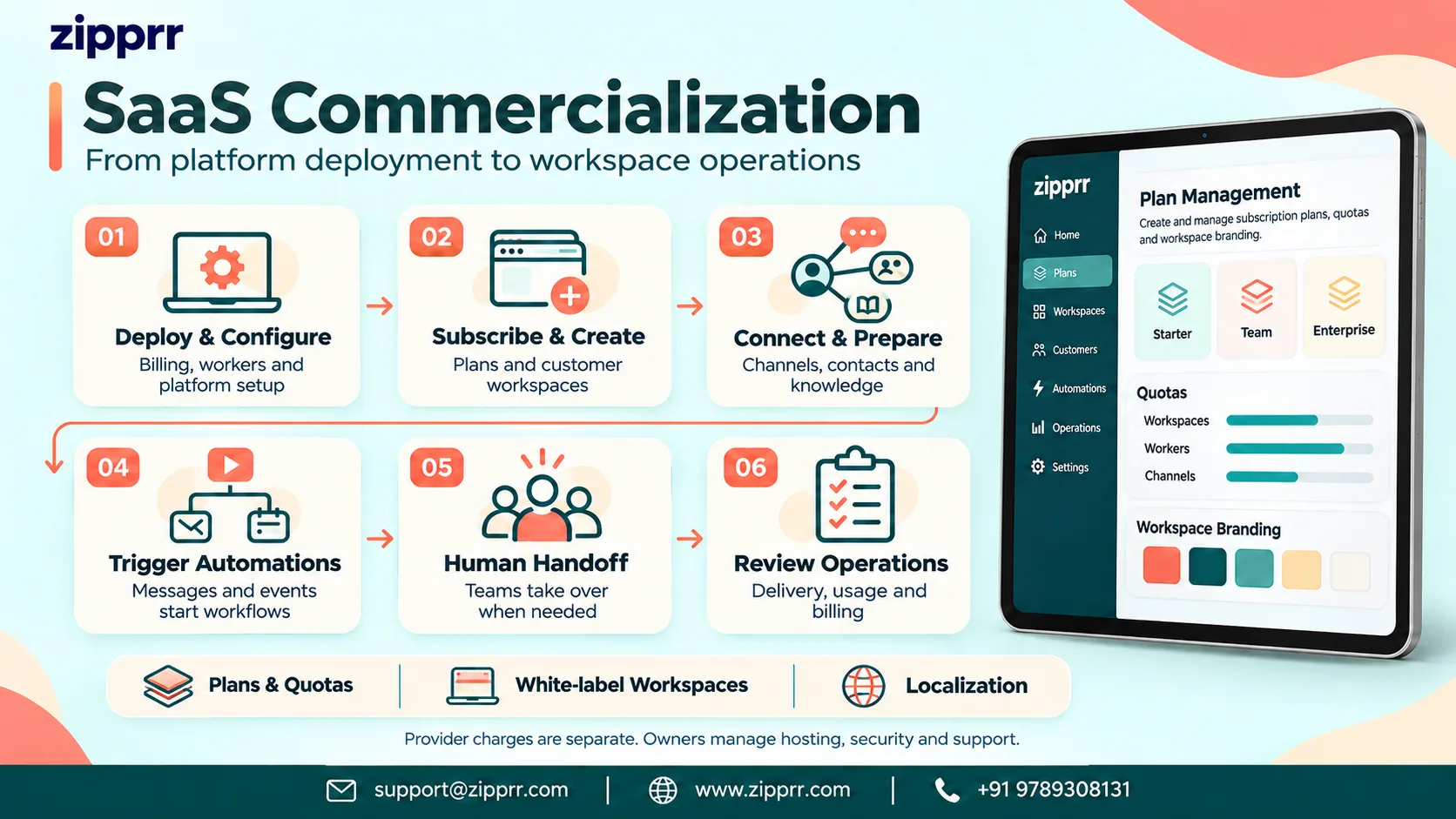
The documented journey runs in six steps. The owner deploys the platform and configures billing and workers. A customer subscribes and creates a workspace. The customer connects channels, imports contacts and sets up knowledge and workflows. Messages and store events trigger actions. Humans take over when needed. Managers review delivery, usage and billing.
Plans and quotas. Set monthly or yearly plans, trials, feature controls and quotas. White-label. Workspaces can carry their own logos, names, brand colours and supported interface branding. The marketing site and CMS cover landing and pricing pages, editable pages, a landing-page builder and administrative email templates. Localization includes translation management, user locale, RTL-friendly layouts, multi-currency settings and dark mode.
Provider Costs and Owner Responsibilities
Provider costs. SMS runs through the customer's own workspace configuration with Twilio, Vonage, MessageBird, Plivo, Telnyx, Infobip, ClickSend, MSG91, Fast2SMS, Amazon SNS, BulkSMSBD, SMS BD, sms.net.bd, MIMSMS or REVE. Each carries separate message charges.
The owner's responsibilities. The owner handles hosting, backups, security updates, provider accounts and approvals, support, tax and legal terms, and pricing.
Business value. Fewer tool switches and clearer ownership of each conversation are potential operational benefits, not proven results. Measure them in your own pilot. Common commercial uses are agency white-label resale, unified support and sales, eCommerce cart recovery and order communication, and segmented campaigns with social publishing.
What to Validate in a Live AI Omnichannel Marketing Demo
Use this list on any demo call. Tick each check as you plan it.
0 of 9 checks ready
Frequently Asked Questions About AI Omnichannel Marketing SaaS
Does it include native mobile apps or AI voice calling?
No. Native Flutter iOS and Android apps and AI voice calling are roadmap items. The current product is a web app with an installable PWA and web push.
Is the WhatsApp QR connection a good choice?
It is optional, unofficial, disabled by default and needs a separate gateway. It carries account-suspension risk. The official WhatsApp Cloud API is the recommended integration path.
Which AI providers does it support, and who pays?
You can configure OpenAI, Anthropic Claude or Google Gemini. Customers use their own API keys. The platform tracks token and cost use per workspace, and the AI provider bills separately.
What hosting does it need?
Node.js 20 or later, MySQL 8 or later or MariaDB 10.6 or later, Redis 6 or later, persistent workers and an HTTPS reverse proxy. A 2 vCPU, 4 GB Ubuntu VPS is the suggested start. PHP-only shared hosting is unsupported.
Can an agency resell it under its own brand?
Yes. The documented scope includes independent workspaces, white-label branding, plans, trials, quotas and subscription billing. Payment connector availability, merchant approval and fees are set by each provider.
Request a Demo
Evaluating an AI omnichannel marketing and chatbot SaaS, or planning to resell one? Zipprr can walk you through multi-tenant messaging architecture and help you shape your own pilot. Request a free demo with Zipprr.
Request a free demoChat on WhatsApp[email protected]