

Launching a platform like this? Zipprr clone scripts start at $490 with 100% source code, a 7-day refund and 90 days of free support. Book a free demo or chat with us on WhatsApp.
A regional dental group in Ohio used to lose new patients before they ever set foot in a clinic. Someone would visit the website at 9 p.m. looking for a Saturday appointment, find a “request an appointment” form, fill it out, and wait. By the time the front desk called back the next morning, the patient had already booked with a competitor whose website answered them in real time. The practice wasn’t losing patients to better dentistry. It was losing them to response speed.
That is the problem AI chat software was built to solve, and it is a more specific problem than most people assume when they hear the word “chatbot.” This guide breaks down what AI chat software actually is, how it differs from the scripted chatbots that gave the category a bad reputation for most of the last decade, what it costs under the pricing models vendors use in 2026, and how a business owner without a technical background can evaluate whether it’s worth adopting, and if so, which capabilities actually matter.
Executive Summary
The chatbot category has effectively split in two. On one side sit decision-tree bots: rigid, button-driven flows that break the moment a customer phrases a question in a way the designer didn’t anticipate. On the other side sit AI chat platforms built on large language models, capable of understanding open-ended questions, pulling accurate answers from a business’s actual data, and knowing when to stop and bring in a human. Independent industry research from Grand View Research puts the global chatbot market at roughly $11.78 billion in 2026, with growth expected to nearly quadruple by the early 2030s, and the customer service segment already accounts for the largest single share of that spend, according to the same research.
What changed the economics wasn’t just the underlying models getting smarter. It was pricing. Through 2025, most vendors billed per seat, which meant the cost of automation didn’t track the value it delivered; a business paid the same whether the bot resolved ten conversations or ten thousand. By 2026, per-conversation and per-resolution billing had become common alternatives, and understanding the difference between those two models, covered in detail later in this guide, is one of the highest-leverage decisions a buyer makes.
This guide walks through what AI chat software actually does under the hood, the core concepts you need to evaluate a platform intelligently, feature-by-feature comparisons, industry-specific use cases, a realistic implementation timeline, the honest math on ROI, and the mistakes that turn a promising rollout into an expensive, abandoned pilot.
The Problem AI Chat Software Solves
Every business with a website or a messaging channel eventually runs into the same math problem. Customer questions arrive continuously, at all hours, and most of them are not hard questions; they’re the same twelve questions asked in slightly different words, over and over. “What are your hours?” “Do you take my insurance?” “Where’s my order?” “Can I reschedule?” A human support team gets the answer right, but not fast, since one agent can only manage a single conversation at a time, and staffing every hour a customer might reach out gets expensive fast.
Traditional approaches to this problem all fail predictably. A static FAQ page requires the customer to already know the right question to search for. A phone tree makes people wait and forces them to navigate a menu that rarely matches their actual issue. A rule-based chatbot, the kind that dominated the 2015-2022 era, only works if the customer’s phrasing happens to match one of the flows a designer anticipated in advance; ask it anything slightly off-script and it either loops or dead-ends into “I didn’t understand that.”
AI chat software addresses the actual bottleneck: understanding open-ended language and connecting it to the right answer, at the volume and speed a website audience demands, without requiring the customer to phrase things in a particular way. It doesn’t replace judgment-heavy conversations. It absorbs the repetitive ones so a smaller human team can spend its time on the conversations that need a person.
Industry Overview: Where the Category Stands in 2026
Three shifts define the current state of AI chat software, and understanding them explains why a platform that looked good in 2023 may not be the right choice today.
The first shift is the move from retrieval-limited bots to models that can reason across a business’s actual data. Early AI chatbots were essentially fancier keyword matchers. Current-generation platforms use retrieval-augmented generation, a technique where the model searches a business’s documents, help articles, product catalog, or order database in real time and grounds its answer in what it finds, rather than guessing from general training data. This is the single biggest driver of the “this bot actually knows about my business” experience customers now expect.
The second shift is pricing model fragmentation. Vendors have moved away from flat per-agent-seat pricing (which never matched how the software is actually used) toward usage-based models, most commonly per-conversation or per-resolution billing. Which model suits a given business changes the total cost by tens of thousands of dollars a year at moderate volume, a point covered in detail in the pricing section below.
The third shift is the “always escalate cleanly” expectation. Research from SurveyMonkey found that 79% of Americans still prefer interacting with a human over an AI agent, and 89% believe companies should always offer a human option. That is not a rejection of AI chat software; it’s a design requirement. The platforms winning market share in 2026 are the ones that treat human handoff as a first-class feature, not an afterthought, because customers judge the software on how gracefully it fails, not just how well it succeeds.
What Is AI Chat Software?
AI chat software is a category of business software that uses natural language processing and, in current-generation platforms, large language models to hold text-based conversations with customers or prospects, understanding what they’re asking, retrieving relevant information from connected systems, and responding automatically, while escalating to a human agent whenever the conversation exceeds what the AI can safely handle.
It’s worth being precise about what separates this from adjacent categories, because vendors blur the lines in marketing copy:
- Live chat software connects a customer to a human agent in real time. It has no automated understanding of the message; it’s a messaging interface, not an intelligence layer.
- Rule-based (decision-tree) chatbots follow pre-built conversation flows. They don’t understand language; they match keywords or button clicks to a predetermined script.
- AI chat software understands open-ended natural language, generates original responses grounded in real business data, and can operate with or without a human ever being involved, depending on how the business configures escalation rules.
A useful mental model: a rule-based chatbot is a phone tree wearing a chat bubble. AI chat software is closer to a new support hire who has read every document in the company wiki, never gets tired, and asks for a manager the moment something falls outside their training, except the “manager” handoff happens in seconds, with the full conversation transcript attached instead of the customer having to repeat themselves.
How AI Chat Software Actually Works
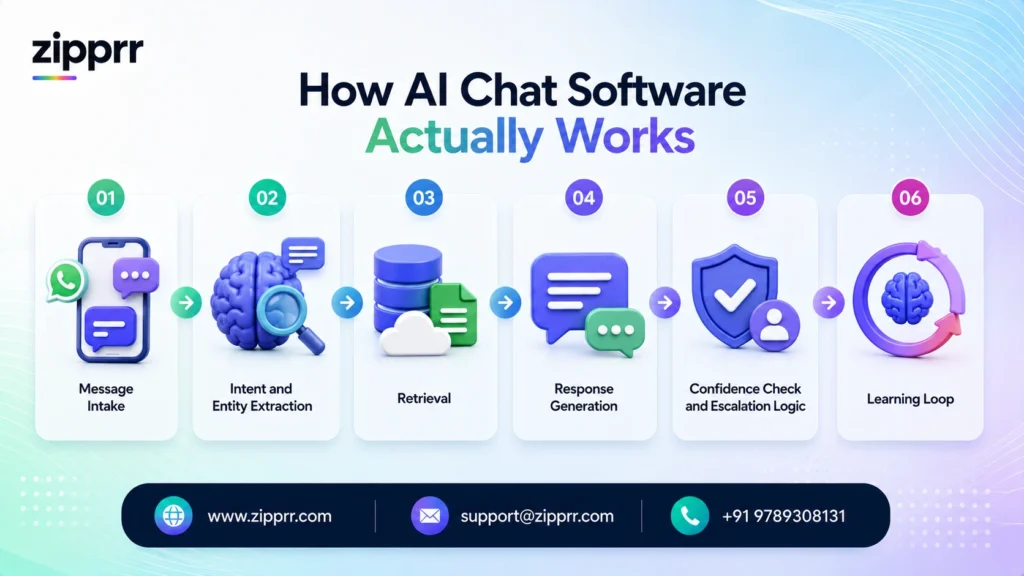
Most business owners evaluating this category get lost in vendor jargon before they understand the actual mechanics. Here is the process in the order it happens, using an example: a customer messages an online furniture retailer asking, “Can I return the sofa I bought last month if it doesn’t fit through my door?”
Step 1: Message intake. The chat widget, WhatsApp integration, SMS number, or app messaging channel receives the raw text and passes it to the AI engine. Modern platforms are channel-agnostic at this layer; the same brain can sit behind a website widget, a WhatsApp Business number, and an in-app chat.
Step 2: Intent and entity extraction. The model parses the message to identify what the customer wants (a return, in this case) and pulls out relevant details (a sofa, purchased roughly a month ago, a stated reason involving delivery/fit). This is where large language models outperform older keyword-matching systems; they correctly parse “if it doesn’t fit through my door” as a delivery concern even though the customer never used the word “delivery.”
Step 3: Retrieval. The platform searches connected data sources, the store’s return policy document, order history tied to that customer’s account, and product dimension data, to ground its answer in facts specific to this business, not generic knowledge about furniture returns.
Step 4: Response generation. The model composes a natural-language answer using what it retrieved: the store’s actual return window, the actual order details, and a next step (schedule a pickup, generate a return label, or explain any restocking fee).
Step 5: Confidence check and escalation logic. Before sending, most platforms run a confidence assessment. If the model is unsure, say, the return falls two days outside the policy window and requires a judgment call, a well-configured system routes to a human agent with the full context attached rather than guessing or giving a wrong answer.
Step 6: Learning loop. Conversations the AI couldn’t resolve, or that a human corrected, feed back into the system’s knowledge base and prompt tuning over time, so the same gap doesn’t recur indefinitely.
This six-step loop happens in a few seconds and is invisible to the customer, who simply experiences a fast, accurate answer, or a fast, graceful handoff to a person when the situation calls for one.
Core Concepts and Glossary
Buyers who understand this vocabulary ask sharper questions during vendor demos and avoid paying for capabilities they don’t need.
Large Language Model (LLM): The underlying AI model, such as those in the GPT, Claude, or Gemini families, that most current AI chat platforms build on top of, either through a direct API or a fine-tuned variant.
Natural Language Processing (NLP): The broader field of teaching software to understand and generate human language; LLMs are the current state of the art within NLP, but the term predates them by decades.
Retrieval-Augmented Generation (RAG): The technique of having the AI search a business’s own documents or database before answering, so responses are grounded in real, current information rather than the model’s general training data.
Resolution rate: The percentage of conversations the AI handles start to finish without human involvement. This is the single most important performance metric, and vendors define it inconsistently; always ask whether it counts a customer simply not replying as a “resolution.”
Human handoff (escalation): The process of transferring a conversation from the AI to a live agent, ideally with full context so the customer never has to repeat themselves.
Confidence threshold: A configurable setting that determines how certain the AI must be before it answers automatically versus escalating. Lower thresholds mean faster automation but more risk of a wrong or unhelpful answer.
Knowledge base integration: The connection between the AI and the business’s actual content, help center articles, product catalogs, policy documents, and CRM records that it draws from to answer accurately.
Omnichannel deployment: The ability to run one AI “brain” across multiple channels (website widget, WhatsApp, SMS, in-app chat, email) with a consistent knowledge base and conversation history.
Sentiment detection: The AI’s ability to recognize frustration or urgency in a customer’s tone and adjust its response, or escalate proactively, rather than waiting for an explicit request for a human.
Agent assist: A mode where the AI doesn’t talk to the customer directly but instead suggests responses or surfaces relevant information to a human agent in real time, speeding up (rather than replacing) that agent’s work.
White-label / self-hosted AI chat software: A licensing model, distinct from typical SaaS subscriptions, where a business (or an agency reselling to clients) buys the software outright, often for a one-time price, and can host it under its own brand and infrastructure rather than renting access indefinitely.
Feature Breakdown
Not every AI chat platform includes every capability below, and not every business needs all of them. This breakdown separates what a serious platform should offer from what tends to be marketing filler.
Natural language understanding across phrasing variations. The AI should correctly interpret the same underlying question asked ten different ways, “when do you open,” “what time can I come in,” “are you open right now”, without the business having to manually anticipate each variation.
Multi-turn conversation memory
The AI should remember earlier parts of the same conversation. If a customer says “I bought the blue one” three messages after mentioning a jacket, the AI shouldn’t ask “which blue one?” from scratch.
Knowledge base and document ingestion
The ability to point the AI at existing help center content, PDFs, product feeds, or a CRM and have it learn from that material directly, rather than requiring a business to manually rebuild a script from scratch.
Structured escalation with context transfer
When the AI hands off to a human, the agent should see the full conversation, not a bare “customer needs help” ticket. This single feature is often the difference between a customer feeling heard and a customer having to start over.
Multi-channel deployment
One configuration that runs consistently across a website widget, WhatsApp, SMS, Instagram or Facebook messaging, and in-app chat, rather than separate bots that don’t share context.
Action-taking, not just answering
Mature platforms can do things, not just say things: check an order status against a live system, reschedule an appointment, apply a discount code, or update a CRM field, turning the chat into a transaction interface, not just an FAQ reader.
Analytics and conversation review
Dashboards showing resolution rate, common unanswered questions, conversation volume by channel and time, and drop-off points,-the data a business needs to keep improving the bot rather than deploying it once and forgetting it.
Human-in-the-loop training
A workflow where a support agent can review AI conversations, correct wrong answers, and have those corrections retrain the system, rather than the AI’s knowledge staying frozen at setup.
Compliance and data controls
For regulated industries especially- healthcare, financial services, legal- the platform needs configurable data retention, redaction of sensitive information, and audit logs of what the AI said and when.
Ownership model flexibility
Whether a business wants a rented monthly subscription or outright software ownership (relevant for agencies and businesses that want to avoid recurring per-conversation fees at high volume) is a structural decision, not a minor preference, covered further in the pricing section.
Business Benefits
The benefits of AI chat software cluster into four categories, and the mistake most buyers make is focusing only on the first one.
Speed and availability. Customers get answers in seconds, at 2 a.m. on a Sunday, without a business needing to staff that hour. For any company with a website audience outside its own time zone or business hours, this alone changes conversion outcomes; the dental practice from this guide’s opening is a direct example.
Cost efficiency at scale. A human agent can hold roughly one conversation at a time. An AI chat platform can hold thousands simultaneously, at a marginal cost per conversation that’s a fraction of a human agent’s fully loaded hourly cost, which is why contact-center automation is projected to concentrate tens of billions of dollars in labor savings industry-wide, according to Gartner’s long-standing projections on the category.
Consistency. The AI gives the same accurate answer every time, doesn’t have an off day, and doesn’t forget to mention a policy detail a new hire might not know yet.
Lead capture and qualification. Beyond support, AI chat software on a marketing site can engage a visitor the moment they show buying intent, ask qualifying questions, and either book a meeting or hand a qualified lead to sales, turning what would have been an anonymous website visit into a tracked, actioned opportunity.
The businesses that get the most value are the ones that treat these as complementary, not as a simple headcount-replacement calculation. The clearest ROI usually comes from redeploying human time toward the conversations that actually need a person, not from eliminating the support team.
Industry Use Cases and Examples
Healthcare and telehealth
Clinics use AI chat software to handle appointment scheduling, insurance-acceptance questions, prescription refill requests, and pre-visit instructions, while routing anything involving a clinical judgment call, symptoms, medication questions, urgent concerns, directly to a nurse line or human staff. The value proposition mirrors the dental practice example: patients research and book outside business hours, and a clinic that answers in real time captures appointments a same-day callback would lose.
E-commerce and retail
Order status, return eligibility, sizing questions, and product recommendations make up the bulk of retail support volume, and all four are well suited to AI resolution because they depend on structured data (order records, size charts, inventory) the AI can query directly. Retailers running AI chat during peak sale periods avoid the classic bottleneck of a support inbox overwhelmed the moment a promotion goes live.
Real estate
Agencies use AI chat to answer property-detail questions instantly for a listing that might otherwise sit unanswered overnight, pre-qualify buyers on budget and timeline before a human agent invests time, and schedule showings directly into an agent’s calendar, compressing the gap between a prospect’s interest and a booked appointment, which in a fast-moving market is often the difference between a sale and a lost lead to a faster-responding competitor.
Hospitality and restaurants
Hotels field a high volume of near-identical questions: check-in time, parking, pet policy, amenity hours- that AI chat resolves instantly across a website widget and WhatsApp, while restaurant groups use it for reservation requests, waitlist updates, and private-event inquiries, freeing front-of-house staff to focus on guests physically in front of them rather than a ringing phone.
Financial services
Balance inquiries, transaction disputes triage, application status, and general product questions are common AI-handled categories, with strict escalation rules for anything involving account changes, fraud reports, or advice that carries regulatory implications- an area where the human-handoff design discussed earlier isn’t optional; it’s a compliance requirement.
B2B SaaS and software companies
AI chat on a marketing site qualifies inbound leads by asking about company size, use case, and timeline before routing to sales, while the same AI, embedded inside the product, answers “how do I…” questions from existing users, reducing tickets that would otherwise queue in a support inbox.
Want a ready-made platform like this?
Skip months of development. Uber Clone, Airbnb Clone, Uber Eats Clone, TaskRabbit Clone and Gojek Clone ship with 100% source code. Book a free demo or chat with us on WhatsApp.
Implementation Guide
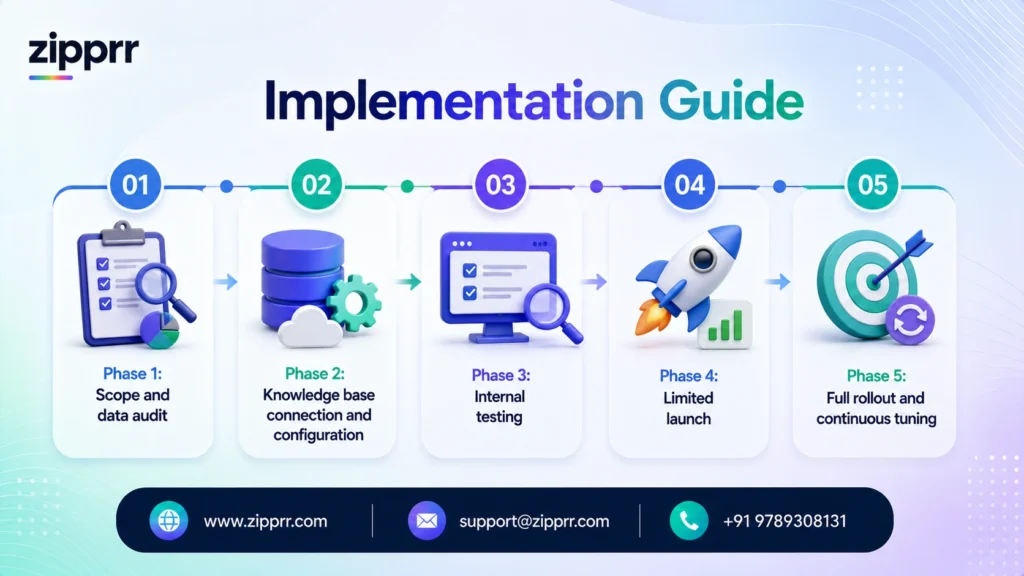
A realistic AI chat software rollout follows a sequence; skipping steps is the most common reason a launch underperforms.
Phase 1: Scope and data audit (week 1). Identify the specific conversation types the AI will handle first, usually the highest-volume, most repetitive categories, not every possible question on day one. Inventory the content the AI will draw from: help articles, policy documents, product data, order systems. Gaps found here are far cheaper to fix before launch than after.
Phase 2: Knowledge base connection and configuration (weeks 2-3). Connect the platform to the data sources identified in Phase 1. Configure escalation rules, what confidence threshold triggers a handoff, and which categories (refunds above a certain amount, anything involving a complaint, anything involving health or legal judgment) always route to a human regardless of AI confidence.
Phase 3: Internal testing (week 3-4). Run the AI against real historical support tickets or a staging environment before it ever talks to a real customer, comparing its answers against what a human agent actually said. This step catches confidently wrong answers before they reach anyone outside the company.
Phase 4: Limited launch (weeks 4-6). Deploy to a subset of traffic or a single channel first- a website widget before WhatsApp, for instance- and monitor resolution rate, escalation reasons, and customer feedback closely.
Phase 5: Full rollout and continuous tuning (week 6 onward). Expand to all planned channels once the limited launch shows stable performance, and establish a recurring cadence, weekly at first, then monthly, for reviewing unresolved conversations and updating the knowledge base.
Most straightforward deployments land somewhere between four and eight weeks from kickoff to full rollout; more complex, multi-system integrations (deep CRM or inventory system connections, multiple languages, heavily regulated data handling) extend that timeline.
| Implementation Timeline | Typical Duration | Key Activities |
|---|---|---|
| Scope & data audit | Week 1 | Identify use cases, inventory content sources |
| Knowledge base setup | Weeks 2-3 | Connect data, configure escalation rules |
| Internal testing | Weeks 3-4 | Validate against historical tickets |
| Limited launch | Weeks 4-6 | Single channel, monitored closely |
| Full rollout | Week 6+ | All channels, ongoing tuning |
Pricing Considerations
Pricing is where AI chat software buying decisions most often go wrong, because the model a vendor pitches first isn’t always the one that fits a given business’s volume pattern.
Per-seat pricing charges based on the number of human agents with access to the platform, typically ranging from roughly $50 to $175 per agent per month depending on the vendor and tier. This model made sense for live-chat software where a seat directly maps to capacity, but it doesn’t track AI usage at all; a business pays the same whether the AI resolves a hundred conversations or a hundred thousand.
Per-conversation pricing charges for every AI-handled conversation regardless of outcome, with published rates from different vendors ranging roughly from under $1 to a few dollars per conversation depending on complexity and contract terms. This model is simple to forecast but means a business pays even for conversations the AI fails to resolve.
Per-resolution pricing charges only when the AI fully resolves an issue without human escalation, with rates in the roughly $0.60-$2.00 range depending on the vendor. This model aligns cost with value delivered but requires clear agreement on what counts as a “resolution”, a definition vendors don’t always apply consistently, so this is worth confirming explicitly before signing.
One-time license / self-hosted pricing, the model under which Zipprr’s AI-chat software is offered, charges a single upfront cost for the software itself, with the business (or a reselling agency) owning and hosting it rather than paying an indefinitely recurring per-conversation or per-seat fee. This structure tends to favor businesses and agencies with high, sustained conversation volume, where the total cost of per-conversation billing over several years would exceed a one-time license, as well as businesses that want direct control over data hosting and branding rather than depending on a vendor’s infrastructure indefinitely.
As a concrete example of this model, Zipprr’s AI-chat software is offered as a one-time purchase priced at $490, which includes full source code so the buyer owns and can self-host the platform rather than renting access, 90 days of free support after purchase to help with setup and initial configuration, and lifetime updates included at no additional recurring cost. That combination directly addresses the two biggest long-run objections to metered pricing covered above: the cost no longer grows with conversation volume, and the business is not dependent on a vendor’s infrastructure or continued goodwill to keep the software current.
The right choice depends heavily on predictable volume: a business with low, seasonal chat volume may do fine on a metered per-resolution plan, while a business with high, steady volume, or an agency planning to deploy the software across many client sites, often finds a one-time-license, self-hosted approach meaningfully cheaper over a multi-year horizon, plus it avoids the risk of a vendor changing its per-conversation rates later.
| Pricing Model | How It Works | Best Fit | Typical Range |
|---|---|---|---|
| Per-seat | Priced by human agent access | Small teams, light AI usage | ~$50-$175/agent/month |
| Per-conversation | Charged per AI conversation, any outcome | Predictable moderate volume | Under $1-$3.50/conversation |
| Per-resolution | Charged only on successful AI resolution | Businesses wanting cost tied to value | ~$0.60-$2.00/resolution |
| One-time license / self-hosted | Single upfront cost, business owns and hosts | High/steady volume, agencies, data-control needs | Fixed one-time cost |
ROI: The Realistic Math
ROI on AI chat software comes from three levers, and the honest answer is that the size of each depends heavily on a business’s current support volume and cost structure. Treat any vendor’s blanket ROI percentage claim with skepticism until you’ve run your own numbers.
Lever one: deflected conversation cost. Take your current average cost per support conversation (agent time plus overhead, divided by conversations handled) and multiply by the number of conversations the AI can realistically resolve without escalation. Published resolution rates vary widely; Intercom has reported an average resolution rate around 76% across a large customer base for its leading AI agent product, while independent case studies more commonly show real-world results in the 42-50% range, so model your own numbers using a conservative estimate first, then revisit once you have real data.
Lever two: recovered revenue from faster response. For any business where response speed affects conversion, sales inquiries, booking requests, cart-abandonment recovery, faster answers convert leads that would otherwise go cold or go to a faster-responding competitor. This is harder to quantify precisely but often larger than the cost-deflection number for revenue-generating use cases.
Lever three: reallocated human capacity. The support hours no longer spent on repetitive questions can go toward proactive outreach, more thorough handling of complex cases, or simply reduced overtime and burnout, value that shows up in retention and quality metrics rather than a line item, but is real.
A simplified worked example: A business handling 3,000 support conversations a month at an average fully loaded cost of $6 per conversation spends $18,000 monthly on support. If AI chat software resolves 45% of those conversations without escalation, a conservative, case-study-grounded estimate rather than a best-case vendor number, that’s 1,350 conversations shifted off human queues, worth roughly $8,100 a month in deflected cost, against a software cost that needs to be modeled against the specific pricing structure chosen. The point of this exercise isn’t the specific dollar figure; it’s building the habit of running this calculation with your own numbers before signing a contract, not after.
Challenges and Solutions
Challenge: The AI gives a confidently wrong answer. This is the failure mode customers remember longest, worse than a slow response, because it damages trust. Solution: Set conservative confidence thresholds during the first months of deployment, route anything ambiguous to a human by default, and treat “I’m not sure, let me connect you with someone” as a perfectly good outcome rather than a failure to eliminate.
Challenge: Customers feel stuck talking to a bot with no way out. Solution: Make human escalation available at every step, not buried behind a menu. A visible “talk to a person” option should always exist, honoring the finding that a large majority of consumers want that option preserved regardless of how good the AI gets.
Challenge: The knowledge base goes stale. Policies change, products get discontinued, and an AI trained on outdated information keeps confidently repeating it. Solution: Assign explicit ownership of knowledge base updates to a specific role, not “whoever remembers,” and build a recurring review cadence into the same process used for updating a public FAQ page.
Challenge: Integration with existing systems is harder than expected. Connecting an AI to a legacy order management system or a CRM with messy data can stall a project for weeks. Solution: Scope the data audit (Phase 1 of implementation) honestly before committing to a launch date, and start with the systems that are cleanest and best-documented rather than the most comprehensive integration first.
Challenge: Measuring success becomes political. Support teams sometimes (reasonably) fear that a high resolution rate will be read as a headcount-reduction signal. Solution: Frame and report metrics around capacity redeployment and response-time improvement, not replacement, and involve the support team in reviewing AI conversations so they see the tool as reducing their worst work, not threatening their role.
Common Mistakes Businesses Make
Launching without human review of a sample of conversations is the most common mistake: a business deploys the AI, gets a resolution-rate number from the dashboard, and never actually reads what the AI said in a sample of real conversations, missing wrong-but-plausible-sounding answers a dashboard metric won’t surface.
Choosing a pricing model before modeling actual volume is a close second; businesses frequently sign a per-conversation contract sized for their expected volume, then find real usage runs two or three times higher once the AI starts working well and more customers use the channel, turning a good product outcome into a budget problem.
Trying to automate everything on day one, rather than starting with the highest-volume, lowest-risk conversation categories and expanding deliberately, tends to produce a worse launch experience than a narrower, well-executed initial scope.
Neglecting the escalation experience, treating human handoff as a technical afterthought rather than a designed part of the customer journey, routinely undoes the goodwill the AI built in the rest of the conversation.
Failing to tell customers they’re talking to an AI, in jurisdictions or industries where disclosure expectations (and in some cases legal requirements) exist, creates a trust problem the moment a customer figures it out on their own, which is worse than if the business had simply been upfront from the first message.
Expert Recommendations
Start with the conversation categories that are simultaneously highest-volume and lowest-risk, order status and business-hours questions before refund exceptions or anything involving a health or legal judgment call. Build trust and internal confidence with early wins before expanding scope.
Treat the AI’s knowledge base the way you’d treat a new employee’s onboarding material: accurate, current, and someone’s explicit responsibility to maintain, not a one-time setup task.
Review a sample of real conversations weekly for at least the first quarter after launch, not just the aggregate dashboard numbers, because the dashboard won’t catch a wrong answer that sounded right.
Model your total cost under at least two different pricing structures, a metered option and a one-time-license option, using your own realistic volume projections, not the vendor’s example numbers, before signing anything.
Keep a visible, easy human-escalation path at every stage of the conversation, regardless of how confident you become in the AI’s accuracy; this isn’t a temporary training-wheels feature; it’s a permanent trust requirement documented consistently across consumer research on the category.
Comparison Table: Zipprr AI Chat Software vs. Alternatives
| Capability | Zipprr AI Chat Software | Typical SaaS AI Chat Software | Rule-Based Chatbot | Live Chat Only | Email/Ticket Support Only |
|---|---|---|---|---|---|
| Understands open-ended phrasing | Yes | Yes | No, keyword/button matching | N/A (human understands) | N/A (human understands) |
| Available 24/7 without staffing | Yes | Yes | Yes | No | No (delayed response) |
| Learns from company-specific data | Yes, via knowledge base/RAG | Yes, via knowledge base/RAG | Limited to pre-built scripts | N/A | N/A |
| Handles high volume simultaneously | Yes, near-unlimited | Yes, near-unlimited | Yes | No, one conversation per agent | Limited by staff capacity |
| Response speed | Seconds | Seconds | Seconds | Minutes (queue-dependent) | Hours to days |
| Handles nuanced/judgment-based issues | No, escalates to human | No, escalates to human | No | Yes | Yes |
| Pricing model | One-time purchase, $490 | Recurring subscription (per-seat, per-conversation, or per-resolution) | Usually flat, low-cost subscription | Scales with headcount | Scales with headcount |
| Source code/ownership | Full source code included, self-hosted | Not included, vendor-hosted only | Rarely included | N/A | N/A |
| Support included | 90 days free support included | Paid support tiers, often an added cost | Limited | Varies by vendor | Varies by vendor |
| Software updates | Lifetime updates included | Tied to an active subscription | Limited | N/A | N/A |
| Setup complexity | Moderate | Moderate | Low | Low | None |
Buyer's Guide
If you’re a small business with under 500 monthly support conversations: A metered per-resolution plan on a mainstream platform is usually the simplest starting point, with low commitment, and the volume is too low for a one-time license to pay back quickly.
If you’re a growing business with 1,000-10,000 monthly conversations and steady growth: This is the range where it’s worth explicitly modeling per-conversation versus per-resolution versus one-time-license costs against your projected volume for the next 12-24 months, since the cheapest option at your current volume may not be the cheapest option in a year.
If you’re an agency or a business planning to deploy AI chat across many properties or client sites: A one-time-license, white-label, self-hosted model, the structure Zipprr’s ai-chat software is built around, typically wins on total cost of ownership and gives direct control over branding and data hosting per deployment, rather than paying recurring per-conversation fees across every site. At a one-time $490 price with source code, 90 days of free support, and lifetime updates included, an agency deploying the same platform across many client sites avoids stacking a recurring per-conversation fee on top of every deployment.
If you’re in a regulated industry (healthcare, financial services, legal): Prioritize platforms with strong data controls, audit logging, and configurable escalation rules over platforms that only compete on conversational polish, for these industries, compliance failures cost far more than a slightly less fluent AI response.
If your primary goal is lead generation rather than support deflection: Look specifically for CRM integration, calendar-booking actions, and lead-scoring logic, since not every AI chat platform that excels at support is equally strong at qualifying and routing sales conversations; these are genuinely different feature sets even within the same product category
Pre-Purchase Checklist
Conclusion
AI chat software earned a skeptical reputation from a decade of clunky, script-bound bots that broke the moment a customer phrased something unexpectedly. The current generation, built on large language models and grounded in a business’s real data through retrieval-augmented generation, is a materially different product, one that can genuinely understand open-ended questions, take real actions inside connected systems, and know when to step aside for a human. The businesses getting the most value from it aren’t the ones chasing full automation;
they’re the ones using it to absorb the repetitive, predictable share of their conversation volume so their human team can spend its time where judgment actually matters, while keeping a visible, easy path to a person for everything else.
Getting there requires treating pricing model, knowledge base maintenance, and escalation design as seriously as the AI’s conversational quality; the businesses that skip that groundwork are the ones who end up disappointed by a technology that, implemented carefully, consistently delivers.



