
| What it is | Software that chats with website visitors in natural language, answers from your content, captures leads, and hands off to a human in real time. |
| How it works | Natural language processing plus retrieval (RAG) pulls the answer from your indexed pages and replies instantly with a citation. |
| Best for | Any business with a website (e-commerce, SaaS, agencies, local services, B2B) that wants 24/7 answers and more captured leads. |
| Typical cost | Rented SaaS runs ~$15 to $500/mo (often metered per chat). Self-hosted (AIchat) means you own the code, with no per-conversation fees. |
| Time to launch | One <script> tag to go live; about 20 to 40 minutes for a full self-hosted deployment. |
What is an AI chat assistant?
An AI chat assistant is software that talks with your website visitors in natural language, understands what they want, and answers instantly from your own content. Unlike a basic chatbot, it uses natural language processing (NLP) and retrieval to interpret intent, pull the right answer from your pages and docs, show its source, capture the visitor as a lead, and pass the conversation to a human when the moment calls for it, 24 hours a day, on every page.
Think of it as a tireless front-desk rep who has read every page of your website, never sleeps, speaks eight languages, and never lets a question go unanswered. For a business owner, that means fewer missed enquiries, faster support, and more of your existing traffic turning into conversations that actually close. The phrase “ai chat assistant” has quietly replaced “chatbot” precisely because the technology grew up: where a chatbot reads from a script, an assistant reasons from your knowledge.
It matters because buying behaviour changed. Visitors no longer scroll a FAQ page or wait for an email reply; they expect an instant, accurate answer in the moment of intent. A well-built AI chat assistant meets that expectation on autopilot, and the businesses that deploy one well convert a noticeably larger share of the traffic they already pay to attract.
How is it different from a regular chatbot?
A traditional chatbot follows scripted rules; an AI chat assistant understands and reasons. Old bots only handle the exact questions they were programmed for, so visitors hit dead ends the moment they phrase things differently. A modern AI assistant is grounded in your real content, so it answers freely, cites its sources, and gets smarter the more it is used.
| Capability | Old rule-based chatbot | AI chat assistant |
|---|---|---|
| Understands natural questions | Keyword / menu only | Full intent and context |
| Source of answers | Hard-coded scripts | Your indexed content, with citations |
| Handles unexpected wording | Dead ends | Reasoned reply |
| Captures and qualifies leads | Basic forms | Intent-timed capture |
| Human handoff | Often none | One-click takeover |
| Improves over time | No | Learns from gaps |
The practical difference shows up in the numbers: scripted bots frustrate visitors into leaving, while grounded assistants keep the conversation moving toward an answer, and an action. That is the whole reason “conversational AI” became a category worth investing in.
How does an AI chat assistant work?
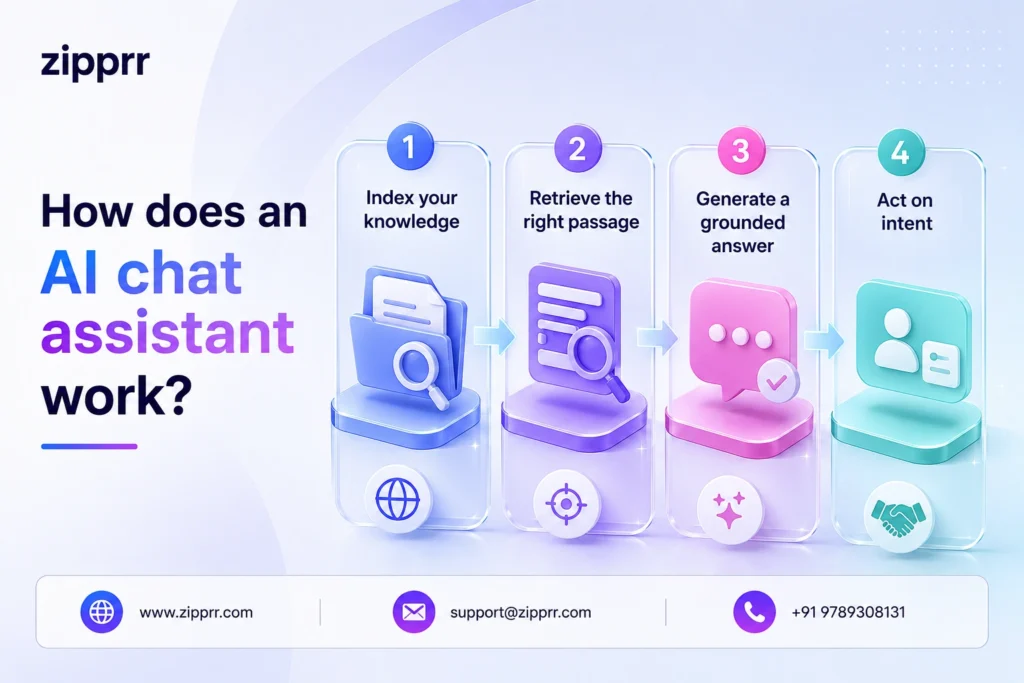
A grounded AI chat assistant works in four steps: index, retrieve, generate, and act. First it indexes your knowledge; when a visitor asks something, it retrieves the most relevant passages, generates a natural answer with a citation, and then acts by capturing the lead, suggesting next steps, or calling a human.
- 1. Index your knowledge. It crawls your URLs, sitemaps, and RSS feeds, or ingests pasted text and synced Notion and Google Docs, turning them into a searchable knowledge base.
- 2. Retrieve the right passage. A two-stage retrieval pipeline (fast vector recall plus a precision rerank) finds the exact passage that answers the question. This is retrieval-augmented generation, or RAG.
- 3. Generate a grounded answer. A language model writes a human-sounding reply from that passage only, streamed token-by-token with a clickable citation, so visitors never wait on a spinner and never get a made-up answer.
- 4. Act on intent. It offers follow-up questions and CTAs, captures the lead at the right moment, and pages a human for handoff when confidence is low or the visitor asks.
Why “grounded” matters: assistants that answer only from your indexed content (with sources shown) avoid the hallucinations that make generic bots untrustworthy. The citation is your proof, and the visitor’s.
7 things a modern AI chat assistant does
The best AI chat assistants bundle seven jobs into one widget, each one a task a business previously needed a separate tool or a human for.
- Answers instantly. Streams accurate, cited replies from your own content in seconds, on every page, in eight languages.
- Captures leads. A no-code form fires at peak intent and pushes the lead, with full transcript, straight to your inbox and CRM.
- Hands off to humans. One click pauses the AI and puts a real person on the thread, with a “Human is here” badge for the visitor.
- Recovers carts and sales. Triggers on exit intent or abandoned carts, answers the last objection, and points to checkout with a CTA.
- Runs workflows. Branching flows qualify, route, and tag leads automatically, with the AI filling the gaps between steps.
- Reveals gaps. Clusters questions it couldn’t answer into an automatic content roadmap, so you know what to publish next.
- Listens and speaks. Voice input lets visitors dictate questions, and starter prompts greet them the moment the widget opens.
What can it do for your business?
An AI chat assistant turns passive website traffic into captured leads and resolved questions, automatically, around the clock. The four wins owners feel fastest:
- Never miss a lead. It greets every visitor instantly, qualifies them, and captures their details, even at 2 a.m. when your team is offline. Most after-hours enquiries die in an inbox; an assistant catches them while intent is hot.
- Deflect repetitive support. Shipping, pricing, refund, and “how do I…” questions get answered in seconds, freeing your team for the conversations that genuinely need a human and cutting your support cost per ticket.
- Convert more of the traffic you already pay for. Answering objections in the moment, with a CTA to pricing, a demo, or checkout, lifts conversion without a cent more in ad spend. It is the cheapest conversion lever most sites are ignoring.
- Learn what your customers want. Knowledge-gap detection clusters the questions it couldn’t answer, giving you an automatic content roadmap and a window into what buyers actually care about.
The 2026 shift: rent it or own it?
Nearly every AI chat assistant on the market is a rented monthly subscription, and that is exactly the gap smart owners are now closing by self-hosting. Rented tools charge $15 to $500+ per month, often meter you per conversation (so success costs more), keep your customer data on their servers, and can’t be rebranded as your own. A self-hosted assistant flips all four.
| Comparison | Rented SaaS chatbot | Owned & self-hosted (AIchat) |
|---|---|---|
| Cost model | $15 to $500+/mo, often per-chat | License once, run on your server |
| Cost as you grow | Rises with every conversation | Flat, growth is free |
| Your data | On the vendor's servers | On your own infrastructure |
| White-label / resell | Their brand | Your brand, multi-tenant |
| Lock-in | Stop paying, it disappears | It's yours to keep |
For an e-commerce store or local business, owning means no surprise bill the month a campaign goes viral. For an agency or SaaS founder, it means you can run the AI chat assistant software as your own product, billing clients with built-in Stripe, PayPal, or Razorpay and pocketing the recurring revenue instead of forwarding it to a vendor. The rent-vs-own decision used to be technical; in 2026 it is mostly financial, and the math increasingly favours ownership.
The ROI math, in plain numbers
An AI chat assistant pays for itself in two ways: leads it captures that you’d otherwise lose, and support hours it deflects. Here is the back-of-envelope version owners use to justify it.
- +10 to 30% lead capture. Typical lift when visitors get an instant, relevant answer instead of a static contact form.
- 30 to 60% deflection. Share of routine tier-one questions an assistant can handle without a human.
- $0 per extra chat. Marginal cost of each additional conversation once you self-host, so growth doesn’t inflate the bill.
Run your own numbers: if your site gets 10,000 visitors a month and even 1% more become leads, that is 100 extra conversations with buyers. Pair that with a few hundred deflected support tickets and the assistant typically clears its cost long before a rented tool clears its first quarterly invoice. The figures above are directional industry ranges, not guarantees; your results depend on traffic quality, offer, and how well the assistant is fed.
Which businesses need an AI chat assistant?
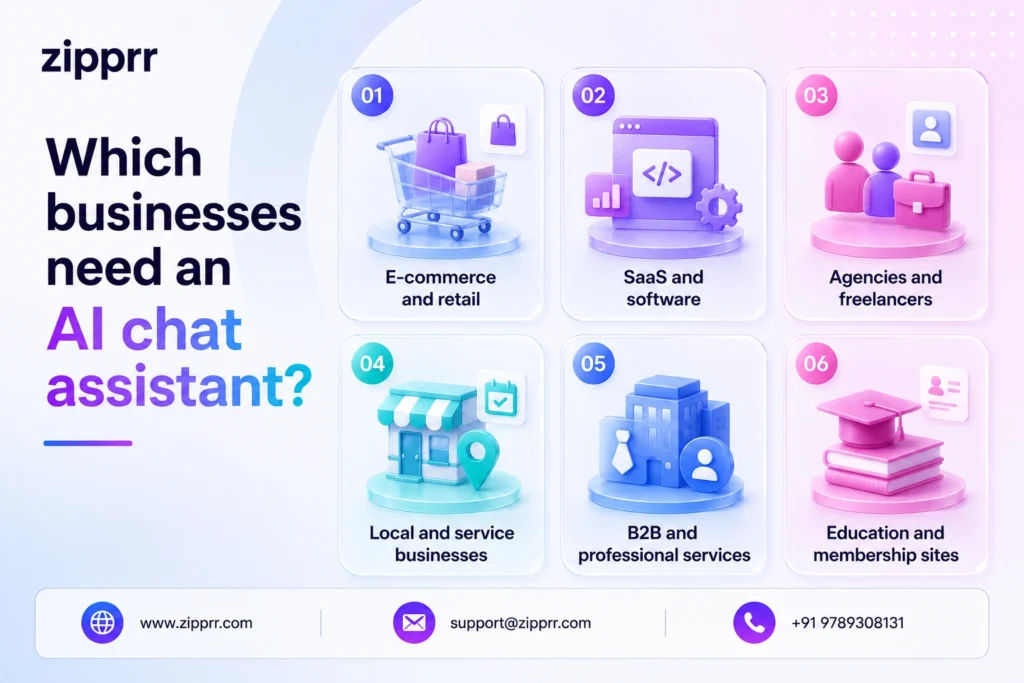
If you have a website and you’d hate to lose a customer to a slow reply, you need one. The use case looks a little different per business, but the payoff (captured leads and deflected questions) is universal.
- E-commerce and retail. Answer product, sizing, shipping, and return questions instantly; recover abandoned carts; lift checkout conversion with timely CTAs.
- SaaS and software. Qualify trials, answer docs and pricing questions, and deflect tier-one support so engineers stay heads-down on the roadmap.
- Agencies and freelancers. Deploy a branded assistant per client, manage them in isolated workspaces, and resell the whole thing as a recurring service.
- Local and service businesses. Capture booking and quote requests after hours, when most enquiries actually come in and a missed call is a lost job.
- B2B and professional services. Route high-intent leads to sales the moment they raise their hand, with the full transcript and captured fields attached.
- Education and membership sites. Field course, enrolment, and access questions instantly, and turn browsers into sign-ups without staffing a live desk.
Is an AI chat assistant secure?
It can be, and ownership is what makes the difference. The security questions that matter are: where does conversation and lead data live, who can read it, and where is the widget allowed to load? A self-hosted assistant answers all three in your favour.
- Your data stays yours. When you self-host, transcripts and captured leads sit on your own infrastructure, so you control retention, residency, and access instead of trusting a vendor’s policy.
- Locked to your domains. A strict origin allow-list means the widget refuses to load anywhere you didn’t approve, so no one can lift your embed and drain your quota.
- Kept off sensitive pages. A per-agent path blocklist keeps the assistant away from routes like /admin, /login, or /checkout, with no code required.
- GDPR-friendly by design. Form presets include a GDPR-ready option, signed webhooks verify every payload, and you decide exactly what is collected and stored.
Switching from a rented chatbot
Migrating to an owned AI chat assistant is mostly a copy-paste job, not a re-platform. Because your knowledge already lives on your website, you don’t rebuild it; you re-point it.
Stand the new assistant up alongside your existing tool, feed it the same URL or sitemap so it indexes your real content, rebuild your lead form from a preset, and connect a webhook to the same CRM you use today. Run both in parallel for a few days, compare answer quality and capture rate, then swap the script tag. Because the assistant is grounded in your pages rather than a vendor’s training data, it often answers better on day one than the bot you’re replacing, and from that point your bill stops scaling with your traffic.
How to choose the best AI chat assistant
Judge an AI chat assistant on five things: where its answers come from, how it captures leads, whether a human can step in, what it does to your site speed, and who owns the data. Use this checklist before you commit to any tool.
- Grounded answers with citations. It must answer from your content and show sources, not improvise. No citations, no trust.
- Real lead capture. Look for a no-code form builder with intent-based triggers and signed webhooks into your CRM.
- Live human takeover. A real-time inbox where one click puts a person on the thread is non-negotiable for high-value chats.
- Featherweight and isolated. One script tag, under 50 KB, Shadow DOM isolation, so it can’t break your styling or your Core Web Vitals.
- Ownership and control. Self-hostable, multi-tenant, white-label, with your data on your infrastructure, so the tool serves you, not the reverse.
Mistakes to avoid
Most disappointing AI chat assistant rollouts fail for the same handful of reasons, all avoidable.
- Feeding it thin content. An assistant is only as good as its knowledge. Index real, complete pages, not a three-line FAQ, or it will hedge and disappoint.
- No human escape hatch. A bot with no takeover path traps your highest-value leads. Always wire a one-click handoff to a person.
- Capturing too early. Demanding an email before answering anything kills trust. Trigger the form at intent, not on arrival.
- Letting it guess. If the tool can’t cite sources, it can hallucinate. Insist on grounded, cited answers for anything customer-facing.
- Renting without doing the math. Per-conversation pricing punishes the exact growth you’re chasing. Compare lifetime cost before you sign.
Why owners pick AIchat
AIchat is a self-hostable, white-label AI chat assistant that checks every box on the list above, and ships ready to resell. It installs with one script tag, answers only from your indexed content with live citations, and lets a human take over any conversation in a single click.
- Grounded and cited. Crawl URLs, sitemaps, RSS, or sync Notion and Google Docs; a two-stage retrieval pipeline keeps every answer precise and sourced.
- One-line install, zero baggage. Under 50 KB, sealed in a Shadow DOM, working on WordPress, Shopify, Next.js, React, Vue, Angular, Astro, or plain HTML.
- Live inbox plus human takeover. Real-time leads and chats over WebSockets; one click puts you on the thread with a “Human is here” badge.
- Capture and convert. No-code form builder, intent triggers, up to three stacked CTAs per reply, and HMAC-signed webhooks to your CRM.
- Yours, end to end. Self-hostable, multi-tenant workspaces, white-label branding, and Stripe / PayPal / Razorpay billing already wired for resale.
Integrations: WordPress, WooCommerce, Shopify, Notion, Google Docs, Slack, Stripe, PayPal, Razorpay, and Zapier.
How to set up an AI chat assistant in 5 steps
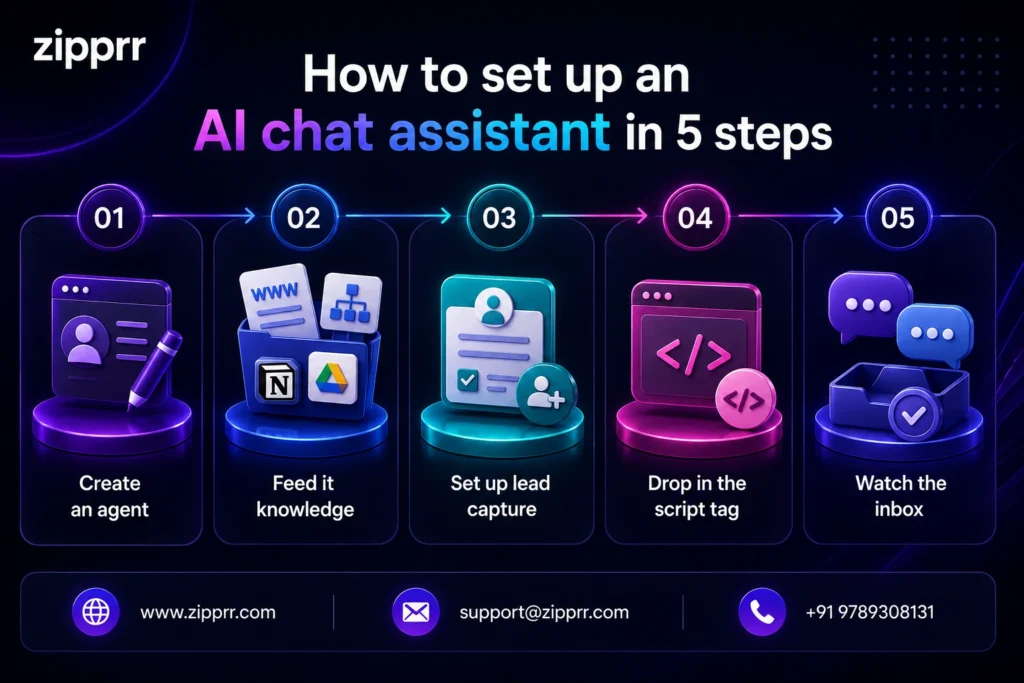
You can have a grounded AI chat assistant live on your site today. Here is the path from zero to answering visitors:
- Create an agent. Give it a name, persona, and brand colours from the dashboard.
- Feed it knowledge. Point it at your URL or sitemap, or sync Notion and Google Docs; it indexes your content in minutes.
- Set up lead capture. Pick a form preset, choose when it triggers (engagement, first message, or keyword), and connect a webhook to your CRM.
- Drop in the script tag. Paste one line into your site’s <head>, or self-host the full platform in about 20 to 40 minutes for complete ownership.
- Watch the inbox. Answers stream live, leads land in real time, and you take over any chat with one click.
Ready to put it to work? Schedule a free AI chat assistant demo and watch AIchat answer live from your own content.